Event Schema mapping issues with Luma Sample Data | Adobe Higher Education
Skip to main content
Level 2
May 10, 2023
Risolto

Event Schema mapping issues with Luma Sample Data

  • May 10, 2023
  • 1 risposta
  • 1478 visualizzazioni

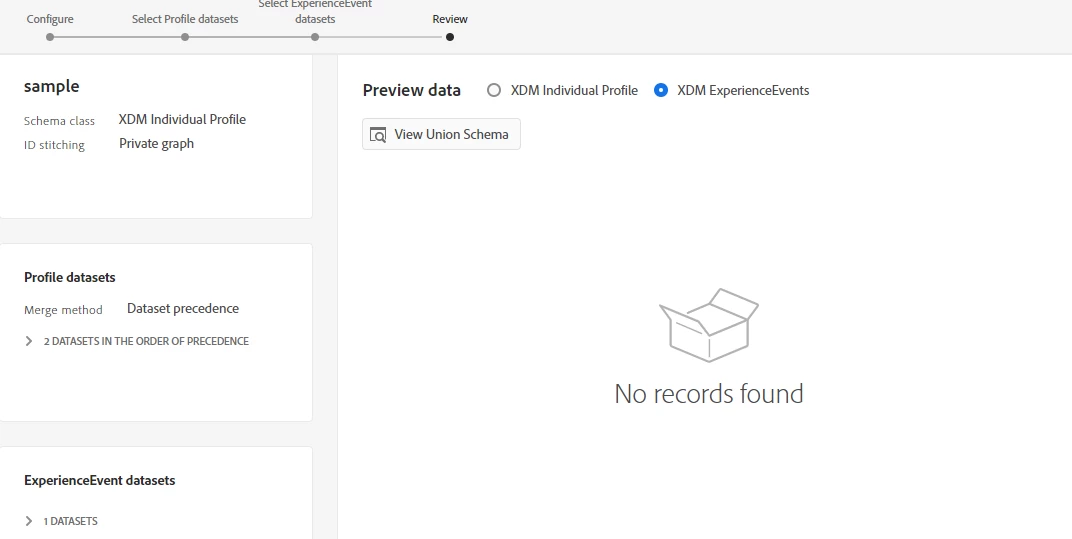
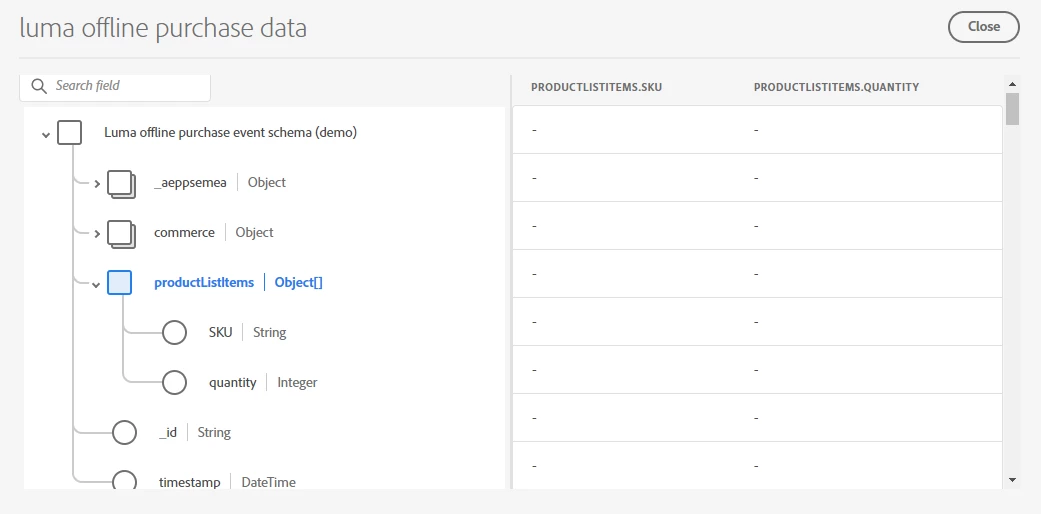
We are trying to import Luma sample data into AEP. We have developed an event schema called "Luma Offline Purchase Event Schema (Demo)" which includes the Commerce Details, Luma Identity ExperienceEvent, and AEP Web SDK ExperienceEvent field groups. The Loyalty ID is set as the primary identity in this event schema. Both the schema and dataset have Profile enabled. For this schema, we have created a dataset named "Luma Offline Purchase Data" and successfully ingested the data. However, we encountered an issue where the array of objects, specifically the fields SKU and quantity within the "productListItems[]" array, are not being mapped properly. As a result, the output appears to be empty, and we are unable to view event data in the merge rule.


Reference Link: https://experienceleague.adobe.com/docs/platform-learn/getting-started-for-data-architects-and-data-engineers/model-data-in-schemas.html?lang=en#

Sample Data: https://experienceleague.adobe.com/docs/platform-learn/assets/luma-data.zip?lang=en
 

Questo argomento è stato chiuso alle risposte.
Migliore risposta di arijitg

Thanks @arijitg . So the data are mapped properly. But still the event dataset is not visible under the merge rule. 


@sowndharya possible if the profile & event datasets you've selected doesn't have any common identity to link (less likely to happen) otherwise I think due to low cardinality in your identity values the subset of data used to generate this preview couldn't find any match within (you can raise a support ticket to get more information on preview generation)

1 risposta

arijitg
Adobe Employee
Adobe Employee
May 10, 2023

Hi @sowndharya just to make sure that your output appears to be empty can you once check from data lake please (explode that particular object in a select query) that none of the record has them mapped?

Level 2
May 10, 2023

We checked the select query. we are getting values there.

arijitg
Adobe Employee
Adobe Employee
May 11, 2023

Thanks @sowndharya for confirming.

As array elements can't cater a tabular view so when you go to preview dataset you won't be able to see the values, correct way to validate them is using query service like you did.