
Error while creation Snowflake to AJO/AEP connection: Authentication failed. Try entering your credentials again. | Community
Skip to main content
mohit_khare
Level 2
October 17, 2025
Solved

Error while creation Snowflake to AJO/AEP connection: Authentication failed. Try entering your credentials again.

  • October 17, 2025
  • 2 replies
  • 631 views

Hi team,


Since Basic Authentication in AEP to Snowflake would be getting deprecated by Nov 2025, we are trying to add the snowflake connection with Key Pair authentication.


We are using the credentials that are provided by the Snowflake Admin and those credentials are working with Snowflake or through Postman.


I am following the documents as per Adobe:
Snowflake source: https://experienceleague.adobe.com/en/docs/experience-platform/sources/connectors/databases/snowflake

Connect Snowflake to Experience Platform using the UI: https://experienceleague.adobe.com/en/docs/experience-platform/sources/ui-tutorials/create/databases/snowflake
Troubleshooting: https://experienceleague.adobe.com/en/docs/experience-cloud-kcs/kbarticles/ka-26294


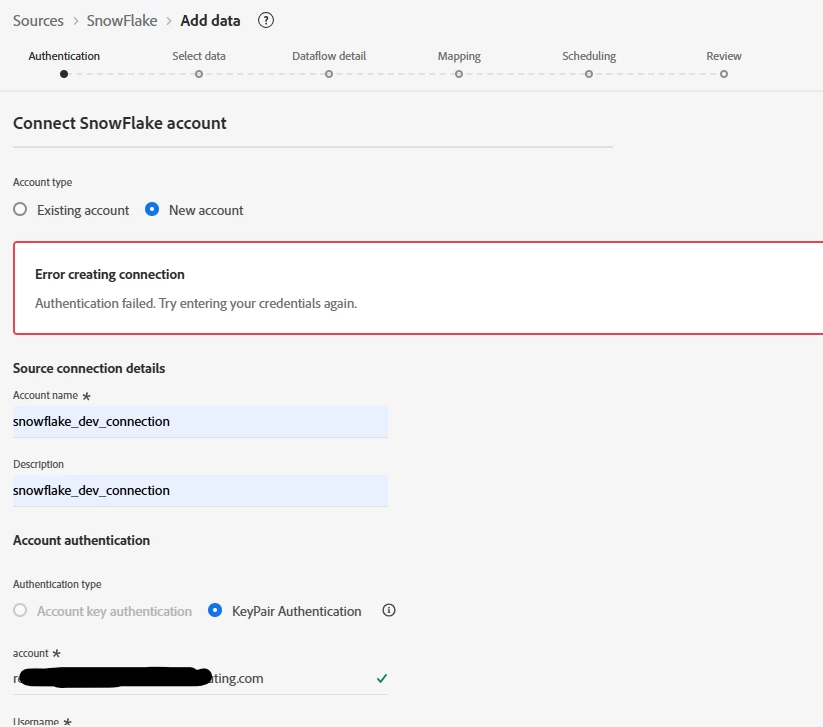
But when I put the details in AEP/AJO Snowflake source connector i see an error: Authentication failed. Try entering your credentials again.


We are using unauthenticated Private Key from snowflake which does not need a passphrase and we don't have any place to whitelist the IPs. Also the basic authentication has been working in the same instance from last 3 years meaning that its not IP issue.


We have tried multiple ways and multiple users but all of them shoe the same error.

AEP/AJO does not even show what is the issue with this connection. Is there a way to check what the actual cause of the issue is and do we know how to get this resolved.
Is there anything that we are doing wrong or any troubleshooting steps that we can go with.
 

Best answer by mohit_khare

No not using the the aforementioned methods.
We did some hit and trial and were able to solve it:


1. Place your private key between
-----BEGIN PRIVATE KEY-----
(your key)
-----END PRIVATE KEY-----

2. Encode the entire block in standard Base64 and use it in the private key field of the connector.

2 replies

Devyendar
Level 6
October 18, 2025

AEP's error notice is very limited. We resolved another connector by monitoring the connection error logs on Source connector (in your case Snowflake) and Browser Network logs on AEP. It would be also best to involve Adobe support to get further validation on your approach and backend logs which only Adobe can view.


mohit_khare
Level 2
October 20, 2025

Hi @devyendar,

I have raised an Adobe Support ticket but to no avail.

I also checked the network logs but i don't see any errors or even warnings.


Is there a particular location that i should look at?

Devyendar
Level 6
October 22, 2025

@mohit_khare You should look for any errors you see in Console or in Network calls. If you don't see any, then it mean Adobe's connection is working as expected, there is an issue with endpoint of Snowflake or the credentials.

For the Endpoint and Credentials, Snowflake should have some sort of error logs. Your Snowflake administrator should help you on finding and understanding those logs.

Sukrity_Wadhwa
Community Manager
Community Manager
October 30, 2025

Hi @mohit_khare,

Were you able to resolve this query with the help of the provided solutions, or were you able to address it with the help of Adobe Support? Please let us know. If any of the answers were helpful in moving you closer to a resolution, even partially, we encourage you to mark the one that helped the most as the 'Correct Reply.'

Thank you!

Sukrity Wadhwa
mohit_khare
mohit_khareAuthorAccepted solution
Level 2
October 31, 2025

No not using the the aforementioned methods.
We did some hit and trial and were able to solve it:


1. Place your private key between
-----BEGIN PRIVATE KEY-----
(your key)
-----END PRIVATE KEY-----

2. Encode the entire block in standard Base64 and use it in the private key field of the connector.

Sukrity_Wadhwa
Community Manager
Community Manager
October 31, 2025

Thanks @mohit_khare for sharing the update! 😊

Sukrity Wadhwa