
Error in filed value while using data prep function in AEP | Community
Skip to main content
Sneha-Parmar
Community Advisor
Community Advisor
September 8, 2023
Solved

Error in filed value while using data prep function in AEP

  • September 8, 2023
  • 1 reply
  • 2331 views

Hi,

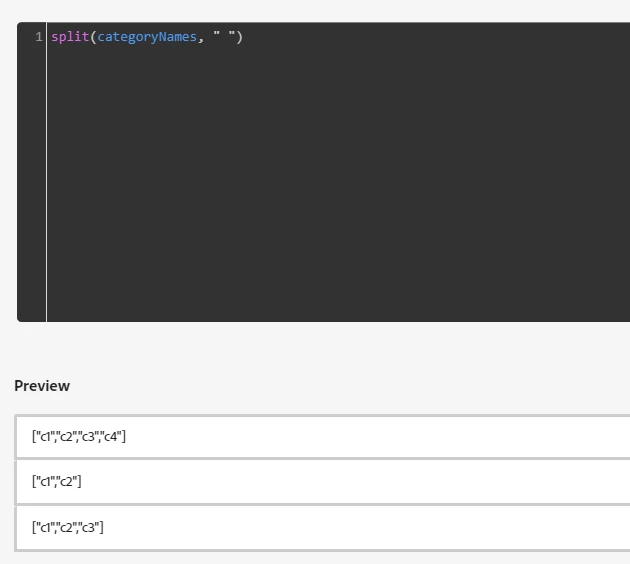
I am trying to ingest a delimiter(space) separated string from a CSV file to an array field in AEP by using "split" data prep function. Below are input string and data prep function I am using.

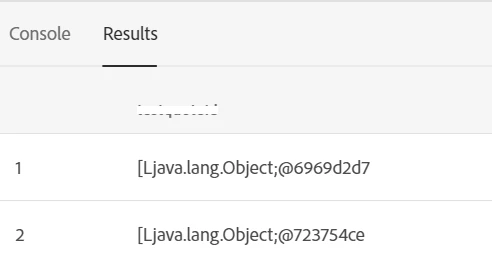
Using data prep function the data that gets inserted is an error text " [Ljava.lang.String;@59c1a063}"  and not the split values from the string.

Can anyone please suggest what could be possible issue here and how to resolve this. I tried using a statis string in data prep split function but getting the same error in schema filed value.

Input String in CSV: 'c1 c2 c3 c4'

customerIdcategoryNames
1001c1 c2 c3 c4
1002c1 c2
1003c1 c2 c3

split function code -> split(categoryNames, " ")

Split function preview
Filed value with error
https://experienceleague.adobe.com/docs/experience-platform/data-prep/home.html? 


Thanks!



This post is no longer active and is closed to new replies. Need help? Start a new post to ask your question.
Best answer by Krish829

Hi @sneha-parmar ,


In my test setup, the "categoryname" field is set up as an Array of String.

When you're mapping data in the dataflow, it automatically points to the first item (index 0) in the array. So, when you're mapping data to an array field, you don't need to specify indices.

To resolve the problem, please remove the [0] index when mapping, and then try to ingest the data again as I mentioned in my earlier message.

Krishna


1 reply

Krish829
Level 2
September 9, 2023

Hi @sneha-parmar ,


The string "[Ljava.lang.Object;@559ce775" is not a typical human-readable representation of data. Instead, it appears to be a result of calling the toString() method on an array of objects in Java at the AEP backend.
 
Breaking down the components:
 
1). [Ljava.lang.Object;: This part indicates that you have an array ([) of objects (Ljava.lang.Object;).
  In Java, arrays are denoted by square brackets, and Ljava.lang.Object; represents the fully qualified name of the Object class.
 
2). @559ce775: This is the hexadecimal representation of the memory address where the array object is located in memory.
It's a unique identifier for that specific instance of the array.
 
This issue would be fixed by using below mapper function and dataflow mapping logic-
 
Mapper Function- to_array(true,split(categoryNames, " "))
 
Dataflow Mapping Logic- to_array(true,split(categoryNames, " "))  --->  <<tenantId>>.categoryname
attached screenshot of df mapping.


Regards,

Krishna Gupta


Sneha-Parmar
Community Advisor
Community Advisor
September 11, 2023

Hi @krish829 ,


I tried above mapper function as well but same error as before. Also I see in your data mapping above you have mapped input list category name filed to a String filed which is not the case. My  schema filed is of type  string and marked as an array. Please see below. Please let me know if there is a workaround when the schema filed is a String Array and not simple String. 

Thanks

Krish829
Krish829Accepted solution
Level 2
September 11, 2023

Hi @sneha-parmar ,


In my test setup, the "categoryname" field is set up as an Array of String.

When you're mapping data in the dataflow, it automatically points to the first item (index 0) in the array. So, when you're mapping data to an array field, you don't need to specify indices.

To resolve the problem, please remove the [0] index when mapping, and then try to ingest the data again as I mentioned in my earlier message.

Krishna
