End date for segment schedule | Community
Skip to main content
Level 3
June 28, 2023
Solved

End date for segment schedule

  • June 28, 2023
  • 2 replies
  • 1600 views

Hello, everyone.


I'm trying to figure out why I am not able to add an end date to my segment schedule.
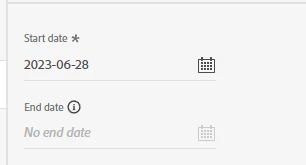
 

Any help is appreciated!

This post is no longer active and is closed to new replies. Need help? Start a new post to ask your question.
Best answer by jayakrishnaaparthasarathy

Hi @kendallhall  - Currently system doesn't allow us to schedule the end date to export data and by default it is greyed out. Also, by using API as well I don't find the option to schdule the end date. However, you have an option of disabling the data flow for the destination what you have created. Use this option to stop exporting data to your "Google Customer Match" whenever it is required. Hope this finds you helpful.

For your API reference - https://experienceleague.adobe.com/docs/experience-platform/segmentation/tutorials/evaluate-a-segment.html?lang=en

2 replies

Umamaheswari_Yakkala
Community Advisor
Community Advisor
June 30, 2023

Hi , 


 I have came across this information in the official docs like this 


 Could you please inform me about the approach or method you are using to access or utilize the "segments schedule" option?


Thank You,

Uma

Level 3
July 5, 2023

Hi, Uma.


Thanks for your response.


The method I am using now is the 'Activate destination' workflow. After selecting my segments and mapping identifiers, I am asked to set up a segment schedule, but I am unable to pick an end date as it is greyed out.


Thanks,


Kendall Hall


Umamaheswari_Yakkala
Community Advisor
Community Advisor
July 10, 2023

Hi , 


for which destination are you trying?? 


Thank You,

Uma

jayakrishnaaparthasarathy
Community Advisor
jayakrishnaaparthasarathyCommunity AdvisorAccepted solution
Community Advisor
July 11, 2023

Hi @kendallhall  - Currently system doesn't allow us to schedule the end date to export data and by default it is greyed out. Also, by using API as well I don't find the option to schdule the end date. However, you have an option of disabling the data flow for the destination what you have created. Use this option to stop exporting data to your "Google Customer Match" whenever it is required. Hope this finds you helpful.

For your API reference - https://experienceleague.adobe.com/docs/experience-platform/segmentation/tutorials/evaluate-a-segment.html?lang=en

Level 3
July 11, 2023

Thanks for your response.


Can you disable the dataflow by segment, or does this option stop the dataflow entirely (all segments)?

jayakrishnaaparthasarathy
Community Advisor
Community Advisor
July 11, 2023

that was a good question, system doesn't allow you to disable the dataflow based on the segment. However, you can seperately disable your dataflow that may encapsulate your multiple segments. Single account may have a mutiple data flow, disabling one dataflow will impact only specific segments which are added on that dataflow and not affect other dataflow and sgements.