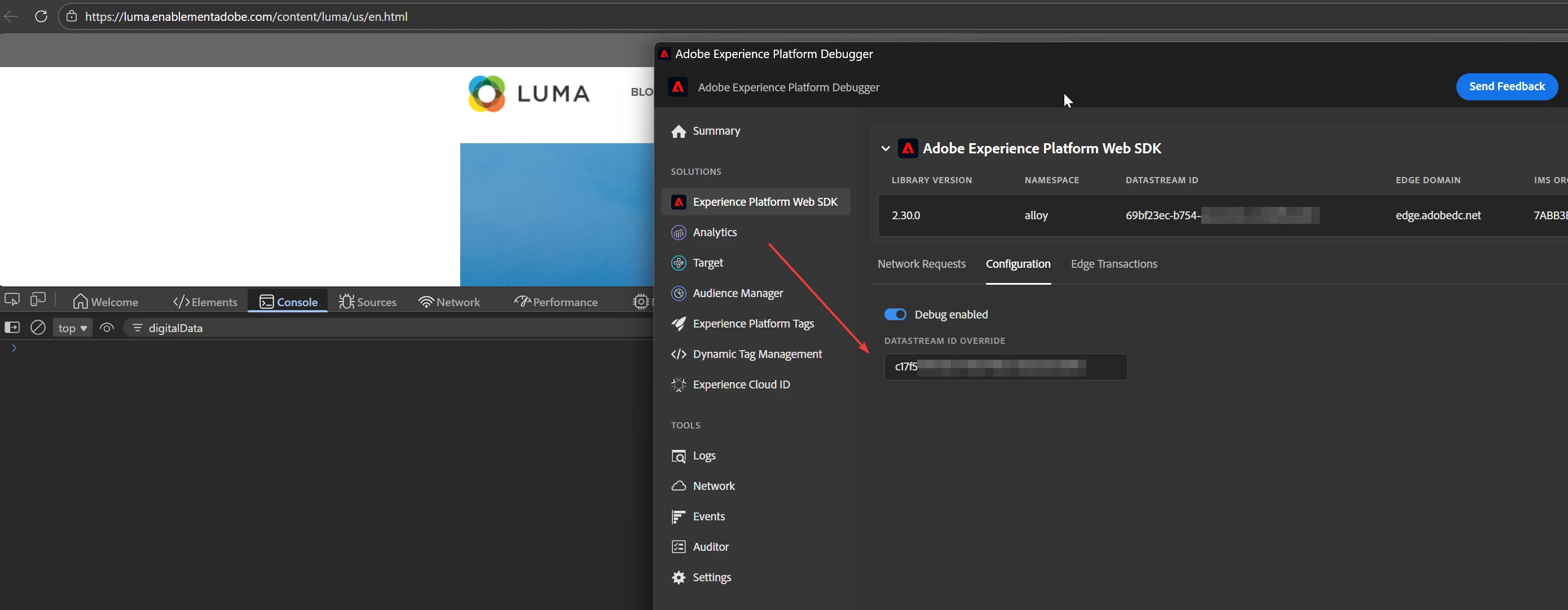
digitalData object not visible on Luma site when following Adobe Tags / Web SDK tutorial
Hi everyone,
I’m following the official tutorial to install Adobe Tags / Web SDK and collect data on a website. After creating the Tag property, Datastream, and related configurations, the tutorial indicates that you can validate the setup by going to:
https://luma.enablementadobe.com/content/luma/us/en.html
and then opening the browser developer tools to check for the digitalData object in the console.
However, I don’t see the digitalData variable available on the page.
What I’ve already checked:
-
I verified that the page loads correctly and reloaded it multiple times.
-
I used Adobe Experience Platform Debugger and tried to override the default Datastream ID with my own Datastream ID.
-
After overriding and reloading the page, the behavior remains the same and
digitalDatais still not present.
Based on the documentation below, I expected the digitalData object to be available for creating data elements:
https://experienceleague.adobe.com/en/docs/platform-learn/implement-web-sdk/tags-configuration/create-data-elements
My questions are:
-
Is
digitalDatastill expected to be available on the Luma site by default? -
Is there an additional step required to expose
digitalData, or has the tutorial become outdated? -
Should validation be done differently when using Web SDK + Datastreams?
Any clarification would be greatly appreciated.
Thanks in advance!