
Destination custom folder path creation | Community
Skip to main content
sheejo
Level 3
August 7, 2025
Solved

Destination custom folder path creation

  • August 7, 2025
  • 2 replies
  • 452 views

Hello Everyone


Good morning!!! We have a usecase to create custom folder path while exporting from AEP to S3 bucket.
The export folder path should be Year >> Month>>date. Is there any way we can extract Year, Month and date from "/%EXPORT_TIME%/" or "%DATETIME%"?
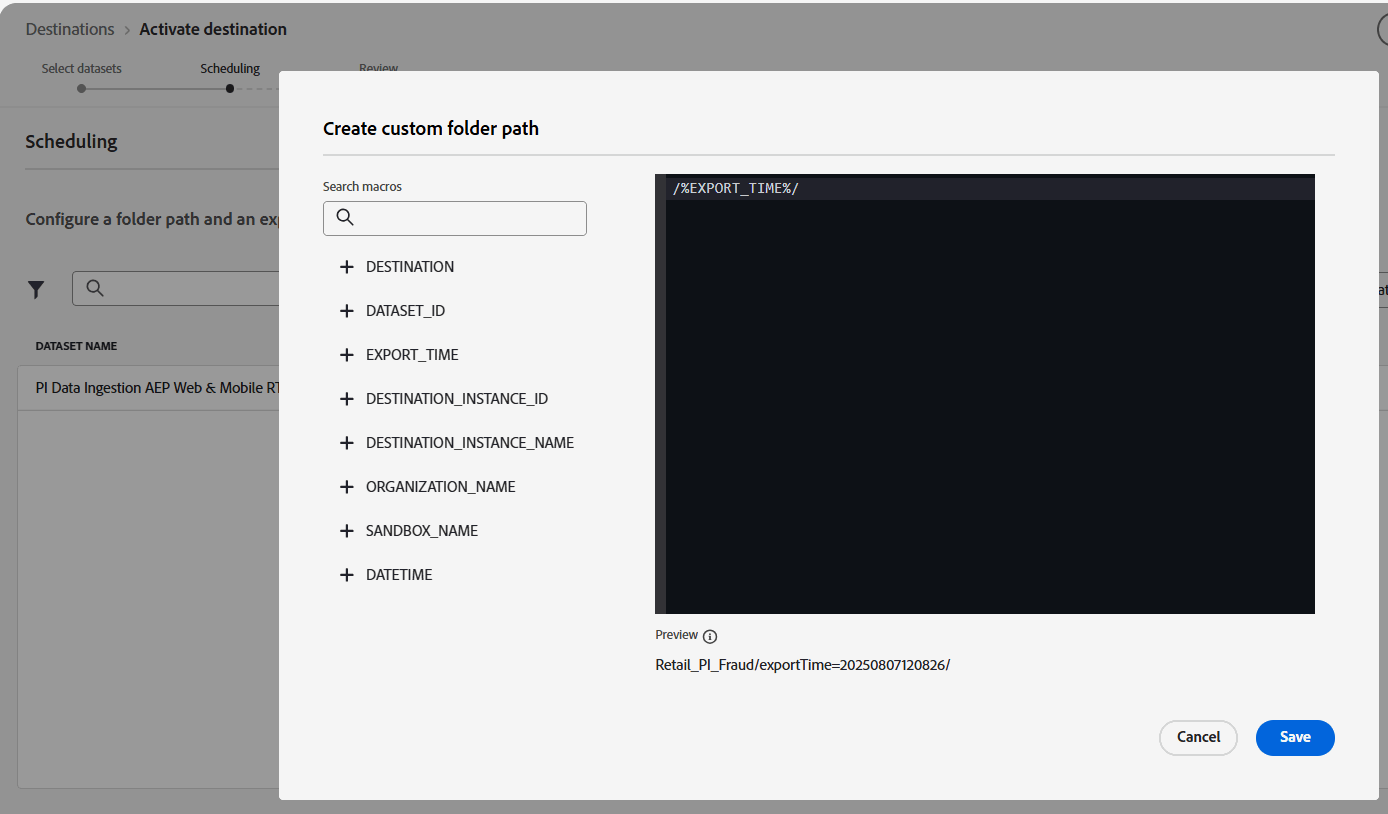
Thanks in advance.


Thanks

Sheejo Rapheal

Best answer by Imbalakumar

Hi @sheejo 


I believe, you can create the custom folder path only using the available macros. I tried this to check it but its not coming up as you expected. Its allowing us to create with mix of these macros.


Just tried from my side but didnt work out 🙂


May be we need to check with support or technical team, but i think its not possible since these options are sufficient to create custom path.


Some relevant adobe docs on export datasets to cloud storage - https://experienceleague.adobe.com/en/docs/experience-platform/destinations/ui/activate/export-datasets#edit-folder-path 


Thanks,

Bala

2 replies

Imbalakumar
ImbalakumarAccepted solution
New Member
August 12, 2025

Hi @sheejo 


I believe, you can create the custom folder path only using the available macros. I tried this to check it but its not coming up as you expected. Its allowing us to create with mix of these macros.


Just tried from my side but didnt work out 🙂


May be we need to check with support or technical team, but i think its not possible since these options are sufficient to create custom path.


Some relevant adobe docs on export datasets to cloud storage - https://experienceleague.adobe.com/en/docs/experience-platform/destinations/ui/activate/export-datasets#edit-folder-path 


Thanks,

Bala

Balakumar Saravanavel
sheejo
sheejoAuthor
Level 3
August 12, 2025

Thanks, Bala. I’ll go ahead and raise a ticket with Adobe to check on this.

Sukrity_Wadhwa
Community Manager
Community Manager
August 26, 2025

Hi @sheejo,

Since there hasn’t been any recent activity on this thread and as suggested by @imbalakumar, this use case should be addressed with the help of Adobe Support, so, we’ll be closing this question for now.
If you have any related questions or updates to share, please don’t hesitate to request to reopen this one or start a new thread. We’d be happy to take another look.
Thanks!

Sukrity Wadhwa