Destination Connector AEP to Salesforce CRM | Adobe Higher Education
Skip to main content
Level 2
March 5, 2024
Répondu

Destination Connector AEP to Salesforce CRM

Hi Community,


I have issues connecting my AEP sandbox with Salesforce CRM (other way round - Source Connection - works fine!). As described here (https://experienceleague.adobe.com/docs/experience-platform/destinations/catalog/crm/salesforce.html) I have created a connected app and collected all relevant credentials - but it's not possible to connect the instances. Is there any additional setting I should know about?



Maybe the connected app is falsely configured? I have added the IPs (see below). Furthermore, there is a "Callback URL" required but not mentioned in the AEP documentation - does anyone have experience here?
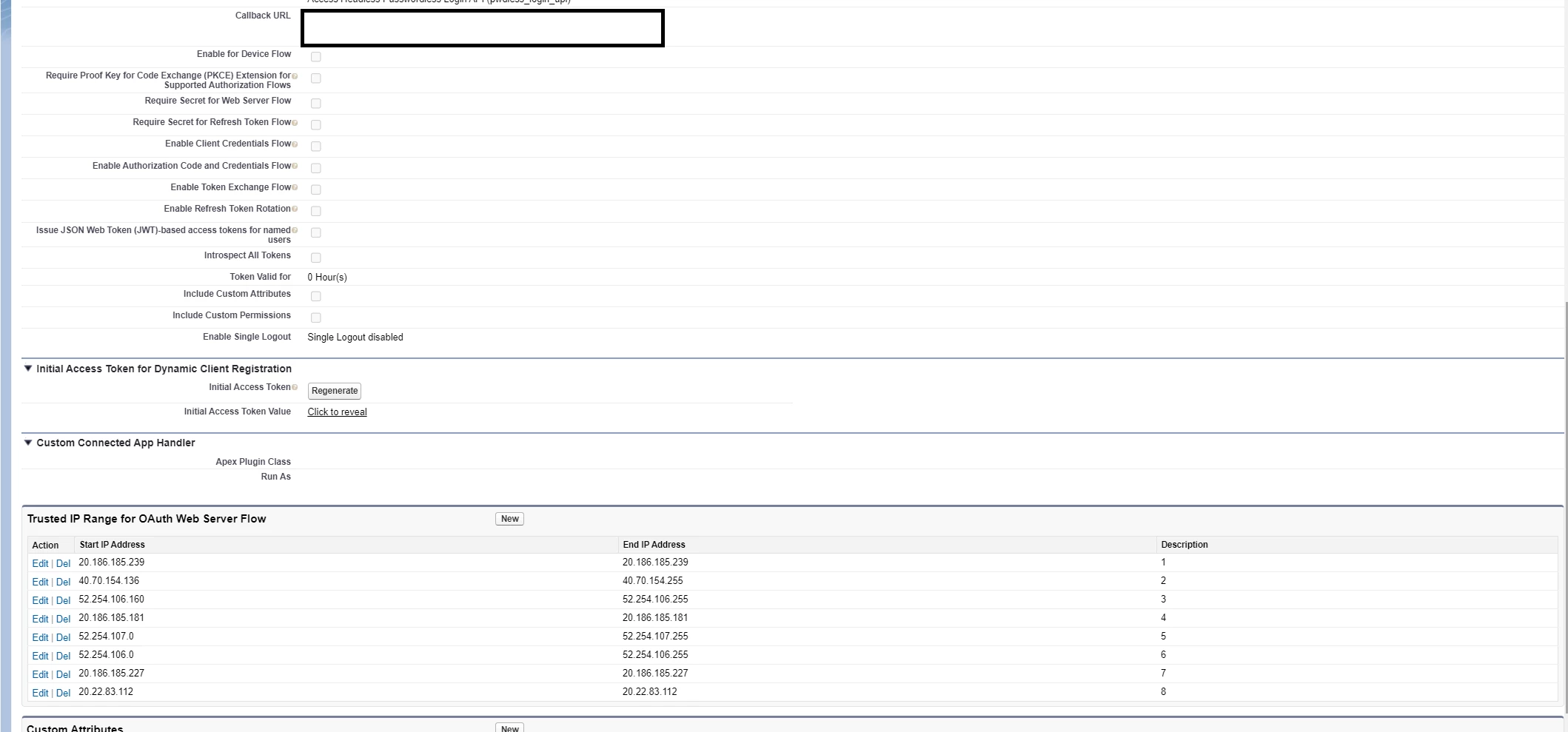
 

Best

Ce sujet a été fermé aux réponses.
Meilleure réponse par Nirmal_Jose

call back URL can be anything, you can use localhost.


Fill in all the required fields and have your client_id key (labelled 'Consumer Key') and client_secret (labelled 'Consumer Secret').

Once done, 
select 'Manage' then 'Edit Policies'

  1. Make sure IP relaxation is set to Relax IP restrictions,

  2. and make sure that Permitted Users is set to "All users may self-authorize.",

  3. and also make sure the your Security > Network Access > Trusted IP Ranges has been set

AEP IP addresses are listed in this [1]  ; use a tool like "ipcalc" to find min and max host.

[1] - https://experienceleague.adobe.com/docs/experience-platform/destinations/catalog/streaming/ip-address-allow-list.html 

1 commentaire

Nirmal_Jose
Adobe Employee
Nirmal_JoseAdobe EmployeeRéponse
Adobe Employee
March 5, 2024

call back URL can be anything, you can use localhost.


Fill in all the required fields and have your client_id key (labelled 'Consumer Key') and client_secret (labelled 'Consumer Secret').

Once done, 
select 'Manage' then 'Edit Policies'

  1. Make sure IP relaxation is set to Relax IP restrictions,

  2. and make sure that Permitted Users is set to "All users may self-authorize.",

  3. and also make sure the your Security > Network Access > Trusted IP Ranges has been set

AEP IP addresses are listed in this [1]  ; use a tool like "ipcalc" to find min and max host.

[1] - https://experienceleague.adobe.com/docs/experience-platform/destinations/catalog/streaming/ip-address-allow-list.html 

ArturRuAuteur
Level 2
March 6, 2024

Thank you Nirmal_Jose!

Your remarks are great and I tried it again, but unfortunately, the connection keeps failing. 


Any other idea what could be wrong? Is there maybe an API Call I can perform with these credentials to see whether the credentials itself are correct?

Nirmal_Jose
Adobe Employee
Adobe Employee
March 6, 2024

Interesting, can you check whether REST APIs are enabled using the sfdx command line before the process:


> sfdx auth:web:login -a nirmal@mydem.sandbox --instanceurl=https://mydemo3-dev-ed.develop.my.salesforce.com Successfully authorized nirmal@mydemo.sandbox with org ID 1232231232​


There are a few tips and tricks mentioned in [1] like API url etc. 

[1] - https://stackoverflow.com/questions/12794302/salesforce-authentication-failing