
Debug computed attributes - do not work as expected | Community
Skip to main content
Michael_Soprano
Level 10
June 1, 2026
Question

Debug computed attributes - do not work as expected

  • June 1, 2026
  • 2 replies
  • 47 views

I have the sales opportunity where I would like to present Computed Attributes. 

However I have got some problems.

  1. Event is present on a profile. This one is fine 
  2. Event which is sent from Web SDK to AEP looks as follows:

events[0].xdm.reservations.flightReservations[0].flightStatusSearch.arrivalAirportCode

  1. The same attribute in Compute Attributes has a path like that: 

reservations.flightReservations.departureAirportCode

  1. In Computed Attributes you need to choose from pre-defined paths. Its not possible to paste your own exact one:
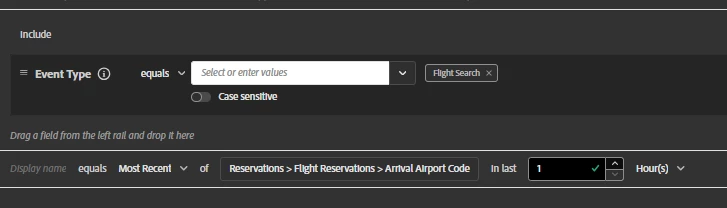
Why it does not work? I created multiple versions - in last 1h, 1day etc. Still does not work :))))
I have AEP Architect certifications so I know AEP basics :)

2 replies

Level 4
June 2, 2026

Hi ​@Michael_Soprano,


A few things to check that commonly cause this:


1. Path mismatch, this is likely your root cause.
Your Web SDK event path is:
events[0].xdm.reservations.flightReservations[0].flightStatusSearch.arrivalAirportCode

But your Computed Attribute is referencing:
reservations.flightReservations.departureAirportCode

Two issues here, arrivalAirportCode vs departureAirportCode (different fields), and the flightStatusSearch node is missing in the CA path. Make sure the schema path in your CA exactly matches what’s being ingested.


2. Schema field group alignment
Computed Attributes pull from the Union Schema. Verify the field you’re selecting in the CA builder is from the same field group that your Web SDK XDM is mapped to. If the field exists in multiple field groups, you may be referencing the wrong one.


3. Profile merge & recompute delay
Even with a 1h lookback window, the CA won’t populate until a new qualifying event arrives after the CA is published and active. Check if the profile received a new event post-publication.


4. Event Type filter
In your screenshot I can see Event Type = Flight Search, confirm that your Web SDK events are actually sending that exact event type value, including case sensitivity.


5. Array indexing
CA paths don’t support array index notation like [0]. The UI path Reservations > Flight Reservations > Arrival Airport Code is the correct flattened format, that part looks right.


Hope this helps resolve it!

Michael_Soprano
Level 10
June 2, 2026

Thanks for your input. 

Ad1. I created both arrivalAirportCode and departureAirportCode Computed attributes. Its screenshot mismatch not the actual error. But thanks for being alert :)

It was also checked by our second architect :) 

Ad2 , Ad3 , Ad4 Sure - checked 

Ad5 You mean that CA do not support arrays?


Level 4
June 2, 2026

Good question on Ad5, to clarify:


Computed Attributes do support array-type fields in the schema (like flightReservations[]), but the CA engine handles the array traversal internally. You don’t reference array indexes like [0] in the path, the UI path builder already handles this by flattening it to Reservations > Flight Reservations > Arrival Airport Code.


So your CA path is correct as-is. The engine will look across all array items in that field for matching events.


Since you’ve confirmed Ad2–Ad4 are all checked, here’s what I’d try next:


    1.    Profile Viewer, pull the specific ECID/profile and check under Events tab whether the Flight Search event is actually stitched to that profile with the correct XDM payload


    2.    Computed Attributes preview, use the “Evaluate” feature on a specific profile to test the CA definition directly


    3.    Recompute trigger, disable and re-enable the CA to force a fresh computation cycle


If the event is confirmed on the profile but the CA still doesn’t populate, it could be a field group mismatch at the Union Schema level worth double-checking.

v-lazar
Level 2
June 3, 2026

@Michael_Soprano, the UI rule builder only supports non-array event paths, but the Computed Attributes API takes PQL directly and PQL handles arrays cleanly via the xEvent[<filter>].<aggregator>(<nested.path>) pattern Adobe shows in their own docs (CA API, PQL array functions).


For your flightReservations case the expression would be roughly xEvent[xdm.eventType = "reservation.flightStatusSearch" and (timestamp occurs <= 30 days before now)].last(xdm.reservations.flightReservations.flightStatusSearch.arrivalAirportCode), and if the nested array returns multiple values per event you switch to the explicit select F.flightStatusSearch.arrivalAirportCode from xEvent E, F in E.xdm.reservations.flightReservations where ... form.


keepCurrent is still required to be false so the CA refreshes on a batch cycle, not in real-time, and a CA defined via API will not reflect cleanly in the UI, so the dev team needs to be comfortable maintaining it through API.

For the sales conversation you mentioned, CAs work for batch activation and audiences but are usually too slow for in-session personalization in Journey Optimizer or Target, so if the client wants "what flight is the user looking at right now" the answer is segmentation or real-time decisioning, not CA.


(for UI limitations see https://experienceleague.adobe.com/en/docs/experience-platform/profile/computed-attributes/ui#:~:text=To%20create%20a%20rule%2C%20first%20select%20attributes%20from%20the%20Events%20section%20to%20filter%20down%20events%20that%20you%20want%20to%20aggregate%20on.%20Currently%2C%20only%20non%2Darray%20type%20event%20attributes%20are%20supported.)

https://www.linkedin.com/in/viktor-lazar/ | https://cyber64.com/insights