Data element not grabbing the values | Community
Skip to main content
Durga_Nandyala
Level 2
April 12, 2022
Solved

Data element not grabbing the values

  • April 12, 2022
  • 1 reply
  • 773 views

Hello,

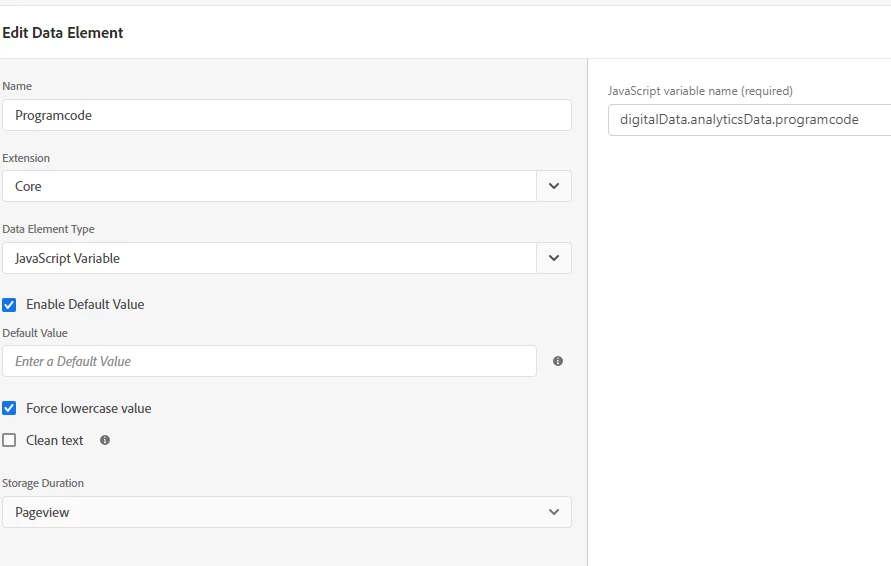
I am trying to populate data element values in an eVar, and I don't see it firing. This is the DataLayer path I was using to create a data element and setting up the eVar value to data element and I see it is not firing. 


"digitalData.analyticsData.programcode"
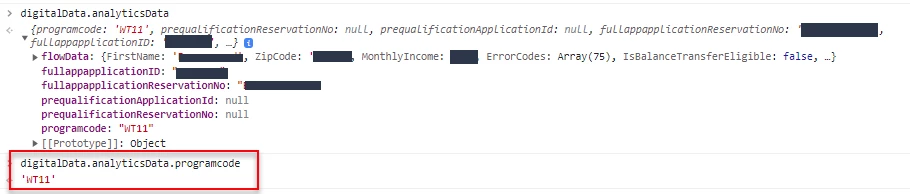


Note: DataLayer firing before adobe Launch but this program code is populated before this page and carried forward throughout the application. 


What am I missing on ? PLease help!!


Thank you!!



This post is no longer active and is closed to new replies. Need help? Start a new post to ask your question.
Best answer by yuhuisg

Could it be that there is a delay between when this value gets set in digitalData vs when your Rule runs? E.g.

  1. Page loads.
  2. Launch library loaded.
  3. Your Rule runs.
  4. digitalData.analyticsData.programcode gets populated.

To verify: in your Rule, add a custom code action to log your "Programcode" data element to your browser console, e.g.

console.log(`Programcode: ${_satellite.getVar("Programcode")}`);

1 reply

yuhuisg
Community Advisor
yuhuisgCommunity AdvisorAccepted solution
Community Advisor
April 15, 2022

Could it be that there is a delay between when this value gets set in digitalData vs when your Rule runs? E.g.

  1. Page loads.
  2. Launch library loaded.
  3. Your Rule runs.
  4. digitalData.analyticsData.programcode gets populated.

To verify: in your Rule, add a custom code action to log your "Programcode" data element to your browser console, e.g.

console.log(`Programcode: ${_satellite.getVar("Programcode")}`);