CSV import in AEP via API | Community
Skip to main content
AtulChavan
Community Advisor
Community Advisor
January 28, 2021
Solved

CSV import in AEP via API

  • January 28, 2021
  • 1 reply
  • 1483 views

When I try to import csv into AEP with batch ingestion API receive below error : 


A required field <sandboxname> of type: object is missing from the input data. Add the required field and try again.

The field: <sandboxname>.<csv field name>does not exist in the target schema. Remove the field and try again.


Ingestion goes well if I do it with UI.

thoughts please.....


This post is no longer active and is closed to new replies. Need help? Start a new post to ask your question.
Best answer by dwright-adobe

Are you missing the x-sandbox-name header in the API request?


x-sandbox-name is a required header in the batch ingestion API. It refers to the Experience Platform sandbox environment in which you are working. By default, there is a prod sandbox, but then you can create multiple development sandboxes for testing.


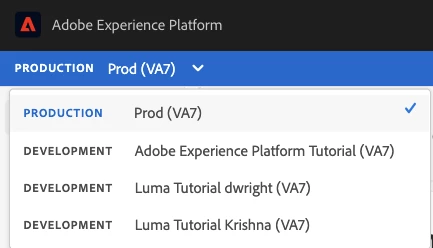
When you log into the UI you are always defaulted into a sandbox, and if you have access to multiple sandboxes, you can switch between them using the dropdown in the top left corner. This is probably why you don't get this error in the UI... because you always have to be in a sandbox.
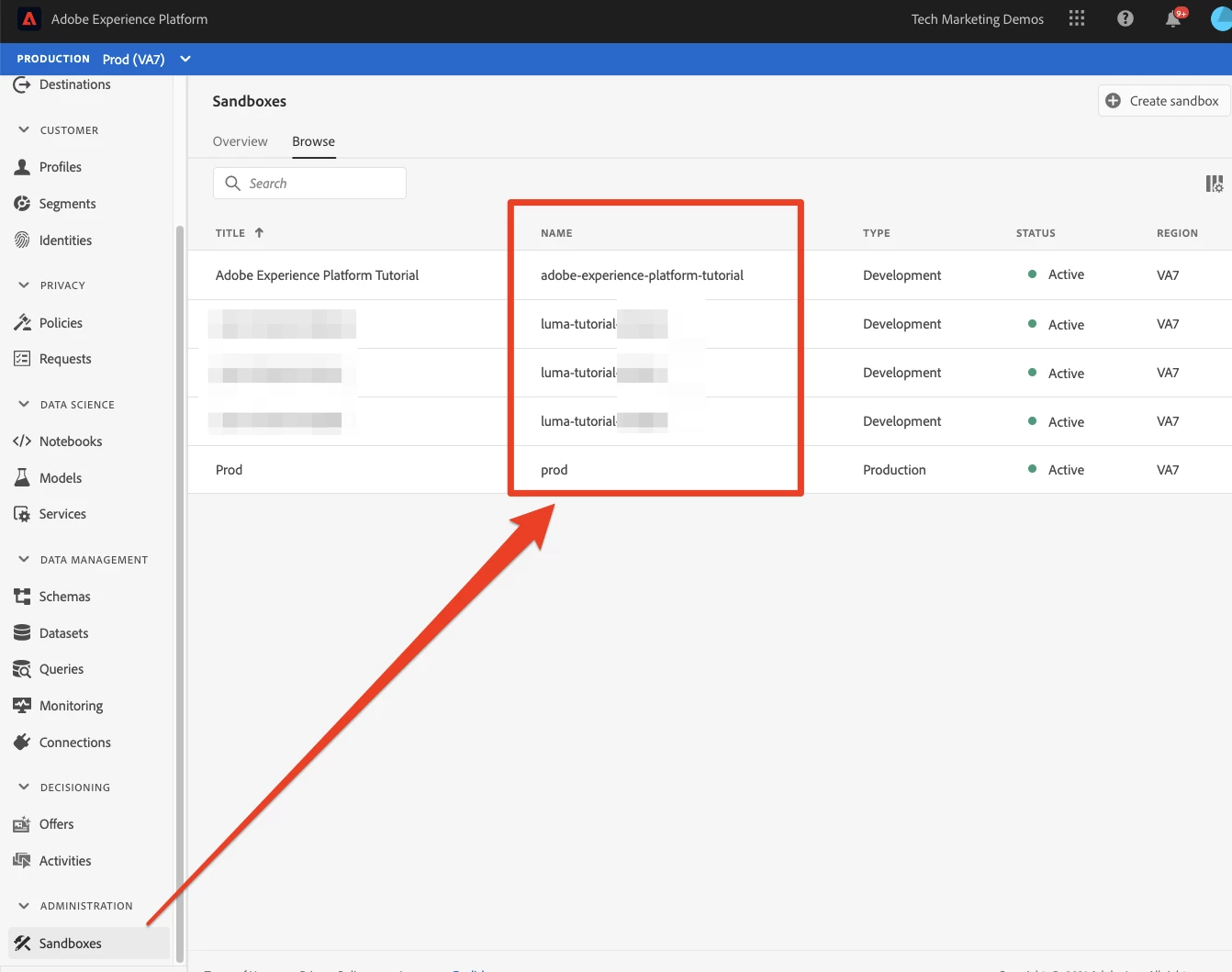
When using the API, you need to use the sandbox name field, which you can see from the UI (if you have sandbox permissions):
You could also retrieve a list of your available sandboxes from one of the requests in this Postman collection:

https://github.com/adobe/experience-platform-postman-samples/blob/master/apis/experience-platform/Sandbox%20API.postman_collection.json



1 reply

dwright-adobeAdobe EmployeeAccepted solution
Adobe Employee
February 4, 2021

Are you missing the x-sandbox-name header in the API request?


x-sandbox-name is a required header in the batch ingestion API. It refers to the Experience Platform sandbox environment in which you are working. By default, there is a prod sandbox, but then you can create multiple development sandboxes for testing.


When you log into the UI you are always defaulted into a sandbox, and if you have access to multiple sandboxes, you can switch between them using the dropdown in the top left corner. This is probably why you don't get this error in the UI... because you always have to be in a sandbox.

When using the API, you need to use the sandbox name field, which you can see from the UI (if you have sandbox permissions):

You could also retrieve a list of your available sandboxes from one of the requests in this Postman collection:

https://github.com/adobe/experience-platform-postman-samples/blob/master/apis/experience-platform/Sandbox%20API.postman_collection.json