Creating an Audience based on Map field | Adobe Higher Education
Skip to main content
Level 6
February 2, 2024
解決済み

Creating an Audience based on Map field

  • February 2, 2024
  • 2 の返信
  • 914 ビュー

Hi there,


I am looking to create a segment based on a Map field, in particular, from the idSpecific map field of the Consent field group. I am not too sure what to put in the Identifier specific, Identifier Type field, couldn't find the documentation for it. Wondering if someone can provide some insight? 


Using this example, if I want to target at ECID level, what would I put?

"idSpecific": { "email": { "jdoe@example.com": { "marketing": { "email": { "val": "n" } } } }, "ECID": { "37784337855396895622558625508046772577": { "collect": { "val": "y" }, "adID": { "val": "n" }, "marketing": { "push": { "val": "n" } } } } }
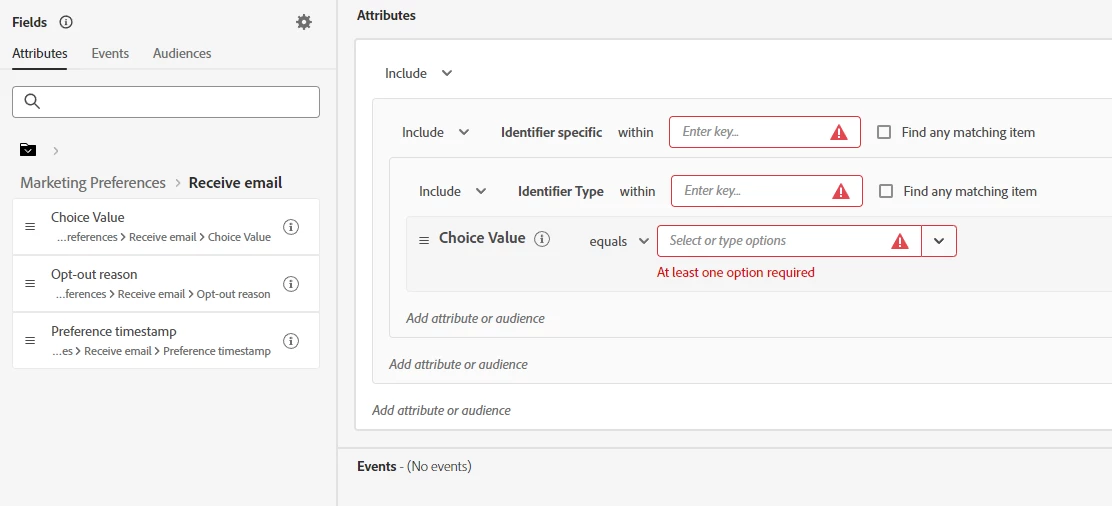
Thank you.

このトピックへの返信は締め切られました。
ベストアンサー _Manoj_Kumar_

Hello @akwankl 


You can just check the checkbox which says "find any matching item"

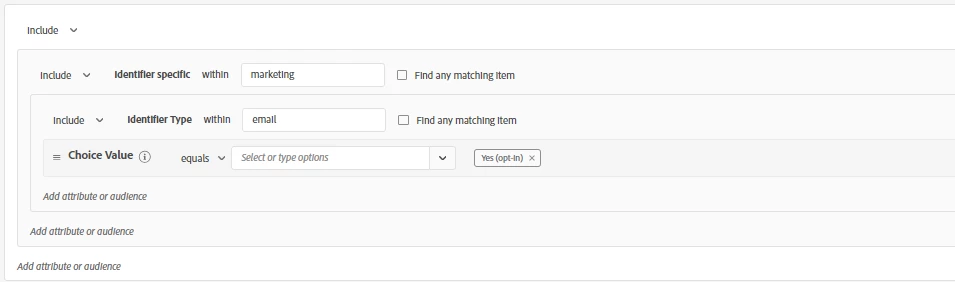
or manually enter the values like this


I prefer option 1 because the JSON structure of the consent field group remains the same for my usecases.


2 の返信

_Manoj_Kumar_
Community Advisor
Community Advisor
February 5, 2024

Hello @akwankl 


You can just check the checkbox which says "find any matching item"

or manually enter the values like this


I prefer option 1 because the JSON structure of the consent field group remains the same for my usecases.


     Manoj     Find me on LinkedIn
akwankl作成者
Level 6
March 15, 2024

Hey @_manoj_kumar_ ,


Thanks for responding. For the "Find any matching item" option, is it like a "like" clause in SQL where it looks for patterns input in the inbox?

NimashaJain
Adobe Employee
Adobe Employee
February 12, 2024

@akwankl Did you find the suggested solutions helpful? It would be great if you can  mark the answer as correct for posterity. If you have found out solution yourself, share it with wider audience in the community.