Cannot set variables: Error: Cannot find the global variable name: "s" | Community
Skip to main content
courtneya707225
January 16, 2020
Solved

Cannot set variables: Error: Cannot find the global variable name: "s"

  • January 16, 2020
  • 3 replies
  • 5887 views

I am migrating our implementation from DTM to Launch and I chose the "Manage the Library for me" option and when I load the page I am seeing rules fire, but then I am receiving this error message: [Adobe Analytics] Cannot set variables: Error: Cannot find the global variable name: "s".


This post is no longer active and is closed to new replies. Need help? Start a new post to ask your question.
Best answer by Joe_Y_1

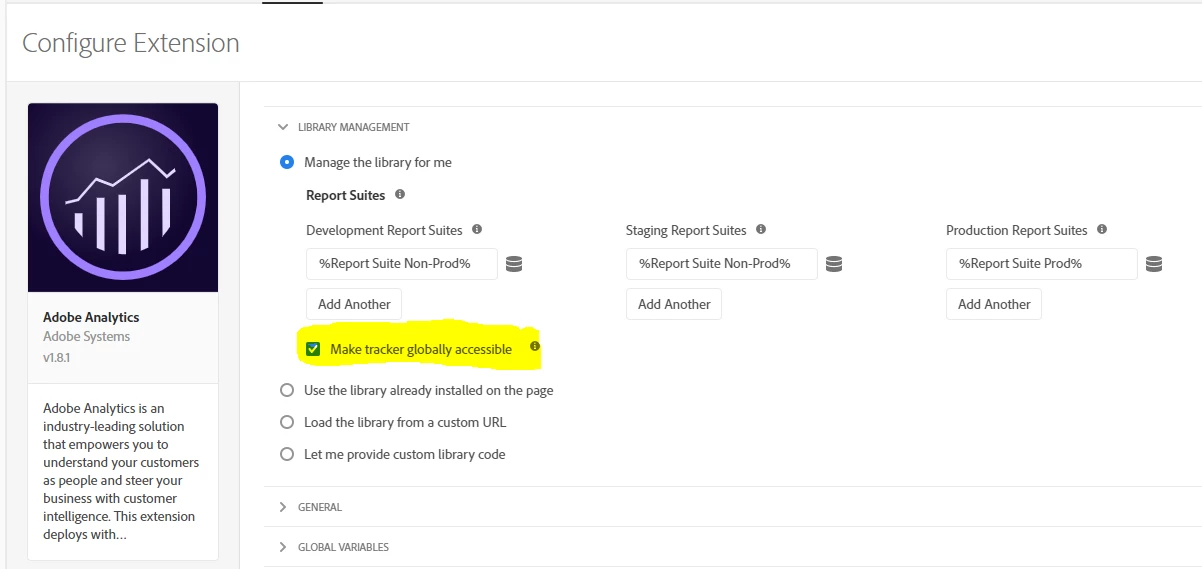
If you do not already have it checked, you may want to try checking the "Make tracker globally accessible" checkbox in the Adobe Analytics extension configuration.


3 replies

franzli
Level 4
January 17, 2020

In general, the s object should be available in all custom code blocks but could it be that you are using the s object somewhere else apart from the custom code blocks?


If so, you will need to create a localized copy of the s object.


More details here:

https://www.digitaldatatactics.com/index.php/2016/01/15/how-to-get-a-global-s-object-in-dtm/


Joe_Y_1Accepted solution
Level 2
January 29, 2020

If you do not already have it checked, you may want to try checking the "Make tracker globally accessible" checkbox in the Adobe Analytics extension configuration.


Haran_Huang
Level 4
February 21, 2020


Need to check Make tracker globally accessible in LIBRARY MANAGERMENT in Adobe Analytics Extension.