BrightCove with DTM | Community
Skip to main content
Level 2
August 17, 2017
Solved

BrightCove with DTM

  • August 17, 2017
  • 5 replies
  • 2719 views

Hi All,

I am facing issue with the bright cove video events.

For bright cove video events – I am able to log video events in the console but unable to map it with Adobe Analytics.

Please see the screenshot below shows events logged into console when certain action has been taken by user on video Highlighted in Yellow:
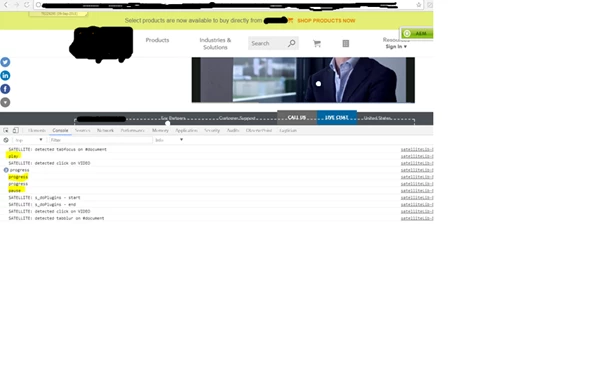
Also, in DTM I have created the tag for the same under page load -Trigger rule- onload - open editor below mention code  i have shared.

try{

if(videojs('te-brightcove-trigger-video_html5_api')){

videojs('te-brightcove-trigger-video_html5_api').on('play',function(){

  var myPlayer = this;

    console.log('play');

  var whereYouAt = myPlayer.currentTime();

  var vidDuration = myPlayer.mediainfo.duration;

  console.log('log'+ whereYouAt);

   console.log('log11'+ vidDuration);

  if(whereYouAt==(vidDuration/4)){

  }

   _satellite.notify("VIDEO - PLAY - "+myPlayer.mediainfo.name + ", "+whereYouAt, 3);

        var c = s_gi(_satellite.getVar("settings_aa_reportsuite")).Media;

});

videojs('te-brightcove-trigger-video_html5_api').on('pause',function(){

     console.log('pause');


});

videojs('te-brightcove-trigger-video_html5_api').on('ended',function(){

    console.log('ended');


});

videojs('te-brightcove-trigger-video_html5_api').on('progress',function(){

    console.log('progress'); 

})};

}

catch(err){

console.log('error in:' + err);

}

_satellite.notify("@Load - Media Module - START", 3);

// set up Media module

s.loadModule("Media");

s.Media.autoTrack = false;

s.Media.trackUsingContextData = true;

s.Media.trackVars = s.linkTrackVars;

s.Media.trackEvents = "event21,event22,event23,event24,event41,event42,event43";

s.Media.trackMilestones="25,50,75";

s.Media.segmentByMilestones = true;

s.Media.contextDataMapping = {

  "a.media.name": "eVar21,prop21",

  "a.media.segment": "eVar22",

  "a.contentType": "eVar23",

  "a.media.timePlayed": "event21",

  "a.media.view": "event22",

  "a.media.segmentView": "event24",

  "a.media.complete": "event23",

  "a.media.milestones": {

    "25": "event41",

    "50": "event42",

    "75": "event43"

  }

};

s.Media.monitor = function (s, media){

  if (media.event == 'play' || media.event == 'pause') {

_satellite.notify("MEDIA MONITOR - event is "+media.event, 3);

    s.Media.track(media.name);

    _satellite.notify("MEDIA MONITOR - just tracked for "+media.event, 3);

  }

};

_satellite.notify("@Load - Media Module - END", 3); 

It would be great if anyone can help us on that.

Thanks,

Payal

This post is no longer active and is closed to new replies. Need help? Start a new post to ask your question.
Best answer by jantzen_b

I'm glad to hear you were able to solve the first issue.

To confirm, you are trying to use the legacy Video Milestone implementation for Analytics as described in the documentation here correct? If so, this has been replaced by the Video Heartbeat model which I would encourage you to look into.

I'm not sure I fully understand your question, but if you're looking for which event needs to be used for your milestone implementation, it looks like you can use any event you'd like. You'd want to make sure your report suite doesn't already have a conflict with using the event, but the milestones aren't tied to a specific event as far as I can tell.

You can see an example in the documentation here

5 replies

jantzen_b
Adobe Employee
Adobe Employee
August 18, 2017

Can you try and attach a bigger version of the screenshot? When I try to see what is being displayed in the console, everything appears to be blurry and unreadable.

From what I can see, it looks like your functions are running since you are getting the console messages you've programed. Are you just not seeing an Analytics beacon being fired? If so, where are you calling the s.t() or s.tl() call? It looks like you are setting a lot of variables and sending messages to the console, but I don't see any s.t or s.tl calls.

If it were me, I'll add direct call rules to the functions. Then within the DTM user interface, you can set the variables and select which type of beacons to fire.

paydrAuthor
Level 2
August 19, 2017

Hi Jantzen.Belliston

I believe direct call rule needs to be triggered from developer end but same thing I am able to do it via DTM and have shared the complete code with you. Could you please suggest where exactly s.t or s.tl call needs to be mapped.

You are absolutely correct from my code which I have written in DTM I am able to log events in console but not seeing Adobe call for those events.

Could you please help how Adobe call for video events can be triggered?

jantzen_b
Adobe Employee
Adobe Employee
August 21, 2017

Where is the code above being deployed within DTM? Is it in a rule or tool?

paydrAuthor
Level 2
August 22, 2017

Hi Jantzen.Belliston​,

The code which i have created in DTM, and i can see the play and pause calls by using s.tl.

Now i am facing another issue which is related to the video milestones.

here i am sharing the code with you, please help me on that.I am not understanding which event i have to used for milestones.

try{

if(videojs('te-brightcove-trigger-video_html5_api')){

videojs('te-brightcove-trigger-video_html5_api').on('play',function(){

  var myPlayer = this;

    console.log('play');

  //s.loadModule("Media");

s.Media.autoTrack = false;

s.Media.trackUsingContextData = true;

s.Media.trackVars = s.linkTrackVars;

s.Media.trackEvents = "event21,event22,event23,event24,event41,event42,event43";

s.Media.trackMilestones="25,50,75";

s.Media.segmentByMilestones = true;

s.Media.contextDataMapping = {

  "a.media.name": "eVar21,prop21",

  "a.media.segment": "eVar22",

  "a.contentType": "eVar23",

  "a.media.timePlayed": "event21",

  "a.media.view": "event22",

  "a.media.segmentView": "event24",

  "a.media.complete": "event23",

  "a.media.milestones": {

    "25": "event41",

    "50": "event42",

    "75": "event43"

  }

};

  s.linkTrackEvents='event22';

  s.events = 'event22';

  s.tl(this, 'o');

  // set up Media module

//s.Media.monitor = function (s, media){

  //if (media.event == 'play' || media.event == 'pause') {

//_satellite.notify("MEDIA MONITOR - event is "+media.event, 3);

    //s.Media.track(media.name);

    //_satellite.notify("MEDIA MONITOR - just tracked for "+media.event, 3);

// }

//};

_satellite.notify("@Load - Media Module - END", 3); 

  var whereYouAt = myPlayer.currentTime();

  var vidDuration = myPlayer.mediainfo.duration;

  console.log('log'+ whereYouAt);

   console.log('log11'+ vidDuration);

  if(whereYouAt==(vidDuration/4)){

  }

   _satellite.notify("VIDEO - PLAY - "+myPlayer.mediainfo.name + ", "+whereYouAt, 3);

        var c = s_gi(_satellite.getVar("settings_aa_reportsuite")).Media;

});

videojs('te-brightcove-trigger-video_html5_api').on('pause',function(){

     console.log('pause');

       s.linkTrackEvents='event23';

  s.events = 'event23';

  s.tl(this, 'o');

});

videojs('te-brightcove-trigger-video_html5_api').on('ended',function(){

    console.log('ended');


});

videojs('te-brightcove-trigger-video_html5_api').on('progress',function(){

    console.log('progress');

});

videojs('te-brightcove-trigger-video_html5_api').on('timeupdate',function(){

    console.log('timeupdate');

    s.linkTrackEvents='event41';

  s.events = 'event41';

  s.tl(this, 'o');

}); 

});

catch(err){

console.log('error in:' + err);

}

/*_satellite.notify("@Load - Media Module - START", 3);

// set up Media module

s.loadModule("Media");

s.Media.autoTrack = false;

s.Media.trackUsingContextData = true;

s.Media.trackVars = s.linkTrackVars;

s.Media.trackEvents = "event21,event22,event23,event24,event41,event42,event43";

s.Media.trackMilestones="25,50,75";

s.Media.segmentByMilestones = true;

s.Media.contextDataMapping = {

  "a.media.name": "eVar21,prop21",

  "a.media.segment": "eVar22",

  "a.contentType": "eVar23",

  "a.media.timePlayed": "event21",

  "a.media.view": "event22",

  "a.media.segmentView": "event24",

  "a.media.complete": "event23",

  "a.media.milestones": {

    "25": "event41",

    "50": "event42",

    "75": "event43"

  }

};

s.Media.monitor = function (s, media){

  if (media.event == 'play' || media.event == 'pause') {

_satellite.notify("MEDIA MONITOR - event is "+media.event, 3);

    s.Media.track(media.name);

    _satellite.notify("MEDIA MONITOR - just tracked for "+media.event, 3);

  }

};

_satellite.notify("@Load - Media Module - END", 3);  */

jantzen_b
Adobe Employee
jantzen_bAdobe EmployeeAccepted solution
Adobe Employee
August 22, 2017

I'm glad to hear you were able to solve the first issue.

To confirm, you are trying to use the legacy Video Milestone implementation for Analytics as described in the documentation here correct? If so, this has been replaced by the Video Heartbeat model which I would encourage you to look into.

I'm not sure I fully understand your question, but if you're looking for which event needs to be used for your milestone implementation, it looks like you can use any event you'd like. You'd want to make sure your report suite doesn't already have a conflict with using the event, but the milestones aren't tied to a specific event as far as I can tell.

You can see an example in the documentation here