Attaching a library to an environment | Community
Skip to main content
Level 1
June 15, 2018
Solved

Attaching a library to an environment

  • June 15, 2018
  • 5 replies
  • 8370 views

I have an environment set up but not able to attach a library to it

When I go to the drop down menu None is selected and I see the environment that has been set up but it is greyed out

What do I need to do ?

This post is no longer active and is closed to new replies. Need help? Start a new post to ask your question.
Best answer by Reyhan_Sadaka

Launch does require you to create a new library instance that you can put your changes into.

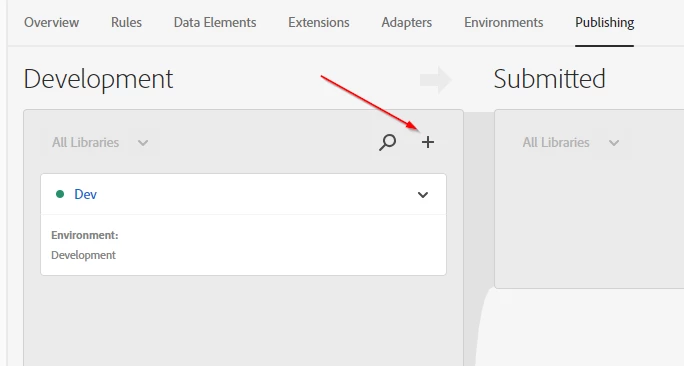
In "Publishing" there's a plus button on the far left in Development, you should be able to click that:

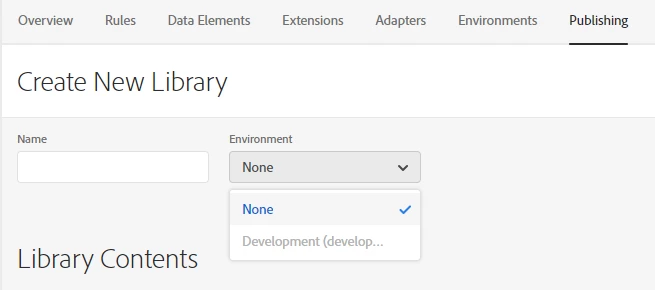
And then you'll actually be able to create a Library to actually put your rules/data elements/etc into:

Just give it a name and select the appropriate environment, and you should be good to go. You should also see it in the "Working Library" dropdown in the upper right after creation.

5 replies

Reyhan_Sadaka
Reyhan_SadakaAccepted solution
Level 2
June 20, 2018

Launch does require you to create a new library instance that you can put your changes into.

In "Publishing" there's a plus button on the far left in Development, you should be able to click that:

And then you'll actually be able to create a Library to actually put your rules/data elements/etc into:

Just give it a name and select the appropriate environment, and you should be good to go. You should also see it in the "Working Library" dropdown in the upper right after creation.

jantzen_b
Adobe Employee
Adobe Employee
June 29, 2018

Does the previous reply answer your question? If so, would you mind marking it correct?

danc76581001
Level 1
August 21, 2019

The environment is still greyed out. What is not made clear is that only one library can sit in Development env at a time. You need to remove any existing libraries before adding new ones.

January 27, 2021
Thanks for mentioning that Dev env only allows for one library at a time, this saved me time.
January 22, 2020
Having the same issue, and the comment does not solve how to make the library clickable for attaching to a created environment.
February 7, 2024

The answer marked in not the correct one. Question is how to enable grayed out environment so that we can select from dropdown.