Level 2
May 6, 2026
Solved

AEP export to Azure Data Lake Storage Gen2

  • May 6, 2026
  • 2 replies
  • 57 views

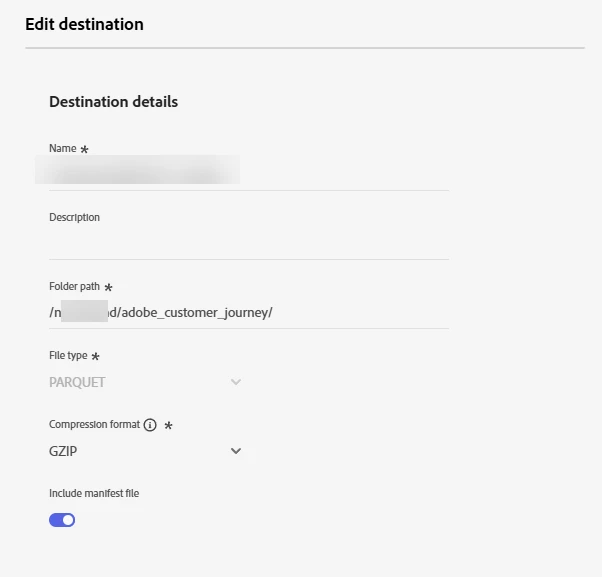
We are exporting a CJA dataset from AEP to Azure Data Lake Storage Gen2 using the destinations connections in AEP. We have connected the account through the initial setup. However, we are receiving an error for the export job. We have confirmed the folder and path do exist and the account has all rights necessary to create the export. The documentation states:

  • Folder path: Enter the path to the destination folder that will host the exported files.”

We aren’t sure if this is an absolute path or relative path, but tried both. Any ideas?

Error Code: ACTBTC-2400-400

Error Message: An error has occurred when exporting data to the destination. Unable to perform the data export with the parameters flowId=45f4d5d5-62fb-4407-8c87-806a66e76015 datasetId=69a9f4aa23235bf67317dd6e flowRunId=550339e9-dded-431d-a115-47e4ef53afc5. The error message returned by the destination is An unsupported operation has been performed. The path may not be correctly specified.



Best answer by DineshK

Hey,

so that error "path may not be correctly specified" is almost always the same thing — the container name is leaking into the folder path field.

AEP doesn't want the container name there. That's set once when you configure the account connection. The folder path field is only what comes after the container, relative to its root.

So instead of /nxxxxxxd/adobe_customer_journey/ try just:


adobe_customer_journey

No leading slash, no container name, no trailing slash. Clean relative path only.

Also two things worth double checking while you're at it:

Is Hierarchical Namespace enabled on that storage account? HNS has to be on at creation time — you can't flip it later. AEP will connect fine without it but the actual export will fail exactly like this. Worth confirming in the Azure portal under the storage account properties.

And make sure that folder actually exists. AEP won't create it for you, it just fails if it's not there already.

If you're still stuck after that, try setting the folder path to just / pointing at the container root and run a test export. If that goes through, you know it's purely a path format issue and can work from there.

2 replies

DineshK
DineshKAccepted solution
Level 2
May 15, 2026

Hey,

so that error "path may not be correctly specified" is almost always the same thing — the container name is leaking into the folder path field.

AEP doesn't want the container name there. That's set once when you configure the account connection. The folder path field is only what comes after the container, relative to its root.

So instead of /nxxxxxxd/adobe_customer_journey/ try just:


adobe_customer_journey

No leading slash, no container name, no trailing slash. Clean relative path only.

Also two things worth double checking while you're at it:

Is Hierarchical Namespace enabled on that storage account? HNS has to be on at creation time — you can't flip it later. AEP will connect fine without it but the actual export will fail exactly like this. Worth confirming in the Azure portal under the storage account properties.

And make sure that folder actually exists. AEP won't create it for you, it just fails if it's not there already.

If you're still stuck after that, try setting the folder path to just / pointing at the container root and run a test export. If that goes through, you know it's purely a path format issue and can work from there.

Level 2
May 20, 2026

Thank you ​@DineshK for the additional context. We updated the account connection and adjusted the folder. Now it’s working. Thanks again!