Level 3
April 10, 2018
Solved

Adobe Launch: Rule to Capture ID for a Clicked Checkbox

I have a series of check boxes. See source HTML below.

When the checkbox is clicked, I want Adobe Launch to capture the "id" and push into Adobe Analytics which clicked without having to wait for a pageload.

I have configured a rule to capture "id" for element "input" on mouse click.

However, the rule captures the 1st element "input" not the "input" which was clicked.

How do you configure a rule to capture the id for a clicked checkbox?

Can this be done without custom Javascript?

<input type="checkbox" id="Return3year" name="performance_returnsThreeYears" class=" skitchen-menu-input" value="performance_returnsThreeYears" data-bind="checked: orders().indexOf(&quot;performance_returnsThreeYears&quot;) >= 0">

<input type="checkbox" id="Return5year" name="performance_returnsFiveYears" class=" skitchen-menu-input" value="performance_returnsFiveYears" data-bind="checked: orders().indexOf(&quot;performance_returnsFiveYears&quot;) >= 0">

<input type="checkbox" id="Return10year" name="performance_returnsTenYears" class=" skitchen-menu-input" value="performance_returnsTenYears" data-bind="checked: orders().indexOf(&quot;performance_returnsTenYears&quot;) >= 0">

This post is no longer active and is closed to new replies. Need help? Start a new post to ask your question.
eham1906Accepted solution
Level 3
April 18, 2018

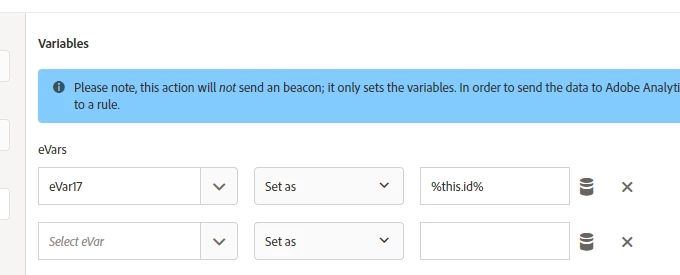
I figured it out...

This will capture the current value of ID on each click...

7 replies

jantzen_b
Adobe Employee
Adobe Employee
April 16, 2018

Can you post a screenshot of how you've configured the rule? I'm not sure if this can be done in the interface, but it could definitely be done with some custom JavaScript.

Translate
eham1906Author
Level 3
April 17, 2018

Thanks

Translate
eham1906AuthorAccepted solution
Level 3
April 18, 2018

I figured it out...

This will capture the current value of ID on each click...

Translate
jantzen_b
Adobe Employee
Adobe Employee
April 18, 2018

I'm glad you were able to figure it out. i was going to suggest looking into the "this" keyword for JavaScript/jQuery.

Translate
Level 3
December 19, 2018

How did you specify the %this.id% data element?

Translate
eham1906Author
Level 3
December 20, 2018

No, I did not specify this %this.id% as a data element.

Thanks

Translate
saml9443
Level 2
March 16, 2020

My best solution has been to create a data element with the custom code below which allows me to loop through each item with the <a> tag, find the index of the onclick, and return the text value.


It's interesting to see "this" being used - I'll have to give that a try!


var pageItemA = document.getElementsByTagName('a'); for (var pageItemAi = 0, len = pageItemA.length; pageItemAi<len; pageItemAi++) { (function(index) { pageItemA[pageItemAi].onclick = function() { var pageSelectionA = document.getElementsByTagName('a')[index].textContent; _satellite.track("pageItemClick",{pageItem: pageSelectionA}); } }) (pageItemAi); }


Translate