Luca_Lattarini
Level 9
December 14, 2021
Répondu

Adobe Journey Optimizer Delivery Approval

Hello guys,

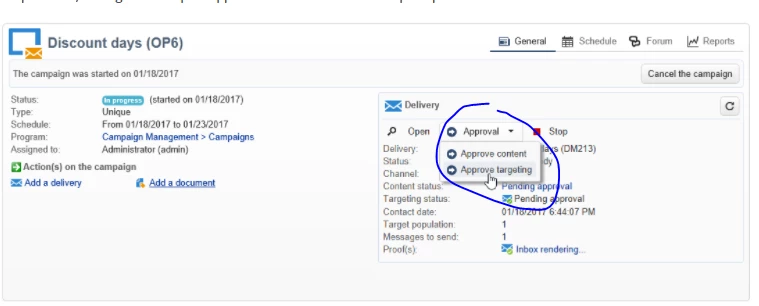
Anyone knows if Approval content and targeting is available in AJO? Basically I am checking if the functionality mentione din the picture below it is supported.

Thanks


Ce sujet a été fermé aux réponses.
Meilleure réponse par adobechat

Hi @luca_lattarini ,


This is a very interesting question.


The screenshot you have provided is from Adobe Campaign Classic. With Adobe Journey Optimizer, this is handled at journey level. You have a toggle for 'Test' as part of your journey canvas, which essentially is activating your journey on test mode before its published, using the test profiles that are created. This basically allows you to preview your content. You can compare this similar to seed addresses within Adobe Campaign Classic. Note that you can only use up to 100 test records per journey.


This functionality you have shown in screenshot is for batch campaigns, so for approving target within Adobe Journey Optimizer, this is managed within Segments where you can view the population, slice and dice there. Following that it can be activated via the Journey.


For a real time journey, then target is handled within Events, but its real time population will not be shown.


Hope this answers your question, thanks !


1 commentaire

adobechat
adobechatRéponse
Level 5
January 10, 2022

Hi @luca_lattarini ,


This is a very interesting question.


The screenshot you have provided is from Adobe Campaign Classic. With Adobe Journey Optimizer, this is handled at journey level. You have a toggle for 'Test' as part of your journey canvas, which essentially is activating your journey on test mode before its published, using the test profiles that are created. This basically allows you to preview your content. You can compare this similar to seed addresses within Adobe Campaign Classic. Note that you can only use up to 100 test records per journey.


This functionality you have shown in screenshot is for batch campaigns, so for approving target within Adobe Journey Optimizer, this is managed within Segments where you can view the population, slice and dice there. Following that it can be activated via the Journey.


For a real time journey, then target is handled within Events, but its real time population will not be shown.


Hope this answers your question, thanks !