
Solved
Adobe Experience Cloud Debugger and s.pageType
I am doing some verification work for a client site using the Adobe Experience Cloud Debugger tool.
I think I have encountered a bug where s.pageType is not shown in the Debugger.
One of the pages we track is the 404 page with s.pageType = "errorPage". However, s.pageType is not turning up in the Debugger tool. The following is the recording in the debugger tool:
| Experience Cloud Visitor ID | X |
| Audience Manager Location Hint | 3 |
| Audience Manager Blob | X |
| Page Name | international:en:errors:not found |
| Page URL | X |
| Server | X |
| Channel | X |
| prop1 | D=v1 |
| prop2 | D=v2 |
| prop3 | D=v3 |
| prop4 | D=v4 |
| prop5 | D=v5 |
| prop6 | D=v6 |
| prop8 | D=v8 |
| prop11 | D=v11 |
| prop12 | D=v12 |
| prop13 | D=v13 |
| prop14 | D=v14 |
| prop15 | D=v15 |
| prop16 | D=v16 |
| prop17 | D=v17 |
| prop18 | D=v18 |
| prop19 | D=v19 |
| prop20 | D=v20 |
| prop22 | D=v22 |
| prop23 | D=v23 |
| eVar1 | Repeat |
| eVar2 | X |
| eVar3 | 4PM |
| eVar4 | Friday |
| eVar5 | international:en:errors:not found |
| eVar6 | X |
| eVar8 | X |
| eVar11 | 01-16-2018 |
| eVar12 | 08-05-2017 |
| eVar13 | X |
| eVar14 | X |
| eVar15 | international |
| eVar16 | en |
| eVar17 | errors |
| eVar18 | not found |
| eVar22 | Guest |
| hier1 | X |
| Currency Code | SGD |
| Javascript Version | 1.6 |
| Color Depth | 24 |
| Screen Resolution | 1920x1080 |
| Browser Width | 1920 |
| Browser Height | 565 |
| Java Enabled | N |
| Cookies Enabled | Y |
| Character Set | UTF-8 |
(X marks the spot...  nah, just censoring out client information)
The following is a partial screenshot of the raw request made:
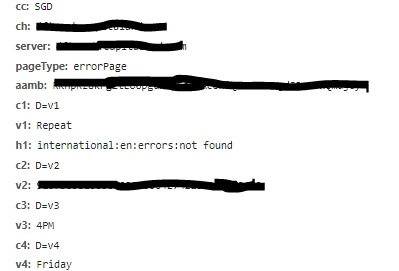
This can be replicated with any page set with s.pageType = "errorPage" in a page load rule in Adobe Launch.
