
Wrong path in resource after upgrade | Community
Skip to main content
aliaksandr_hvoz
Level 2
February 16, 2023

Wrong path in resource after upgrade

  • February 16, 2023
  • 2 replies
  • 13464 views

Hello
Got a problem after upgrading ai from 6.5.14 to 6.5.15.


Prior to this, the component worked without problems, but after the upgrade, it began to work incorrectly.

The component does not work correctly only on the publish node.


As I understand it, different types of resources are returned, but I can't find why.

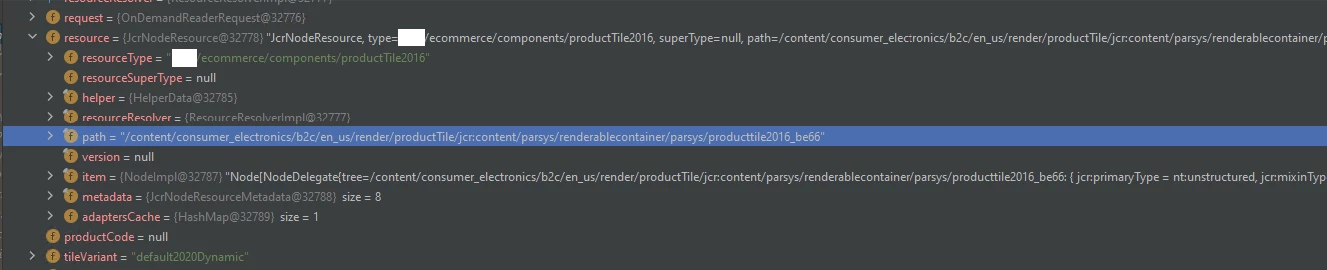
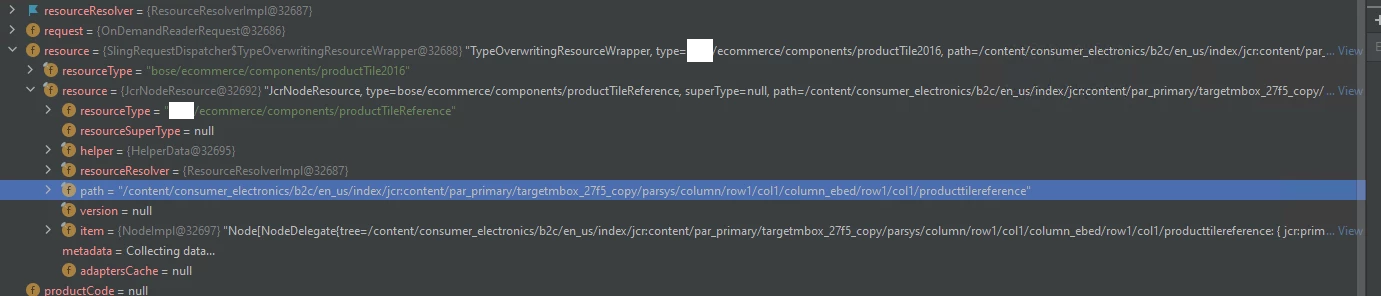
An example is the pictures in the author and the publisher. With the same page and the same component.

AUTHOR (correct)
PUBLISH (not correct)
Codebase was not updated only AEM 6.5.15 was applied. 

Tell me what could be the problem, please? Thank you very much in advance.

This post is no longer active and is closed to new replies. Need help? Start a new post to ask your question.

2 replies

joerghoh
Adobe Employee
Adobe Employee
February 18, 2023

I am not sure if your screenshot shows the same component.

The first screenshot shows a resource with the resourcetype "ProductTile2016" while the second shows a resource with the resourcetype "productTileReference".


aliaksandr_hvoz
Level 2
February 19, 2023

I found that I can not determine (find the resource along the path) and I can not understand why, since the type of the resource is passed.

I checked and I'm getting resource type url = myApp/ecommerce/components/productTile2016


No changes were made to the codebase. Only the new AEM 6.5.15 service package was applied. Before the new package, worked perfectly. All bundles are active.

joerghoh
Adobe Employee
Adobe Employee
March 4, 2023

All I could think of is a permission problem... Can you paste the the 3rd screenshot with the error message again, the path is not completely visible.

aliaksandr_hvozdzeu
Level 3
April 5, 2023

Hello.

How I understand the problem with getting SlingHttpServletRequest. 

I am getting requests as org.apache.sling.scripting.core.impl.helper.OnDemandReaderRequest instead of org.apache.sling.api.SlingHttpServletRequest after applay SP 6.5.15


package com.project.aem.ecommerce.components; import com.project.aem.common.utils.RequestParameterUtils; import com.project.aem.common.utils.StringUtils; import com.project.aem.ecommerce.common.components.ProductFeatureItem; import com.project.aem.ecommerce.utils.ProjectHybrisConstants; import com.project.aem.plugins.widget.CheckBox; import com.project.aem.plugins.widget.MultiFieldPanel; import com.citytechinc.cq.component.annotations.*; import com.citytechinc.cq.component.annotations.editconfig.FormParameter; import com.citytechinc.cq.component.annotations.widgets.Selection; import com.citytechinc.cq.component.annotations.widgets.TextField; import org.apache.sling.api.SlingHttpServletRequest; import org.apache.sling.api.resource.Resource; import org.apache.sling.api.resource.ResourceResolver; import org.apache.sling.api.resource.ValueMap; import org.apache.sling.api.scripting.SlingBindings; import org.apache.sling.models.annotations.Model; import org.apache.sling.models.annotations.Optional; import org.apache.sling.models.annotations.Via; import org.apache.sling.models.annotations.injectorspecific.SlingObject; import org.slf4j.Logger; import org.slf4j.LoggerFactory; import javax.annotation.PostConstruct; import javax.inject.Inject; import javax.jcr.Node; import javax.jcr.NodeIterator; import javax.jcr.RepositoryException; import java.util.ArrayList; import java.util.List; @Component(value = "Product Tile 2016", group = "Project Product Tiles", actions = {"text:Product Tile 2016", "-", "edit", "copymove", "delete", "-", "insert"}, disableTargeting = true, tabs = { @Tab(title = "Product Tile"), @Tab(title = "Classification Features") }, formParameters = { @FormParameter(name = "tileVariant", value = "default") }, extraClientlibs = "project-ecommerce.producttile2016-author") @Model(adaptables = {SlingHttpServletRequest.class}) public class ProductTile2016 { private static final Logger LOG = LoggerFactory.getLogger(ProductTile2016.class); private static final String FEATURE = "feature"; @SlingObject private SlingHttpServletRequest request; @SlingObject private ResourceResolver resourceResolver; @SlingObject private Resource resource; @DialogField(fieldLabel = "Product code", fieldDescription = "Product code (to visualize in author mode).", required = true, tab = 1 ) @TextField private String productCode; @DialogField(fieldLabel = "Tile variant", defaultValue = "default", tab = 1, additionalProperties = {@Property(name = "cq-dialog-dropdown-showhide", value = ""), (name = "class", value = "tile_variant_select"), (name = "cq-dialog-showhide-target", value = ".default_producttile_2020")}) @Selection(type = "select", options = { (text = "Default", value = "default"), (text = "Default Support", value = "defaultSupport"), (text = "Default 2020 - Static", value = "default2020"), (text = "Default 2020 With Compare Button - Static", value = "default2020Compare"), (text = "Default 2020 - Dynamic", value = "default2020Dynamic"), (text = "Default 2020 With Compare Button - Dynamic", value = "default2020CompareDynamic"), (text = "Compare Table Tile", value = "compareTableTile"), (text = "Variant A", value = "variantA"), (text = "Variant B", value = "variantB"), (text = "Variant C", value = "variantC"), (text = "Shop", value = "shop"), (text = "Special Product", value = "specialProduct"), (text = "Variant Line", value = "variantLine"), (text = "Variant Pro", value = "variantPro"), (text = "Accessories Layout", value = "productDrawerAccLayout"), }) ("resource") private String tileVariant; @DialogField(fieldLabel = "Enable Stock", value = "true", tab = 1) (text = "Enable Stock", inputValue = "true") ("resource") private boolean enableStock; @DialogField(fieldLabel = "Enable Buy Overlay", tab = 1, additionalProperties = {@Property(name = "class", value = "hide default2020_hide_option")}) @Selection(type = "checkbox", options = {@Option(text = "Yes", value = "true")}) ("resource") private boolean enableBuyOverlay; @DialogField(fieldLabel = "Hide Review Ratings", value = "true", tab = 1, additionalProperties = {@Property(name = "class", value = "hide default2020_show_option")}) (text = "Hide Review Ratings", inputValue = "true") ("resource") private boolean hideReviewRatings; @DialogField(fieldLabel = "Low Stock Message color", tab = 1, additionalProperties = {@Property(name = "class", value = "hide default2020_show_option")}) @Selection(type = "select", options = { (text = "Grey", value = "-endingSoonGrey"), (text = "Red", value = "-endingSoon") }) ("resource") private String stockMessageColor; @DialogField(fieldLabel = "Tile Background Color", tab = 1, additionalProperties = {@Property(name = "class", value = "hide default2020_show_option")}) @Selection(type = "select", options = { (text = "Light Grey", value = "light-grey"), (text = "White", value = "project-productTile2020--white") }) ("resource") private String tileBackgroundColor; @DialogField(fieldLabel = "Show Classification Features", defaultValue = "false", tab = 2) @Selection(options = { (text = "Yes", value = "true"), (text = "No", value = "false") } ) ("resource") private boolean enableClassificationFeatures; @DialogField(fieldLabel = "Product Feature", tab = 2) @MultiFieldPanel private List<ProductFeatureItem> feature = new ArrayList<>(); public String getProductCode() { return productCode; } public boolean getEnableStock() { return enableStock; } public boolean getEnableBuyOverlay() { return enableBuyOverlay; } public boolean isHideReviewRatings() { return hideReviewRatings; } public String getStockMessageColor() { return stockMessageColor; } public String getTileBackgroundColor() { return tileBackgroundColor; } public String getTileVariant() { return tileVariant; } public List<ProductFeatureItem> getFeature() { return feature; } public boolean isEnableClassificationFeatures() { return enableClassificationFeatures; } @PostConstruct public void init() throws Exception { String code = null; if (request != null) { code = RequestParameterUtils.getParameter(request, ProjectHybrisConstants.PROPERTY_NODE_PRODUCTCODE); if (StringUtils.isEmpty(code)) { SlingBindings bindings = (SlingBindings) request.getAttribute(SlingBindings.class.getName()); Object productCodeBinding = bindings.get(ProjectHybrisConstants.PROPERTY_NODE_PRODUCTCODE); if (productCodeBinding != null) { code = productCodeBinding.toString(); } if (StringUtils.isEmpty(code)) { Object resourceBinding = bindings.get("resource"); if (resourceBinding != null) { ValueMap properties = ((Resource) resourceBinding).adaptTo(ValueMap.class); if (properties != null) { code = properties.get(ProjectHybrisConstants.PROPERTY_NODE_PRODUCTCODE, String.class); } } } } this.feature = new ArrayList<>(); Resource featureResource = resourceResolver.getResource(resource.getPath() + "/" + FEATURE); if (featureResource != null) { Node featureNode = featureResource.adaptTo(Node.class); try { NodeIterator it = featureNode.getNodes(); while (it.hasNext()) { Node featureItemNode = it.nextNode(); ProductFeatureItem productFeatureItem = new ProductFeatureItem(); productFeatureItem.setFeatureName(featureItemNode.getProperty(ProductFeatureItem.KEY_FEATURE_NAME).getString()); productFeatureItem.setPath(featureItemNode.getProperty(ProductFeatureItem.KEY_PATH).getString()); productFeatureItem.setImageAltText(featureItemNode.getProperty(ProductFeatureItem.KEY_IMAGE_ALT_TEXT).getString()); this.feature.add(productFeatureItem); } } catch (RepositoryException e) { LOG.error("unable to get the feature node items", e); } } } if (StringUtils.isNotEmpty(code)) { this.productCode = code; } } }


This is an old model but worked before the upgrade as expected. All fields returned null.


Thanks for any advice.

aliaksandr_hvozdzeu
Level 3
April 9, 2023

UPDATE

This component works on the author as expected but publish doesn't work after the upgrade.

Rechecked everything I know - no more ideas.