Workflow running instance console-AEMasCS | Community
Skip to main content
Level 4
April 23, 2024

Workflow running instance console-AEMasCS

  • April 23, 2024
  • 4 replies
  • 2001 views

Hi Team

       We are on AEMasCS, we were seeing the WF instance(QA-Cloud-instance) console 0 count, but in health check console the running instance showing as 7900(PFB screenshot), Kindly let us know how to check the running instance WF status.

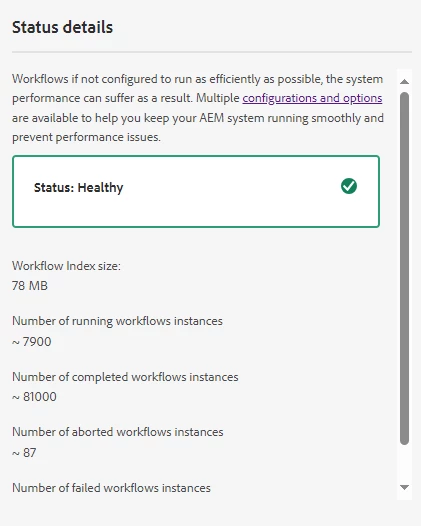
 

This post is no longer active and is closed to new replies. Need help? Start a new post to ask your question.

4 replies

TarunKumar
Community Advisor
Community Advisor
April 23, 2024

HI @rajat168 ,

Can you follow below steps and check if your running workflow has stopped:


  1. Terminate the normal /workflows window.
  2. Open ip:port/system/console/bundles and stop below bundles:

Adobe - XMPFiles Worker host com.adobe.xmp.worker.files.host                            

Adobe XMPCore com.adobe.xmp.xmpcore5.0.20

Day Communique 5 DAM Asset Handler Implementationcom.day.cq.dam.cq-dam-handler 5.6.6                           

Day Communique 5 WCM Workflow com.day.cq.wcm.cq-wcm-workflow 5.6.4                  

Day Communique 5 Workflow Implementation com.day.cq.workflow.cq-workflow-impl 5.6.8


3. Now close your AEM instance or restart your AEM instance and double check if all the above bundles which were stopped are now up and running, if not then activate the above bundles.


Thanks
Tarun

rajat168Author
Level 4
April 23, 2024

Hi @tarunkumar , thanks for your response. as i informed above its aemascs, we dont have access to admin console.

sravs
Community Advisor
Community Advisor
April 23, 2024

Hi @rajat168 , Can you please check the user permissions, whether you have access to workflow console or not.

rajat168Author
Level 4
April 23, 2024

Hi @sravs , as i checked its not releated to permission issue,even i was part of admin group.

sravs
Community Advisor
Community Advisor
April 23, 2024

Can you please confirm if you are able to access and see some data in the other workflow consoles like Archive and Failures.

aanchal-sikka
Community Advisor
Community Advisor
April 23, 2024

@rajat168 


1. Please verify if you are receiving any errors in browser console or logs, when you access Workflow console. If any specific instance/model is causing issue, we might need to terminate them. May be via purge.

2. Please visit the repository browser or query to check for workflows that have status RUNNING


Please update the following query as per your need

path=/var/workflow/instances type=cq:Workflow 1_property=status 1_property.value=RUNNING 2_property=modelId 2_property.value=/var/workflow/models/dam/test-staging-assets p.limit=-1


Aanchal Sikka
rajat168Author
Level 4
April 24, 2024

Hi @aanchal-sikka , thanks for your response, we need to get all WF instance on the WF instance console, but the query have only 1 WF with running status.

rajat168Author
Level 4
April 30, 2024

Hi Team,

 Kindly let me know is there any documentation for this running and completed workflow were counted in this health window.


kautuk_sahni
Community Manager
Community Manager
May 16, 2024

@rajat168 Did you find the suggestions from users helpful? Please let us know if more information is required. Otherwise, please mark the answer as correct for posterity. If you have found out solution yourself, please share it with the community.

Kautuk Sahni