Workflow Launcher problem with project task workflow
Hi All,
We created a workflow in AEM6.3 using the Approval project / Project tasks.
This works fine when I go to a project and add a content path and kick off the workflow manually. However when I configure the Workflow launcher to point to a folder in DAM and looking for some metadata attribute value to kick of the workflow upon uploading an asset.
This seems to error out and I can see the below in the log.
com.adobe.granite.workflow.WorkflowException: Process execution resulted in an error
at com.adobe.granite.workflow.core.job.HandlerBase.executeProcess(HandlerBase.java:199)
at com.adobe.granite.workflow.core.job.JobHandler.process(JobHandler.java:258)
at org.apache.sling.event.impl.jobs.JobConsumerManager$JobConsumerWrapper.process(JobConsumerManager.java:500)
at org.apache.sling.event.impl.jobs.queues.JobQueueImpl.startJob(JobQueueImpl.java:291)
at org.apache.sling.event.impl.jobs.queues.JobQueueImpl.access$100(JobQueueImpl.java:58)
at org.apache.sling.event.impl.jobs.queues.JobQueueImpl$1.run(JobQueueImpl.java:227)
at java.util.concurrent.ThreadPoolExecutor.runWorker(Unknown Source)
at java.util.concurrent.ThreadPoolExecutor$Worker.run(Unknown Source)
at java.lang.Thread.run(Unknown Source)
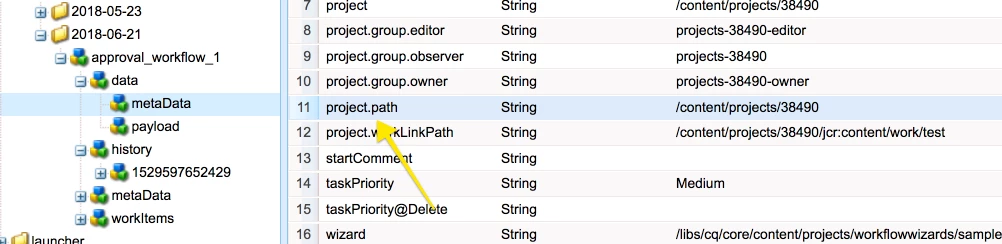
Caused by: com.adobe.granite.workflow.WorkflowException: Metadata must include project path property in property named: project.path
at com.adobe.cq.projects.impl.workflow.ProjectTaskWorkflowProcess.execute(ProjectTaskWorkflowProcess.java:120)
at com.adobe.granite.workflow.core.job.HandlerBase.executeProcess(HandlerBase.java:193)
... 8 more
I figured that when we start a workflow manually from project there are bunch of attributes that are assigned in the <Workflowinstance>/data/metaData. One such attribute is Project Path for which it is error out.
Does anyone face this issue earlier and have any pointers on how to make launcher work with the workflow created out of Approving Project/ Project tasks.
Help is much appreciated. Thanks.