WKND Tutoria - Why I am missing Design in touch UI screen | Community
Skip to main content
May 14, 2021
Solved

WKND Tutoria - Why I am missing Design in touch UI screen

  • May 14, 2021
  • 3 replies
  • 1373 views

Hi,

I have couple of questions -


1) I am missing the components on side panel after successfully building the project through maven as per the instructions from the WKND site. I am using 6.5.7 version.


Getting Started with AEM Sites - Project Setup | Adobe Experience Manager


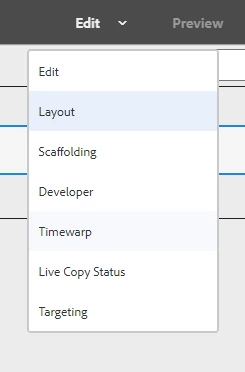
2) I am missing Design in the list. Please see attached. Any help would be greatly appreciated.


Thanks
This post is no longer active and is closed to new replies. Need help? Start a new post to ask your question.
Best answer by mayank0990

Hi @nemmani 


In Editable Templates, instead of assigning components to the Parsys via Design Console, we use the policies to assign the components to layout-container. As you're using WKND Site, they've made the implementation via Editable Templates.

For more details, go through this blog: https://myaemlearnings.blogspot.com/2018/03/policies-in-editable-templates.html#:~:text=Policies%20in%20Editable%20templates%20are,dialog%20of%20that%20particular%20component)


I hope it solves your problem. 

3 replies

nemmaniAuthor
May 14, 2021

anyone? what am I missing? Thanks

Asutosh_Jena_
Community Advisor
Community Advisor
May 15, 2021

Hi @nemmani 


To make the component available in the side panel, your component should be part of a component group and the same component group should be allowed in the template policy. If it was working earlier and now you do not see the component in side panel, that means the template policy is was not part of the code base and it was created directly on AEM instance. Post the deployment, the template policy got overwritten and which is why you do not see the option.


To re-enable it you need to go the template editor, and allow the component group in the template policy.

https://myaemlearnings.blogspot.com/2018/03/policies-in-editable-templates.html


Now for Design mode, it is only available for static templates. Templates that are created with editable templates should be edited using the template editor which will be using the template and component policy.

https://experienceleague.adobe.com/docs/experience-manager-65/authoring/siteandpage/default-components-designmode.html?lang=en#siteandpage


Hope this helps!

Thanks

nemmaniAuthor
May 15, 2021
THANK YOU very much Asutosh.
mayank0990
mayank0990Accepted solution
Level 2
May 15, 2021

Hi @nemmani 


In Editable Templates, instead of assigning components to the Parsys via Design Console, we use the policies to assign the components to layout-container. As you're using WKND Site, they've made the implementation via Editable Templates.

For more details, go through this blog: https://myaemlearnings.blogspot.com/2018/03/policies-in-editable-templates.html#:~:text=Policies%20in%20Editable%20templates%20are,dialog%20of%20that%20particular%20component)


I hope it solves your problem. 

nemmaniAuthor
May 15, 2021
THANK YOU Mayank.