Where to insert third-party tags/scripts | Community
Skip to main content
This post is no longer active and is closed to new replies. Need help? Start a new post to ask your question.
Best answer by BrianKasingli

In my response, I am assuming that your AEM pages is using the latest WCM Core Components V2 Page. Also the screenshot provided below is Google's documation on how to install GTM onto your page. https://developers.google.com/tag-platform/tag-manager/web
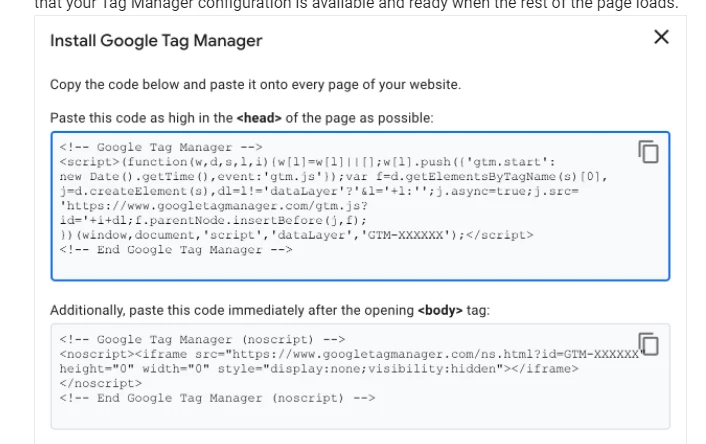
 

Assuming that your AEM pages is using the latest WCM Core Components V2 Page, I will be placing the GTM code as high as in the head on the page as possible, so I will place the code in line:19 of my overlayed v2 Page Component, (head.html) https://github.com/adobe/aem-core-wcm-components/blob/master/content/src/content/jcr_root/apps/core/wcm/components/page/v2/page/head.html


2) I will be placing the next installation code from Google GTM immediately after the closing of the <body> tag, so I will place the code in line:45 of my overlayed v2 Page Component (page.html) https://github.com/adobe/aem-core-wcm-components/blob/master/content/src/content/jcr_root/apps/core/wcm/components/page/v2/page/page.html


2 replies

Kishore_Kumar_
Level 9
December 18, 2021

Hi @taise24051991 ,


  • GTM <script> part should be inside <head> element. data layer object creation should be before this.
  • <noscript> part should be immediately after the opening of <body> element.
BrianKasingli
Community Advisor and Adobe Champion
BrianKasingliCommunity Advisor and Adobe ChampionAccepted solution
Community Advisor and Adobe Champion
December 21, 2021

In my response, I am assuming that your AEM pages is using the latest WCM Core Components V2 Page. Also the screenshot provided below is Google's documation on how to install GTM onto your page. https://developers.google.com/tag-platform/tag-manager/web


Assuming that your AEM pages is using the latest WCM Core Components V2 Page, I will be placing the GTM code as high as in the head on the page as possible, so I will place the code in line:19 of my overlayed v2 Page Component, (head.html) https://github.com/adobe/aem-core-wcm-components/blob/master/content/src/content/jcr_root/apps/core/wcm/components/page/v2/page/head.html


2) I will be placing the next installation code from Google GTM immediately after the closing of the <body> tag, so I will place the code in line:45 of my overlayed v2 Page Component (page.html) https://github.com/adobe/aem-core-wcm-components/blob/master/content/src/content/jcr_root/apps/core/wcm/components/page/v2/page/page.html