What is the best way to add more properties to the page component? | Community
Skip to main content
Level 3
July 10, 2017
Solved

What is the best way to add more properties to the page component?

  • July 10, 2017
  • 6 replies
  • 1662 views

Hello all,

I've a requirement where I have to add more properties to the existing page component. I've tried these two ways:

- Overlay the page component and add more properties in tab_basic (this worked)

- Inherit the page component (giving in slingResourceSuperType) and copy and paste the dialog node and add more properties (this did not work)

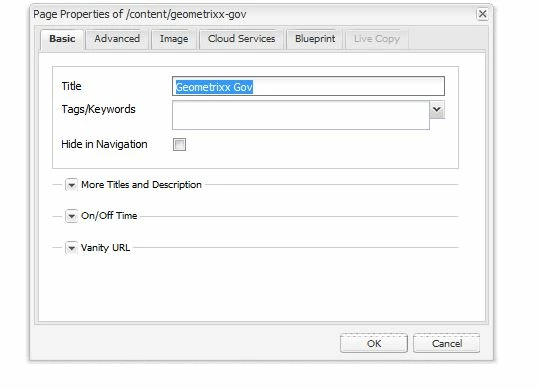
Are there any other options to do it? Basically I want to have more options in the basic tab rather than just 3 which has been given. I have added the pic also here for more clarity. Thanks!
This post is no longer active and is closed to new replies. Need help? Start a new post to ask your question.
Best answer by viveksachdeva

Should not copy paste whole dialog. That defeats the purpose of resource merger. Here is a link that does similar to what you are doing GitHub - Adobe-Marketing-Cloud/aem-authoring-extension-page-dialog​ .

But still its strange that copying the dialog doesnt work. Could you add details exactly what doesnt work? Does the dialog not open or it still shows old fields?

6 replies

smacdonald2008
Level 10
July 10, 2017

When you overlayed the page component - where you able to see the new tabs?

viveksachdeva
Community Advisor
viveksachdevaCommunity AdvisorAccepted solution
Community Advisor
July 11, 2017

Should not copy paste whole dialog. That defeats the purpose of resource merger. Here is a link that does similar to what you are doing GitHub - Adobe-Marketing-Cloud/aem-authoring-extension-page-dialog​ .

But still its strange that copying the dialog doesnt work. Could you add details exactly what doesnt work? Does the dialog not open or it still shows old fields?

vitis90Author
Level 3
July 11, 2017

The dialog doesn't open when i click on page properties

vitis90Author
Level 3
July 11, 2017

Yes I was able to see that new properties. OVerlaying works fine but I'm wondering if its the right practice or not.

viveksachdeva
Community Advisor
Community Advisor
July 11, 2017

I think there would be some JS error.. Possible that the dialog got copied under incorrect node.. Can verify the hierarchy of your new component? If there is a sample package that you can share, that will be great... Could you also check browser console and share JS error, if you see any?

P.S. overlaying(that works for you) is better practice. So your work is accomplished but it would be good to find out root cause of this issue.

vitis90Author
Level 3
July 11, 2017

There was no js error in console actually. Wonder why. But I'm going with overlaying approach. Thank you.