
Virtual Components in AEM 6.4
Hello, I would like to use Virtual Components feature to provide different versions of the same component (i.e. same resource type) in the Component Browser. I've found some information about this feature on few AEM documentation pages:
- https://helpx.adobe.com/experience-manager/6-4/sites/developing/using/custom-nodetypes.html#Core
- https://helpx.adobe.com/experience-manager/6-4/sites/developing/using/components-basics.html
I have created following structure:
{
"jcr:primaryType":"cq:Component",
"jcr:title":"My Component",
"componentGroup":"SomeGroup",
"cq:design_dialog": { ... }
},
"cq:editConfig":{ ... },
"cq:dialog":{ ... },
"virtual":{
"jcr:primaryType":"nt:unstructured",
"myVirtual1":{
"jcr:primaryType":"cq:VirtualComponent",
"jcr:title":"My Virtual 1",
"componentGroup":"MyGroup",
"cq:design_dialog":{ ... },
"cq:editConfig":{ ... }
},
"myVirtual2":{
"jcr:primaryType":"cq:VirtualComponent",
"jcr:title":"My Virtual 2",
"componentGroup":"MyGroup",
"cq:design_dialog":{ ... },
"cq:editConfig":{ ... }
}
}
}
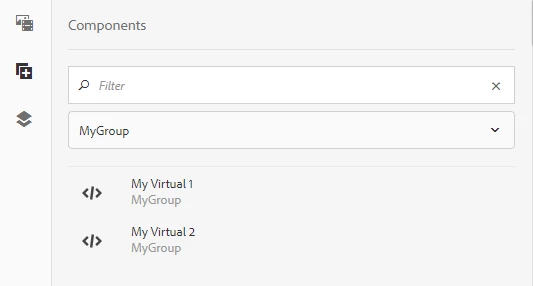
This works very well - after adding component group "MyGroup" to the Allowed Components of Layout Container (in the Policy configuration on Editable Template) I can see each virtual component listed separately in the Components Browser.
I would also like to configure AEM Styles for those components through their design in the policy configuration (I’ve created “cq:design_dialog” definition for the main cq:Component and also for my cq:VirtualComponent’s).
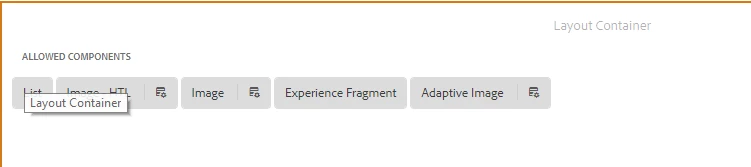
However, after adding my Virtual Components as the “Allowed components” in the Layout Container policy configuration, I am not able to see them displayed as the “pills” on the Layout Container - only regular “cq:Component”s are displayed there:
I know that if I directly add the “parent” component (“My Component”) to the list of “Allowed Components”, then I will be able to see it as the “pill” and configure the Styles (in policy config) for this component, and the styles will be shared by all virtual versions of that component. However I don’t want the “parent” component (“My Component”) to be available to authors in the Component Browser on the pages using that template - I only want the virtual components to be available there. Is there any way to achieve this or the behaviour which I’ve described is expected?
In general, do you know any recommendations on how the virtual components should be used and why they don’t have the same support as regular components (e.g. seperate design dialog/policy config)?
Thank you