Variations option missing in Experience Fragments in AEM 6.4 | Community
Skip to main content
surenk
Level 4
September 10, 2019
Solved

Variations option missing in Experience Fragments in AEM 6.4

  • September 10, 2019
  • 5 replies
  • 4021 views

Version: AEM 6.4 - 6.4.4.0

Why does "Variation" option does not show up in a new Experience Fragment being built using default "HTML 5 Page" template that we're trying to create? While it shows if we use We.Retail's template? What are we missing?

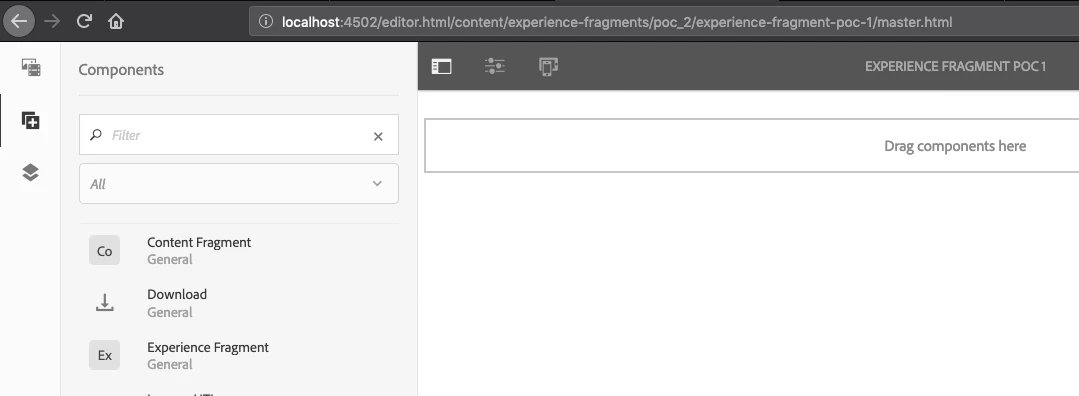
Steps -- Does not show up

  1. Settings > Configuration Browser > Create > (Project-Name) > Editable Templates
  2. Settings > Templates > Create > (Project-Name) > HTML 5 Page > (PorjectName-Template) > Open
  3. Loads the Template Edit page but "Variations" does not show up.
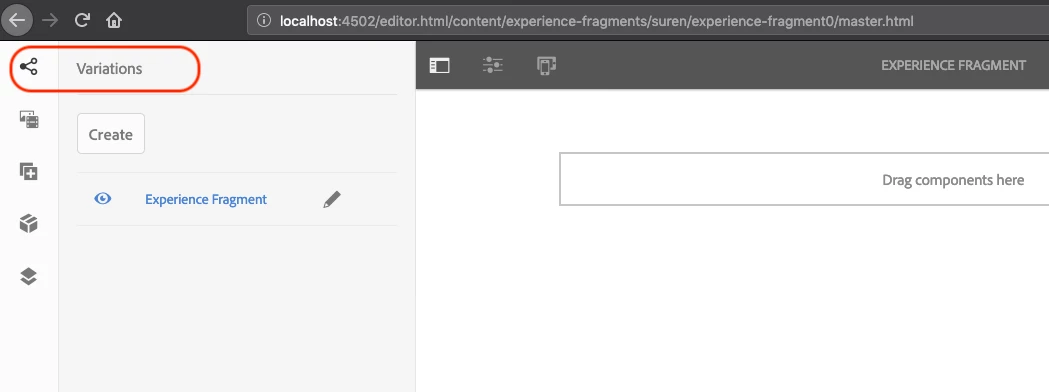
Steps -- Shows up if We.Retail us used:

  1. Settings > Experience Fragment > ProjectName > Create > Experience Fragment > Choose We.Retail Web Variation Template > Open
  2. Loads the Template Edit page with "Variations" Option
This post is no longer active and is closed to new replies. Need help? Start a new post to ask your question.
Best answer by surenk

Thanks for suggestions.

1. Recompiling did not help.

2. And i do not see any Errors in browser (tried Chrome & Firefox)

Here's the issue/solution:

An "Experience Fragment" needs to be built in a certain way only.. as follows:

  • An Experience Fragment <-- Editable Template <-- Template Type that uses xfpage (like sling:resourceType="wknd/components/structure/xfpage"/> and the xfpage component should use sling:resourceSuperType="cq/experience-fragments/components/xfpage")
  • The name of the template need to be used for an XF should have the prefix "experience-fragment-<name>" [I didn't like this hard rule but the designers of this may have some reasons for this]

REF: Experience Fragments

So if the XF is built using a Template (Editable) and Template Type which are built as above.. then the XF will show the Variations option.

NOTE: Adobe WKND (/conf/wknd/settings/wcm/template-types) demo site and OOTB Template - HTML5 Page (/libs/settings/wcm/template-types/html5page) do not have a Template Type built using xfpage and if you're trying to build a template using any of them.. XF's will not show the Varations option. Only We.Retail has those special XF based templates (and template types)

5 replies

Adobe Employee
September 10, 2019

Try to force clientlibs re-compilation [1] and clear browser's cache

[1] How to force a recompilation of all Sling scripts jsps, java, and sightly in AEM 6.4

Adobe Employee
September 10, 2019

If the issue persists after force clientlibs re-compilation you may wanna check the browser debug tool as well as "error.log" for any relevant error that may help to understand what might went wrong.

Adobe Employee
September 10, 2019
surenk
surenkAuthorAccepted solution
Level 4
September 11, 2019

Thanks for suggestions.

1. Recompiling did not help.

2. And i do not see any Errors in browser (tried Chrome & Firefox)

Here's the issue/solution:

An "Experience Fragment" needs to be built in a certain way only.. as follows:

  • An Experience Fragment <-- Editable Template <-- Template Type that uses xfpage (like sling:resourceType="wknd/components/structure/xfpage"/> and the xfpage component should use sling:resourceSuperType="cq/experience-fragments/components/xfpage")
  • The name of the template need to be used for an XF should have the prefix "experience-fragment-<name>" [I didn't like this hard rule but the designers of this may have some reasons for this]

REF: Experience Fragments

So if the XF is built using a Template (Editable) and Template Type which are built as above.. then the XF will show the Variations option.

NOTE: Adobe WKND (/conf/wknd/settings/wcm/template-types) demo site and OOTB Template - HTML5 Page (/libs/settings/wcm/template-types/html5page) do not have a Template Type built using xfpage and if you're trying to build a template using any of them.. XF's will not show the Varations option. Only We.Retail has those special XF based templates (and template types)

arunpatidar
Community Advisor
Community Advisor
September 12, 2019

Hi,

for naming it is not a hard rule to name template with experience-fragments, but it will help to avoid further changes to allow template but it is easy

  • The name of the template must begin with: experience-fragments This allows users to create experience fragments in /content/experience-fragments as the cq:allowedTemplates property of this folder includes all the templates that have names beginning with experience-fragment . Customers can update this property to include their own naming scheme or template locations.
  • Or:Add the template details manually in cq:allowedTemplates on the /content/experience-fragment node.
  • Or using UI in experience fragment console.

Arun Patidar