Validation Script field of the Script tab of Edit dialog of the component | Community
Skip to main content
NomNomzx
Level 2
November 15, 2019
Solved

Validation Script field of the Script tab of Edit dialog of the component

  • November 15, 2019
  • 3 replies
  • 2410 views

Hi all,

wonder if anyone can provide pictures or the exact steps pertaining to how to locate the "validation expression according to this link https://helpx.adobe.com/experience-manager/6-3/forms/using/adaptive-form-expressions.html#main-pars_header_3

I can't seem to find script tab of the edit dialog in my console.

Many thanks in advance

This post is no longer active and is closed to new replies. Need help? Start a new post to ask your question.
Best answer by Umesh_Sondhi

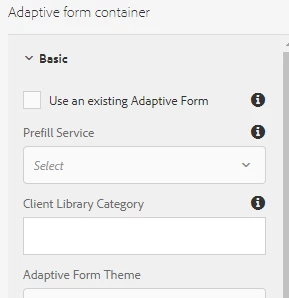
Okay so, for that I suggest you to configure the root container of the adaptive form where you can find the Client Library Category property where you can put your clientlib name having custom JS code

3 replies

Umesh_Sondhi
Level 4
November 15, 2019

Hi,

Do you need steps for adding validation pattern on the fields of your adaptive form? If so then please follow the below steps:

  • In your main navigation, open Form section


  • Then, open Form and Documents section


  • Open your adaptive form in Edit mode and click on the desired field and then Configure icon


  • Find Patterns menu in the left sidebar and add the desired pattern
NomNomzx
NomNomzxAuthor
Level 2
November 15, 2019

Hi Umeshsondhi

thanks for the prompt reply. I am aware of this feature in aem but unfortunately that is not what I am not looking for. I can't seem to find the script tab.... On a broader perspective what I am trying to do is that to validate a numeric box with another. For example, check if the value of the total sales numeric box is bigger than the value of the sales for the month of February numeric box.

Please enlighten me if you know the answer.

Thanks ^^

Umesh_Sondhi
Umesh_SondhiAccepted solution
Level 4
November 15, 2019

Okay so, for that I suggest you to configure the root container of the adaptive form where you can find the Client Library Category property where you can put your clientlib name having custom JS code