User can't see custom experience fragment template | Community
Skip to main content
Level 2
October 12, 2021
Solved

User can't see custom experience fragment template

  • October 12, 2021
  • 3 replies
  • 1779 views

Hey all,


I have create a custom experience fragment template under /conf. I have also create a new user and added that user to experience-fragments-editors group but the new user is not able to view the template while creating new experience fragments. However, an admin user can see the new template. What might be missing in this case?


Thank you!
This post is no longer active and is closed to new replies. Need help? Start a new post to ask your question.
Best answer by Siva_Sogalapalli

Hi Prateek,


by default, either eperience-fragments-editors group/content-authors group doesn't have Read access on conf folder.

There are two ways you can fix it:


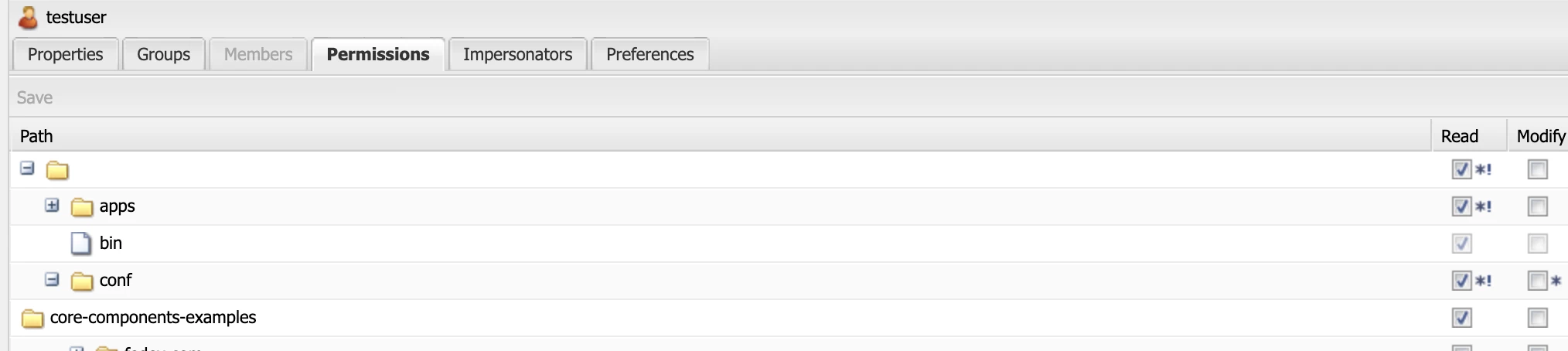
1.  Go to the new user --> Permissions tab --> expand the /conf folder and give Read access to the templates which you wanted enabled on experience fragments folder

2. If want to give access to multiple users, then better to provide 'Read' access on /conf/<templates folder> for the group which user belongs to

example: 


Hope this will resolve 🙂 


Thanks


3 replies

Asutosh_Jena_
Community Advisor
Community Advisor
October 12, 2021

Hi @prateekkumar 


Have you provided access to create the page to new user? Page will be created under /content/experience-fragments/project....


User should have create page access under this path. Also is your user added into "content-author" group. Make sure to add him to that he/she get's the content authoring permission.


If it's enabled for admin, then it should work for others as well.


Thanks!

Level 2
October 12, 2021

Yes, I have added the user to the "content-author" group as well but still no luck.

Sanjay_Bangar
Community Advisor
Community Advisor
October 12, 2021

Hi @prateekkumar ,

                                 Could you please share screen shot what is the error. Did you given write and read access to the user of Conf folder and content .

also compare the admin content and conf acees  and share the user access screenshots.


Regards,

Sanjay

Level 2
October 12, 2021

Thanks Sanjay. Which out of the box group will give access to the /conf folder? Also why would the user need access to the conf folder to create XFs since they are part of the content?

Sanjay_Bangar
Community Advisor
Community Advisor
October 12, 2021

In that case you need to manually give the access to the particular user/user-group.

First check "Search User name" Means User is a part of which group and then you need to assign write access to that user group. Yes, If they are part of content group but they don't have proper write access.

Siva_Sogalapalli
Community Advisor
Siva_SogalapalliCommunity AdvisorAccepted solution
Community Advisor
October 12, 2021

Hi Prateek,


by default, either eperience-fragments-editors group/content-authors group doesn't have Read access on conf folder.

There are two ways you can fix it:


1.  Go to the new user --> Permissions tab --> expand the /conf folder and give Read access to the templates which you wanted enabled on experience fragments folder

2. If want to give access to multiple users, then better to provide 'Read' access on /conf/<templates folder> for the group which user belongs to

example: 


Hope this will resolve 🙂 


Thanks


Level 2
October 14, 2021

Thanks Siva. I ultimately did it like you said above but a bit disappointed that there is no out of the box group for this functionality. Wondering how others have done it.