Unable to see allowed components in parsys getting overlapped by placeholder | Community
Skip to main content
Level 2
February 13, 2023
Solved

Unable to see allowed components in parsys getting overlapped by placeholder

  • February 13, 2023
  • 2 replies
  • 1411 views

Hi 


I will need some input over this issue when I am using wcm/foundation/components/parsys in my template that's extending mcm/campaign/components/campaign_newsletterpage component. I am not able to see the allowed components in my template structure properly its showing me the allowed components overlapped by the placeholders and I unable to edit component policies.
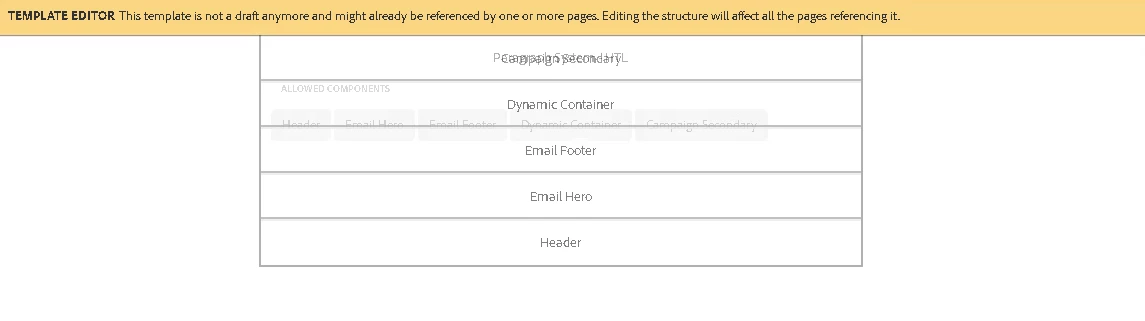

This post is no longer active and is closed to new replies. Need help? Start a new post to ask your question.
Best answer by Suraj_Kamdi

@koustuva1 This happens because of the CSS framework overriding with AEM OOTC CSS styling. You need to update CSS styling for this.

2 replies

Suraj_Kamdi
Community Advisor
Suraj_KamdiCommunity AdvisorAccepted solution
Community Advisor
February 13, 2023

@koustuva1 This happens because of the CSS framework overriding with AEM OOTC CSS styling. You need to update CSS styling for this.

BrianKasingli
Community Advisor and Adobe Champion
February 15, 2023

This looks funky. make sure your container uses the cq:isContainer property. AEM Lab - Arun Patidar: cq:isContainer Property in AEM