Unable to rename the page in AEM 6.5 | Community
Skip to main content
April 27, 2020
Solved

Unable to rename the page in AEM 6.5

  • April 27, 2020
  • 4 replies
  • 6142 views

Hello,


We recently migrated our sites from AEM 6.3 to AEM 6.5. In AEM 6.5 rename page is not working in touch UI but it works in Classic UI. 


Is it known issue in 6.5 or am i missing anything ?


Thanks! 

This post is no longer active and is closed to new replies. Need help? Start a new post to ask your question.
Best answer by VeenaVikraman

@sheela_do As @nirmal_jose told, you can do the same using "Move" option. 
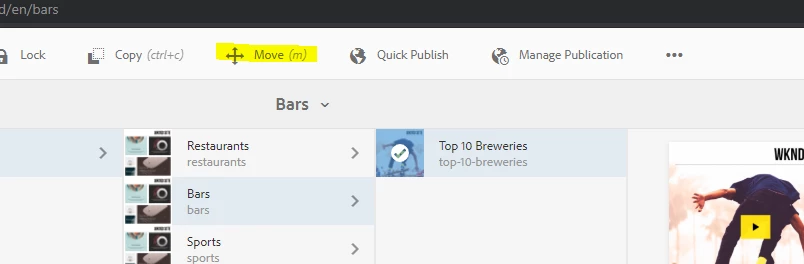
 

  1. Select the page you want to rename


2. Change the values as required. and select the destination as same folder
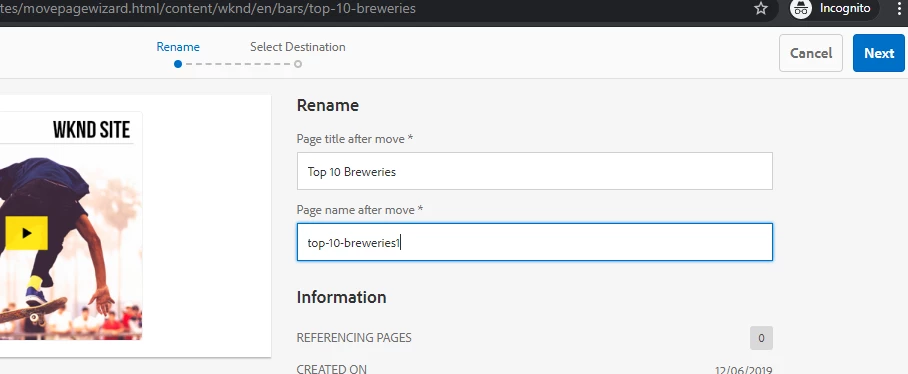
Click next and choose the same folder as destination and you can rename (title or node name or both) the file .

 

Thanks

Veena


4 replies

ArpitVarshney
Community Advisor
Community Advisor
April 28, 2020

Hi @sheela_do 

Can you check and share the JS console error and error logs if any?


Regards,

Arpit

Suraj_Kamdi
Community Advisor
Community Advisor
April 28, 2020

@sheela_do Please share the screenshots and steps to reproduce this error. This will really help to resolve your issue.

Thanks & Regards,

Suraj Kamdi

Suraj Kamdi
Nirmal_Jose
Adobe Employee
Adobe Employee
April 28, 2020

You can move the page in which you get the option to rename the page. Adobe has streamlined the rename feature to move feature as per documentation [1]


[1] - https://docs.adobe.com/content/help/en/experience-manager-65/authoring/authoring/managing-pages.html#moving-or-renaming-a-page


VeenaVikraman
Community Advisor
VeenaVikramanCommunity AdvisorAccepted solution
Community Advisor
April 28, 2020

@sheela_do As @nirmal_jose told, you can do the same using "Move" option. 


  1. Select the page you want to rename


2. Change the values as required. and select the destination as same folder

Click next and choose the same folder as destination and you can rename (title or node name or both) the file .


Thanks

Veena