Unable to edit any component in AEM 6.3 Classic UI | Community
Skip to main content
ketanb
November 22, 2017
Solved

Unable to edit any component in AEM 6.3 Classic UI

  • November 22, 2017
  • 6 replies
  • 3702 views

Hi,

We want to open and edit pages in classic UI mode in AEM 6.3. We enabled classic UI (disabled by default in AEM 6.3) by following the instructions here.

However when we open the Classic UI in AEM 6.3, it does seem as if the page has opened in edit mode (as seen from the sidekick option). The sidekick shows that the page is already open in edit mode. However we are not able to in-place edit any of the components (text, title, image, custom components). Or even if we right-click on the component, it doesn't show any option to edit. Check the attached screenshot of AEM 6.3 Classic UI mode showing edit not working.
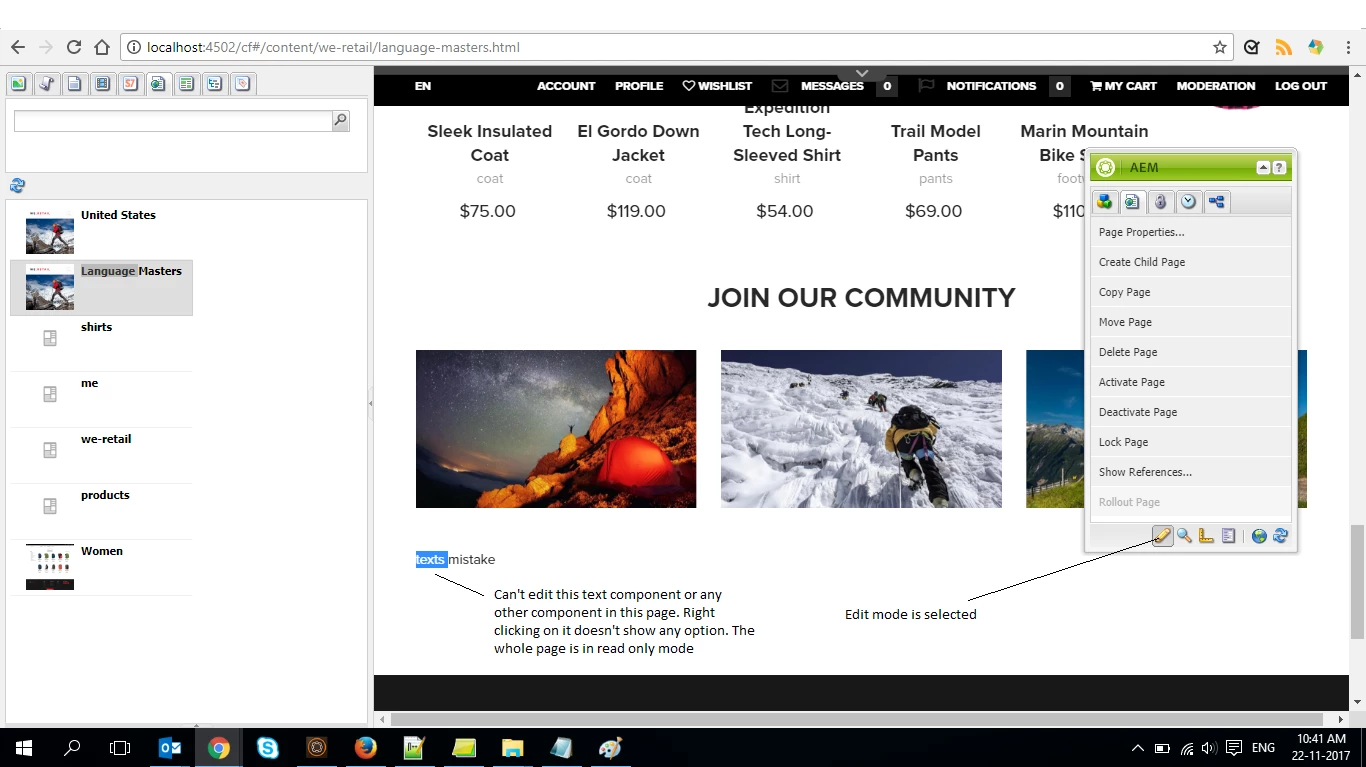
We also checked suggestion given here. Even though its for AEM 6.2. We already have the profile node present with correct value set up like the link says.

Thanks

This post is no longer active and is closed to new replies. Need help? Start a new post to ask your question.
Best answer by kautuk_sahni

Adding to Techaspect

This is AsDesigned behavior because WeRetail isn't supported on Classic UI by design.

You will be unable to edit WeRetail site whereas sites made from the static template are editable as mentioned by Techaspect that WeRetail  do not define dialog for classic UI.  A dialog defined for the classic UI will operate on the touch-optimized UI wheras a dialog defined for the touch-optimized UI will not operate on the classic UI.

6 replies

kautuk_sahni
Community Manager
Community Manager
November 22, 2017
Kautuk Sahni
kautuk_sahni
Community Manager
Community Manager
November 22, 2017

I can reproduce the behavior mentioned here. I have further asked the internal team to get back to me on this.

Kautuk Sahni
kautuk_sahni
Community Manager
kautuk_sahniCommunity ManagerAccepted solution
Community Manager
November 22, 2017

Adding to Techaspect

This is AsDesigned behavior because WeRetail isn't supported on Classic UI by design.

You will be unable to edit WeRetail site whereas sites made from the static template are editable as mentioned by Techaspect that WeRetail  do not define dialog for classic UI.  A dialog defined for the classic UI will operate on the touch-optimized UI wheras a dialog defined for the touch-optimized UI will not operate on the classic UI.

Kautuk Sahni
Techaspect_Solu
Level 7
November 22, 2017

Hi,

This is duplicate of below question:

Unable to edit components in AEM 6.3 Classic UI

We've already answered it. Please let us know if you need any other further information on this.

Regards,

TechAspect Solutions

ketanb
ketanbAuthor
November 22, 2017

Thanks for the reply.

Since we.retail is not supported package, we will try to migrate Geometrixx package to 6.3 classic.

Can you point us to any publicly available AEM 6.3 packages that we can use with classic/touch UI for testing?

Techaspect_Solu
Level 7
November 23, 2017

Hi,

Please refer the link below. It has a package that uses both classic UI dialog and touch UI dialog.

https://helpx.adobe.com/experience-manager/using/creating-touchui-component.html

We hope this helps!

Regards,

TechAspect Solutions