Unable to create page in site, Page option is not showing. | Community
Skip to main content
Level 2
February 22, 2022

Unable to create page in site, Page option is not showing.

  • February 22, 2022
  • 2 replies
  • 3478 views

Unable to create page in AEM as cloud. Using site console.
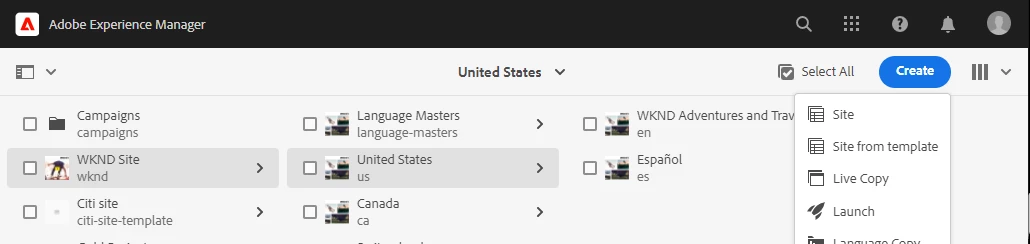
 

While creating the page option is not there.
CRXDE structure.
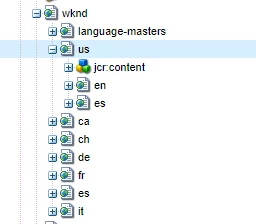
 

Please help to resolve this.


This post is no longer active and is closed to new replies. Need help? Start a new post to ask your question.

2 replies

Anish-Sinha
Adobe Employee
Adobe Employee
February 28, 2022

hi @vinayakm ,

Is this a local instance of AEM as CS? try recreating the instance and the check. Ideally these are sample sites provided by AEM installation. The jcr:content might have some corrupt properties due to which you see this error. Also, I am assuming you are using admin username and pwd to access. Admin should have default all rights over each node. So this shouldn't happen. Please share your instance status.

New Member
November 8, 2024

Was there another solution to this issue?  We are experiencing the same. We are using AEM as a Cloud Service. Similar to the screenshot above, in our local environments, create page is not an option.


Additionally, we are unable to access Content Fragments. Selecting Content Fragments opens a new window asking for authentication. Our local uses admin, which does not authenticate and our Cloud credentials do not authenticate as this is coming from localhost.


We have deleted and re-created the crx folder and we have updated the sdk and tried again.  We still have the same results.