Level 4
Jun 22, 2023 8:04 AM UTC

Unable to access audio file via publish url

I have a content fragment which has references to audio files from dam. I'm exposing a graphQL endpoint which pulls contents from this content fragment and exposes publish url of contents. In the response, I'm getting the url of the audio like :


https://publish-pXXXX-XXX.adobeaemcloud.com/content/dam/my-project/folder/audio/file.mp3


In graphql query, I'm referring to audio like:
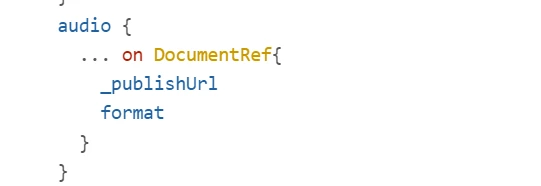
format I'm getting in response is : 'audio/mpeg'

When I hit this url in browser, I get a 'Not found' error. For images, when I hit the publish url in browser, it gets downloaded. Doesn't work the same way for audio.

Please help.

 

This post is no longer active and is closed to new replies. Need help? Start a new post to ask your question.

4 replies

rawvarun
Community Advisor
Community Advisor
Jun 22, 2023 6:23 PM UTC

Can you check if the file exists here:

/content/dam/my-project/folder/audio/file.mp3


Also, see if the below URL is blocked in AEM as Cloud Publish: 

https://publish-pXXXX-XXX.adobeaemcloud.com/content/dam/my-project/folder/audio/file.mp3


Translate
Varun Rawat
rakesh_h2Author
Level 4
Jun 23, 2023 4:44 PM UTC

File exists in the above location in author instance and it has been published too. But unable to access via publish url.

Translate
EstebanBustamante
Adobe Champion and Community Advisor
Jun 23, 2023 1:38 PM UTC

Additionally, check if you don't have ACL issues, perhaps the folder is not allowed by an anonymous user, did you try once logged in to the publish instance?

Translate
Esteban Bustamante
rakesh_h2Author
Level 4
Jun 23, 2023 4:45 PM UTC

No ACL applied. 

Translate