


Troubleshooter #1 : PKIX path building failed: sun.security.provider.certpath.SunCertPathBuilderException for Node.js installation error in ui.frontend. | AEM Community Blog Seeding
Troubleshooter #1 : PKIX path building failed: sun.security.provider.certpath.SunCertPathBuilderException for Node.js installation error in ui.frontend. by Nikhil Kumar
Abstract
Along with the technical articles on AEM, I have started a Troubleshooter series which will help developers to troubleshoot any error or any blocker while working on AEM code in local.

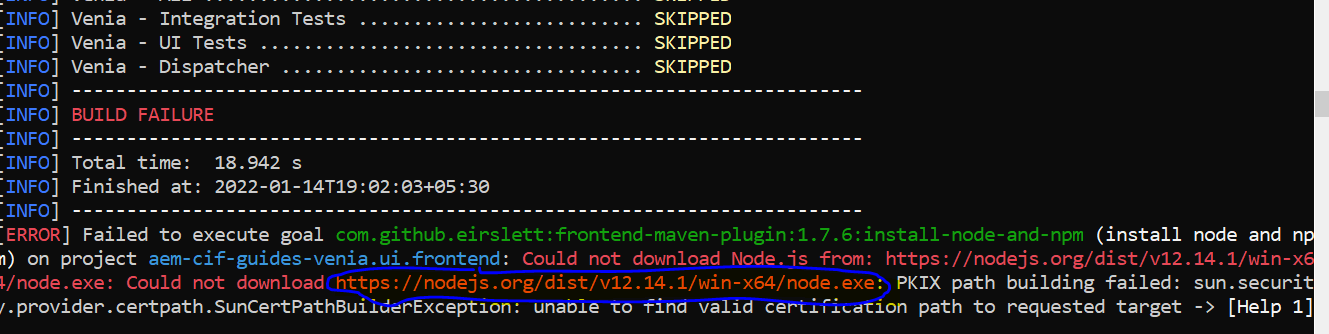
In this article we will look into the below error which I have seen coming up from quite sometime with new archetypes( mostly 27+) while building the project for the first time.


Error
As per the above error we can clearly see that it’s not able to download node – v12.14.1 which is required for ui.frontend module in our AEM codebase.

Now to rectify this error we need to follow below steps:
1. Copy and paste the URL which is market in blue in above image in any browser.
2. Once you do so a node.exe will be downloaded in your PC.
3. Go to C:\Users\.m2\repository\com\github\eirslett\node.
4. Now create a folder with the same version number which is shown in the error i.e, 12.14.1
5. Now copy the exe downloaded in step 2 and paste it inside the folder 12.14.1 and rename it as node-12.14.1-win-x64.exe.

Now go ahead and give a build again and you can see the error would be gone.

Thanks for Reading!
Subscribe for the new articles and troubleshooters.
Read Full Blog
Troubleshooter #1 : PKIX path building failed: sun.security.provider.certpath.SunCertPathBuilderException for Node.js installation error in ui.frontend.
Q&A
Please use this thread to ask the related questions.