
Translated pages showing Wrong Special Characters in page properties | Community
Skip to main content
Anny0505
Community Advisor
Community Advisor
January 26, 2021
Solved

Translated pages showing Wrong Special Characters in page properties

  • January 26, 2021
  • 2 replies
  • 1819 views


Hi All,


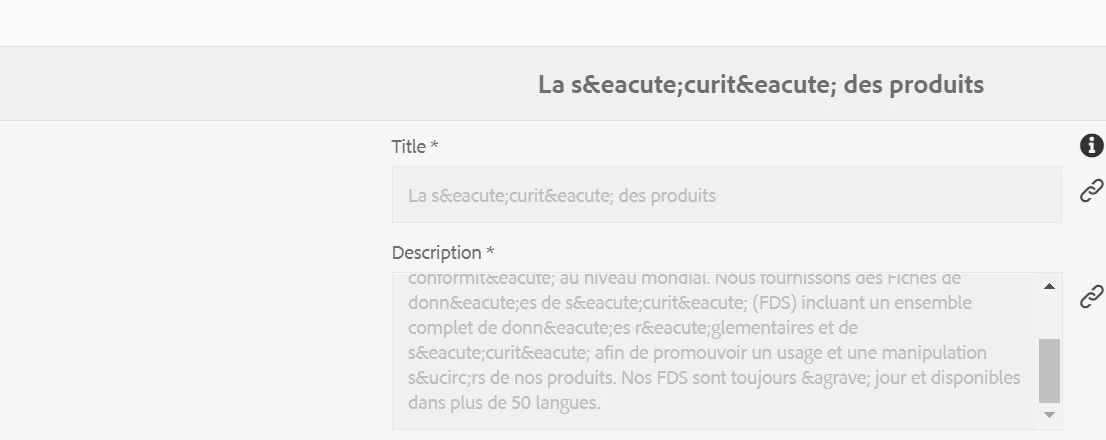
I am facing issues with translated content after coming back from Translated services, AEM is showing content as mentioned below screenshot.


We are creating pages in language master and sending them for translations to translate the content. Once the content pages are back from translation servers, in AEM  page properties showing below.

Please help me on how to resolve this issue.
This post is no longer active and is closed to new replies. Need help? Start a new post to ask your question.
Best answer by BrianKasingli

annyreddy, you might need your translator to NOT encode special symbols and characters, as your example shows, the Granite UI dialogues will not decode the ended.

Once your data is written in AEM with regular symbols and characters, Making sure your pages are encoded in UTF-8 , your symbols and special characters should be played property to the end uses. If you cant do this, then maybe you would probably need to create something custom to run when translations are written into AEM; Decode all the ended. Checkout this tool here for encoding/decoding special symbols and characters, https://www.web2generators.com/html-based-tools/online-html-entities-encoder-and-decoder


<!DOCTYPE html> <html lang="en"> <head> <meta http-equiv="Content-Type" content="text/html; charset=utf-8"/>


2 replies

BrianKasingli
Community Advisor and Adobe Champion
BrianKasingliCommunity Advisor and Adobe ChampionAccepted solution
Community Advisor and Adobe Champion
January 27, 2021

annyreddy, you might need your translator to NOT encode special symbols and characters, as your example shows, the Granite UI dialogues will not decode the ended.

Once your data is written in AEM with regular symbols and characters, Making sure your pages are encoded in UTF-8 , your symbols and special characters should be played property to the end uses. If you cant do this, then maybe you would probably need to create something custom to run when translations are written into AEM; Decode all the ended. Checkout this tool here for encoding/decoding special symbols and characters, https://www.web2generators.com/html-based-tools/online-html-entities-encoder-and-decoder


<!DOCTYPE html> <html lang="en"> <head> <meta http-equiv="Content-Type" content="text/html; charset=utf-8"/>


May 5, 2021

@anny0505 What exactly worked for you the translator or page encoding?