
Training workflow for Smart Tagging | Community
Skip to main content
stiegjo22
Level 4
October 16, 2024
Solved

Training workflow for Smart Tagging

  • October 16, 2024
  • 3 replies
  • 1115 views

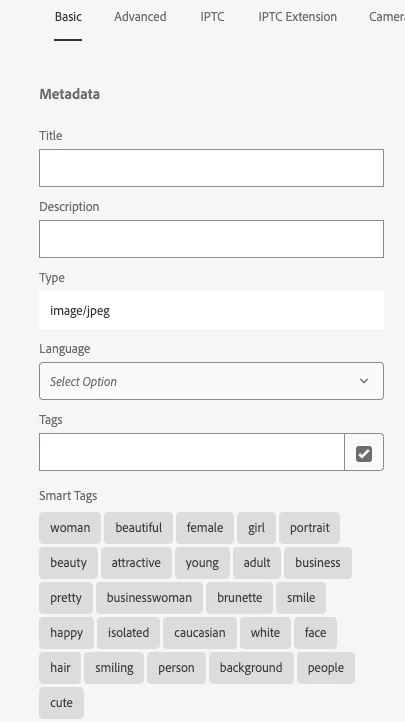
I'm trying to use the Smart Tags Training workflow to train the Smart Tagging for DAM images on our site. I've used the "Manage Tags" to remove inappropriate tags (i.e. caucasian, white, attractive, etc.) and then I run the Smart Tags Training workflow. However the inappropriate smart tags still get applied to new images with similar content. How can I train the model to remove these inappropriate tags?
 

This post is no longer active and is closed to new replies. Need help? Start a new post to ask your question.
Best answer by stiegjo22

Here's the response from AEM support:

"We have a functionality called blocked tags which is the current solution for your issue. The only way to remove unwanted tags for all newly created assets is to block them. This functionality is available in AEMaaCS but on an AMS environment I am checking internally what we can do. If needed we might log an enhancement request as there are couple of more customers who reported similar issue."

3 replies

stiegjo22
stiegjo22Author
Level 4
October 16, 2024

Yes - I've tried running the Smart Tags Training workflow after manually reviewing and removing any unwanted tags from our assets, but the smart tagger still adds these keywords to new images.

stiegjo22
stiegjo22Author
Level 4
October 18, 2024

Also I see this information in the log for the workflow. Why does it say "Not requesting training." How do we transfer tags? 


18.10.2024 11:17:24.848 *DEBUG* [pool-93-thread-1] com.day.cq.dam.similaritysearch.internal.impl.TransferTrainingDataServiceImpl Skipping transfer for /content/dam/jhi-investments/JHINV/smart-tags/long-jeff-2x3-rgb.jpg. [lastTransferredForTraining > lastModified] 18.10.2024 11:17:24.849 *INFO* [JobHandler: /var/workflow/instances/server3/2024-10-14_2/smart-tags-training_74:/content/dam/jhi-investments/JHINV/smart-tags] com.day.cq.dam.similaritysearch.internal.impl.TransferTrainingDataServiceImpl Completed Training Data Transfer for [/content/dam/jhi-investments/JHINV/smart-tags]. No tags were transferred 18.10.2024 11:17:24.851 *INFO* [JobHandler: /var/workflow/instances/server3/2024-10-14_2/smart-tags-training_74:/content/dam/jhi-investments/JHINV/smart-tags] com.day.cq.dam.similaritysearch.internal.impl.SimilaritySearchServiceImpl Not requesting training. No tags were transferred in the previous step.
stiegjo22
stiegjo22AuthorAccepted solution
Level 4
October 23, 2024

Here's the response from AEM support:

"We have a functionality called blocked tags which is the current solution for your issue. The only way to remove unwanted tags for all newly created assets is to block them. This functionality is available in AEMaaCS but on an AMS environment I am checking internally what we can do. If needed we might log an enhancement request as there are couple of more customers who reported similar issue."