Touch UI Pathfield - 'disabled' property not working | Community
Skip to main content
vikashy47555224
Level 2
September 27, 2018
Solved

Touch UI Pathfield - 'disabled' property not working

  • September 27, 2018
  • 4 replies
  • 2277 views

Hi All,

we are moving from Classic UI to touch UI on AEM 6.3 SP1. One of our touch ui component field has resource type as "granite/ui/components/coral/foundation/form/pathfield". As per Granite UI 1.0 documentation, when we apply disabled="{Boolean}true" property on pathfield, it does not disable the pathfield on dialog.
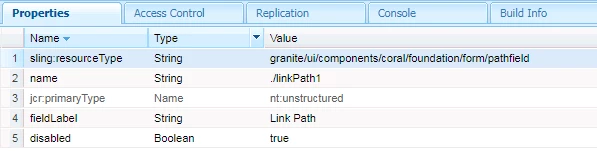
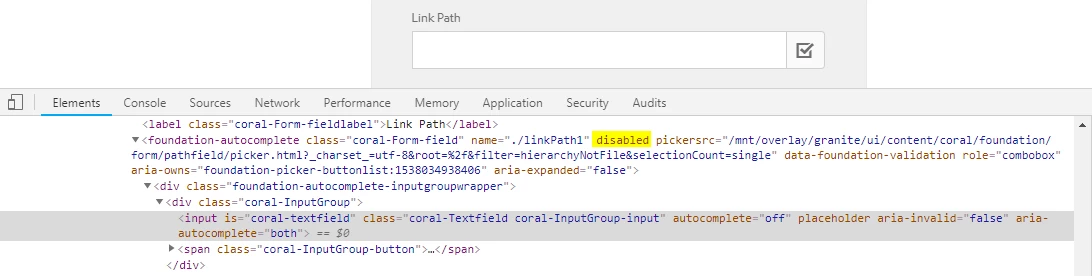
1 ] In browser developer tool I can see "disabled" attribute is present for pathfield
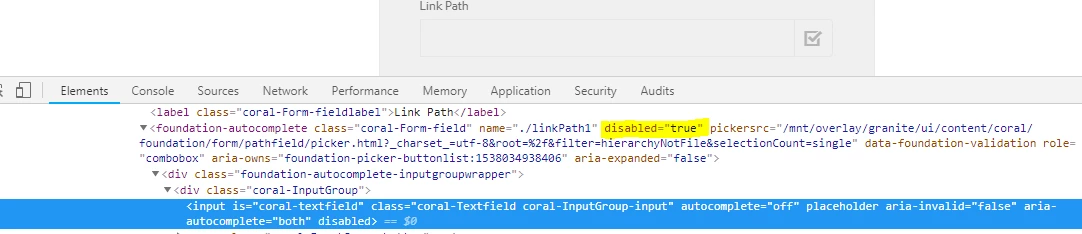
2] I edited "disabled" attribute in browser developer tool as "disabled=true", this makes pathfield disabled.
This post is no longer active and is closed to new replies. Need help? Start a new post to ask your question.
Best answer by arunpatidar

Whoever is following this thread, this issue can be fixed for all pathfield in dialog by creating clientlibs of category 'cq.authoring.dialog' with below generic code.

(function($, $document) {

    "use strict";

    $document.on("dialog-ready", function() {

        var pathfieldVar = $('foundation-autocomplete[disabled]')

        pathfieldVar.each(function() {

            $(this).removeAttr("disabled");

            $(this).attr("disabled", "disabled");

        });

    });

})($, $(document));

4 replies

arunpatidar
Community Advisor
Community Advisor
September 27, 2018

Hi,

The way disabled attributed added it works but here the issue is with input field which render later. To fix this issue you can write javascript to add disabled attribute to input field as well or remove and then add disabled attribute after dialog ready.

Arun Patidar
arunpatidar
Community Advisor
Community Advisor
September 27, 2018

below is sample code :

(function($, $document) {

    "use strict";

    $document.on("dialog-ready", function() {

        var pathfieldVar = $('foundation-autocomplete[name="./linkPath1"]')

        if (typeof pathfieldVar !== 'undefined' || pathfieldVar !== null) {

            if (pathfieldVar.attr("disabled") == "disabled") {

                pathfieldVar.removeAttr("disabled");

                pathfieldVar.attr("disabled", "disabled");

            }

        }

    });

})($, $(document));

Arun Patidar
arunpatidar
Community Advisor
arunpatidarCommunity AdvisorAccepted solution
Community Advisor
September 27, 2018

Whoever is following this thread, this issue can be fixed for all pathfield in dialog by creating clientlibs of category 'cq.authoring.dialog' with below generic code.

(function($, $document) {

    "use strict";

    $document.on("dialog-ready", function() {

        var pathfieldVar = $('foundation-autocomplete[disabled]')

        pathfieldVar.each(function() {

            $(this).removeAttr("disabled");

            $(this).attr("disabled", "disabled");

        });

    });

})($, $(document));

Arun Patidar
smacdonald2008
Level 10
September 27, 2018

Excellent information Arun!