The "Additional level of childrens" option while export CSV is generating empty excel file. | Community
Skip to main content
Level 2
May 17, 2024

The "Additional level of childrens" option while export CSV is generating empty excel file.

  • May 17, 2024
  • 2 replies
  • 875 views

When trying to export csv  (/mnt/overlay/wcm/core/content/sites/createcsvexport.html/content) for the list of projects under /content, the excel is generating properly with depth field set to "Direct children only".

But when I am using the option "Additional level of childrens" with 1 or 2 or 3 level, an empty excel is generated with headers only with no content.


I have tried this on AEM version 6.5.9.0 and also with 6.5.20.0. both are not working.


Any one have any idea where to look for the resolution?
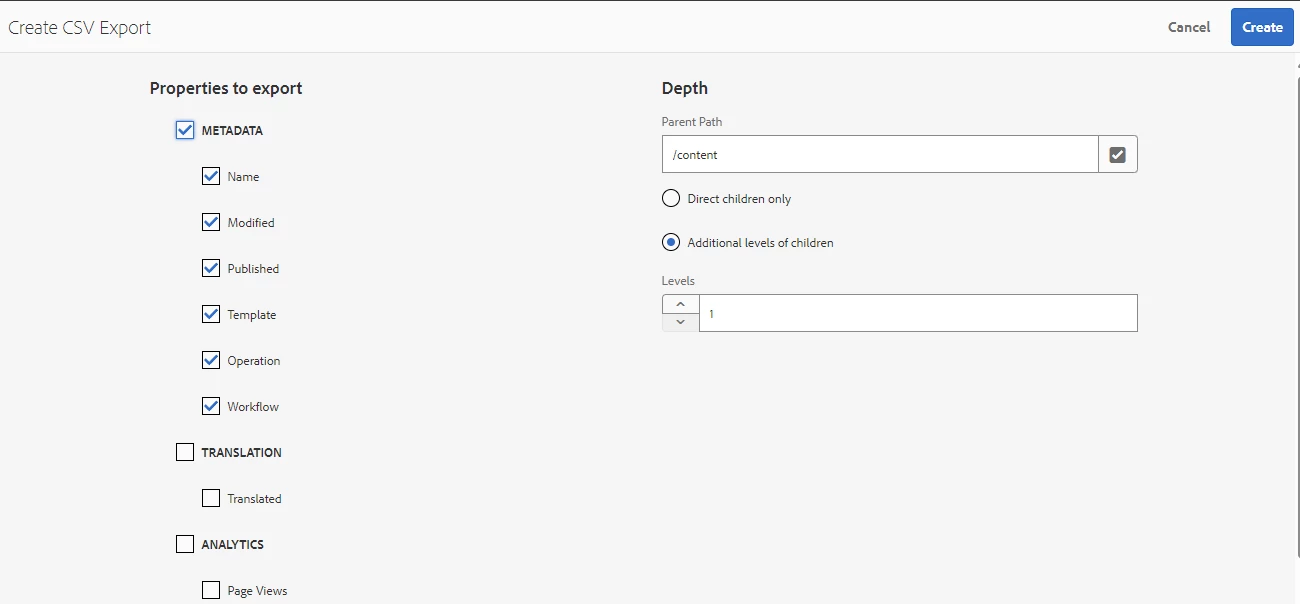
 

The problem is only coming for path /content. If we select any project path like /content/project1, then the csv report is generating properly. 

This post is no longer active and is closed to new replies. Need help? Start a new post to ask your question.

2 replies

gkalyan
Community Advisor and Adobe Champion
May 17, 2024

@maheshkpati 


This behavior might be because Excel has limitations in rendering hierarchical data structures. However, the CSV report should be generated correctly with the specified depth level.

As the "Additional levels of children" option in the depth field instructs AEM to include assets from all subfolders recursively in the report, This hierarchical data structure can be represented in a flat CSV file but not easily rendered in Excel, which expects tabular data.


Try opening the CSV in Google sheets which handle hierarchical data better than Excel.


Level 2
May 19, 2024

The downloaded excel doesn't have data at all if we select the "Additional level of childrens" option.
If the Data is there, then I may try your suggestion which sounds logical.

gkalyan
Community Advisor and Adobe Champion
May 20, 2024

@maheshkpati 

Then the problem something else entirely. Let me dig a little deep into this issue and will let you know if I find some solution.

Level 2
June 5, 2024

We,ve raised Adobe support ticket and will post the resolution on ticket closer.