Text Component Modification | Community
Skip to main content
Level 2
October 3, 2018
Solved

Text Component Modification

  • October 3, 2018
  • 8 replies
  • 2910 views

HI,

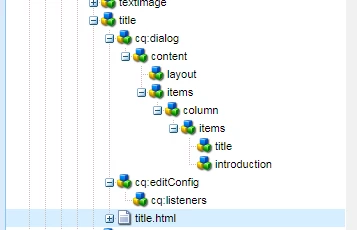
I am trying to modify the text component, as per my client requirement, i have to keep the Headline & introduction of title components is mandatory for few templates. and not mandatory info page & info page-wide components,
This post is no longer active and is closed to new replies. Need help? Start a new post to ask your question.
Best answer by arunpatidar

Addition to above

Hi,

If your page component is different for each templates then you can find out pageResource in js and add validation on dialog submit

Granite.author.pageInfoHelper.json.pageResourceType

If your page component is same for mandatory and non-mandatory templates, the you can check template type using servlet and based on response add validation on dialog submit.

you can find page location in js using Granite.author.pageInfoHelper.json.status.path

8 replies

raj_mandalapu
Level 7
October 3, 2018

you can add default components to parsys by adding child node at the template level, check this OOTB example which is /apps/we-unlimited-app/templates/article/jcr:content/par/article

In your case, you need to add title component as a child node of the parsys

/app/your-project-name/templates/your-templates-name/jcr:content/name-of-the-parsys/title

When you create a page using the template by default the title component will appear on the page.

VeenaVikraman
Community Advisor
Community Advisor
October 3, 2018

Did u mean that few of the fields of your title component should be mandatory for one set of pages and optional for other set of pages ?

Level 2
October 3, 2018

Yes for few set of pages, fields under title component is mandatory, for rest its optional.

smacdonald2008
Level 10
October 3, 2018

I assume you are referring to core components - you can override core components. See this HELPX artilce as an example of how to override a core component - Extending Adobe Experience Manager Core Components (this is an example of how to override a core component)

VeenaVikraman
Community Advisor
Community Advisor
October 3, 2018

smacdonald2008

    What he wants is lets say he has a title component with 3 fields in dialog. He want 2 field to be mandatory in Page 1 and optional in Page 2 . So its more like handling a field's required property depending upon the templates

raj_mandalapu
Level 7
October 3, 2018

Are these components are default components on the page ?

If these components are default components then you can follow the same approach whatever I have mentioned earlier by adding by adding a required property to the component node.

If not default components then you write javascript which finds template type and based on that it will dynamically add the required property. it requires some R&D and Javascript knowledge

The simple and easy approach creates another version of the text component v2 that contains mandatory fields, but you need to convince the client on this.

arunpatidar
Community Advisor
arunpatidarCommunity AdvisorAccepted solution
Community Advisor
October 3, 2018

Addition to above

Hi,

If your page component is different for each templates then you can find out pageResource in js and add validation on dialog submit

Granite.author.pageInfoHelper.json.pageResourceType

If your page component is same for mandatory and non-mandatory templates, the you can check template type using servlet and based on response add validation on dialog submit.

you can find page location in js using Granite.author.pageInfoHelper.json.status.path

Arun Patidar
Lokesh_Shivalingaiah
Level 10
October 3, 2018

For a component, when you save a dialog.. write a listener and have a validation in place based on the resourceSuperType of that page. However as Rajas mentioned you need to have experience in JS to handle this.