Template policy in AEM 6.5 | Community
Skip to main content
Level 2
August 29, 2024
Solved

Template policy in AEM 6.5

  • August 29, 2024
  • 1 reply
  • 424 views

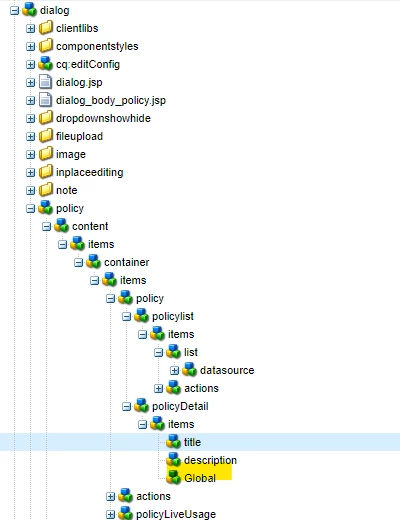
My task is when you edit template  and open any layoutcontainer policy, there should be additional filed name "global" along with existing policy field such as Select policy, Policy title , Policy description. How Can I add one more filed "Global" in Template LayoutContainer Policy?
This post is no longer active and is closed to new replies. Need help? Start a new post to ask your question.
Best answer by sherinregi-1

Hi @zeeltr1 

You can overlay the below node and add the new field which will add the Global to the layoutcontainer policy 


Overlay the node to apps /libs/cq/gui/components/authoring/dialog/policy/content/items/container/items/policy/policyDetail/items/title

https://experienceleaguecommunities.adobe.com/t5/adobe-experience-manager/concept-of-override-and-overlay-in-aem-aem-community-blog/m-p/453403


Once overlayed you can add the new property and it will start appearing 


Hope this helps 


1 reply

sherinregi-1
Community Advisor
sherinregi-1Community AdvisorAccepted solution
Community Advisor
August 30, 2024

Hi @zeeltr1 

You can overlay the below node and add the new field which will add the Global to the layoutcontainer policy 


Overlay the node to apps /libs/cq/gui/components/authoring/dialog/policy/content/items/container/items/policy/policyDetail/items/title

https://experienceleaguecommunities.adobe.com/t5/adobe-experience-manager/concept-of-override-and-overlay-in-aem-aem-community-blog/m-p/453403


Once overlayed you can add the new property and it will start appearing 


Hope this helps