TarMK Cold Standby - Channel Unregistered for Primary Instance | Community
Skip to main content
ivanj63944896
November 20, 2019

TarMK Cold Standby - Channel Unregistered for Primary Instance

  • November 20, 2019
  • 3 replies
  • 5877 views

I'm trying to setup TarMK Cold Standby in AEM6.3.

I can see the log is running in both primary and standby instance.

After the setup done, I still can see assets and sites view from standby instance. Is it expected?

I try to update some assets in the primary instance and those assets are not sync-ed to standby instance.

I also found the status in primary instance is "channel unregistered".
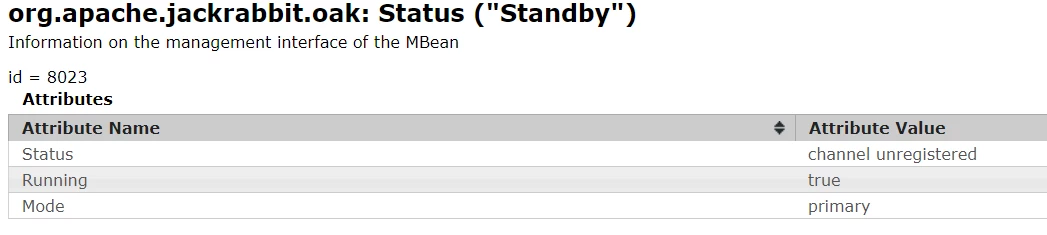
Anyone face this issue before?

Response is highly appreciated.

This post is no longer active and is closed to new replies. Need help? Start a new post to ask your question.

3 replies

Adobe Employee
November 20, 2019

have you seen first time sync happening:

How to Run AEM with TarMK Cold Standby

ivanj63944896
November 21, 2019

Hi Hamid,

The logs is not the same.

This is what i get from primary and standby tarmk logs:

Primary

02.11.2019 16:18:07.060 *DEBUG* [TarMK flush [/<CQ_Directory>/aem/crx-quickstart/repository/segmentstore]] org.apache.jackrabbit.oak.segment.file.TarWriter Writing segment 5a16bc19-3b5d-4893-a88e-b62554187e60 to /<CQ_Directory>/aem/crx-quickstart/repository/segmentstore/data10507a.tar

02.11.2019 16:18:07.089 *DEBUG* [TarMK flush [/<CQ_Directory>/aem/crx-quickstart/repository/segmentstore]] org.apache.jackrabbit.oak.segment.file.TarRevisions TarMK journal update 67a4a05e-c534-4ea3-a90d-2f4dda2fc058.00000038 -> 5a16bc19-3b5d-4893-a88e-b62554187e60.00000077

02.11.2019 16:18:45.585 *DEBUG* [sling-default-9-Waiting:com_day_cq_replication_job_publish:1262139350] org.apache.jackrabbit.oak.segment.SegmentWriter NodeStats{op=write, nodeCount=13, writeOps=13, deDupNodes=0, cacheHits=0, cacheMiss=0, hitRate=NaN}

Standby

02.11.2019 16:28:29.388 *DEBUG* [sling-oak-2-Registered Service.740] org.apache.jackrabbit.oak.segment.SegmentWriter NodeStats{op=write, nodeCount=2, writeOps=2, deDupNodes=0, cacheHits=0, cacheMiss=0, hitRate=NaN}

02.11.2019 16:28:31.776 *DEBUG* [TarMK flush [/<CQ_Directory>/aem-standby/aem/crx-quickstart/repository/segmentstore]] org.apache.jackrabbit.oak.segment.SegmentBufferWriter Writing data segment: id=57294c0c-d2b4-4039-a8e8-b156d7a79845,size=25040,segmentIdCount=9,recordIdCount=362,recordCount=33

02.11.2019 16:28:31.776 *DEBUG* [TarMK flush [/<CQ_Directory>/aem-standby/aem/crx-quickstart/repository/segmentstore]] org.apache.jackrabbit.oak.segment.file.TarWriter Writing segment 57294c0c-d2b4-4039-a8e8-b156d7a79845 to /<CQ_Directory>/aem-standby/aem/crx-quickstart/repository/segmentstore/data10507a.tar

ivanj63944896
November 28, 2019

This issue has been solved by updating the folder structure for config file. Earlier the install folder was renamed to install.primary and install.standby. After create new folder install.primary and install.standby under install folder, the standby is working now.