targeting option is not appearing on the modes dropdown on a page | Adobe Higher Education
Skip to main content
shwetakhatana
Level 2
January 8, 2019
해결됨

targeting option is not appearing on the modes dropdown on a page

  • January 8, 2019
  • 8 답변들
  • 5406 조회

I have created a page in my project under sites and when i am editing that page I am not able to see the targeting mode in the modes dropdown in order to apply it on the experience fragment used.

Thanks in advance.
이 주제는 답변이 닫혔습니다.
최고의 답변: Gaurav-Behl

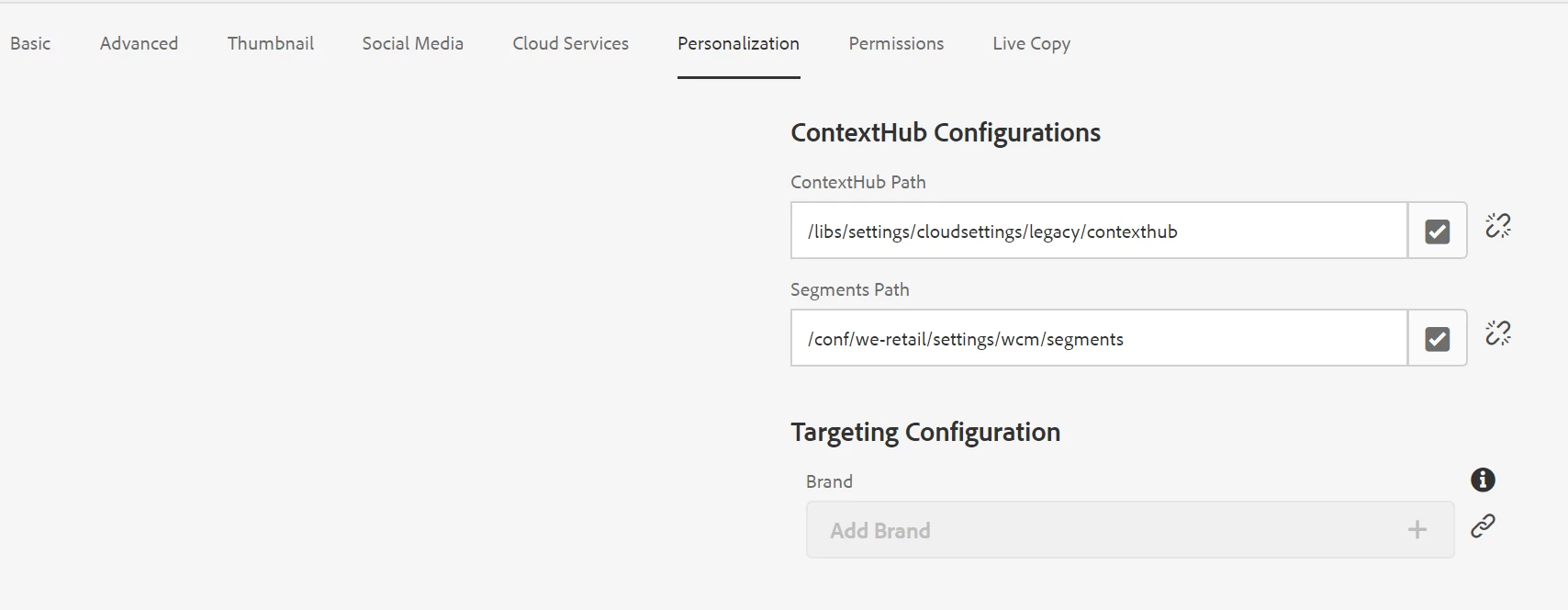
Check if Personalization is configured in root page properties and doesn't point to /etc

8 답변

Gaurav-Behl
Level 10
January 8, 2019

check if you are able to see it on we-retail page?

http://localhost:4502/editor.html/content/we-retail/us/en.html

smacdonald2008
Level 10
January 8, 2019

Go through this document - it sets up the page so this appears -- Working with Experience Fragments and the Experience Manager ContextHub

arunpatidar
Community Advisor
Community Advisor
January 8, 2019

Add below in your headlibs

<!--/* Include Context Hub */-->

<sly data-sly-resource="${'contexthub' @ resourceType='granite/contexthub/components/contexthub'}"/>

Arun Patidar
shwetakhatana
shwetakhatana작성자
Level 2
January 9, 2019

yes it is seen on we-retail only, but i cannot see it on my own projects.

shwetakhatana
shwetakhatana작성자
Level 2
January 9, 2019

It is already there in my customheaderlibs file, although i remember one thing i did, which might have been wrong.

  • On the Experience Manager rail, click or tap Tools > Sites > Context Hub.

  • Click or tap the default Configuration Container.

  • Click or tap the Context Hub Configuration.

  • Click or tap the Create button, and then click or tap Context Hub UI Mode.

    But now when i am goint to tools- sites- contexthub, there is no default configuration container under global, it shows legacy configuration container and clicking on it shows me null.
Gaurav-Behl
Level 10
January 9, 2019

Check if Personalization is configured in root page properties and doesn't point to /etc

shwetakhatana
shwetakhatana작성자
Level 2
January 9, 2019

yes thanks, i also tried this watching a video on the link Adobe Experience Manager Help | Set up ContextHub with AEM Sites , now I have got my targeting mode on the project's pages.

But after that the contextHub option on toolbar in the preview mode is not coming. Can i get help on that too?

gargsahil099
Level 3
January 20, 2020
Shweta i am also facing the same issue can you please share the solution if it got fixed for you