Target language is not showing single language code | Community
Skip to main content
Level 7
August 22, 2024
Solved

Target language is not showing single language code

  • August 22, 2024
  • 2 replies
  • 1148 views

Hello Team,


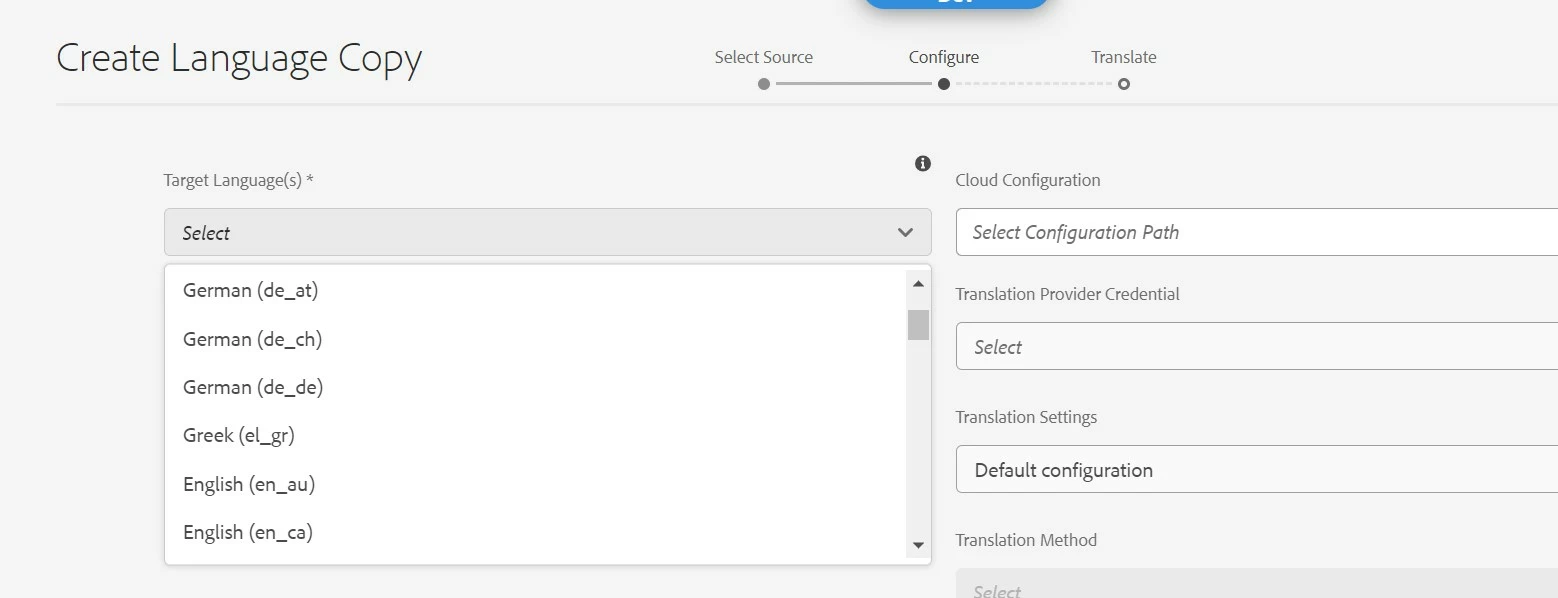
When I try to create language copy under language-masters, during the Target Language selection, for many language, this is not showing single word for language. I was expecting single words for German, French. Where as for Spanish, this shows single word: es.

How to resolve this issue? Thanks
 

This post is no longer active and is closed to new replies. Need help? Start a new post to ask your question.
Best answer by h_kataria

These are country and region based ISO codes, so you are bound to see multiple entries for German, French etc. For e.g de_at is Austria German, de_ch is Swiss German and so on. 
The supported languages are located at /libs/wcm/core/resources/languages or at /apps/wcm/core/resources/languages (if you have overlayed it) So you can cross check the languages there.

Hope this helps.

2 replies

arunpatidar
Community Advisor
Community Advisor
August 22, 2024

Hi @mahesh_gunaje 
Which version of AEM are you using? I can see same in 6.5


Arun Patidar
Level 7
August 22, 2024

Hi @arunpatidar 


I am using AEM sdk: aem-sdk-2024.8.17465.20240813T175259Z-240700


Note: For Spanish, I can see single word: es  Could you please check for German, French, Italian


Thanks

arunpatidar
Community Advisor
Community Advisor
August 23, 2024

Hi @mahesh_gunaje 
Yes, I can see that in cloud as well.


Please check if you already have language copy for those languages

Arun Patidar
h_kataria
Community Advisor
h_katariaCommunity AdvisorAccepted solution
Community Advisor
August 23, 2024

These are country and region based ISO codes, so you are bound to see multiple entries for German, French etc. For e.g de_at is Austria German, de_ch is Swiss German and so on. 
The supported languages are located at /libs/wcm/core/resources/languages or at /apps/wcm/core/resources/languages (if you have overlayed it) So you can cross check the languages there.

Hope this helps.

Level 7
August 23, 2024

Thanks @h_kataria  for your reply. In my project, team has overridden the language nodes under: /apps/wcm/core/resources/languages 

Here, there is no node(single entry) for German, French, Italian

Thats the reason, I am not able to see the necessary option. Thanks for your help.