Style system with initial width in responsivegrid | Community
Skip to main content
visomar
May 3, 2019
Solved

Style system with initial width in responsivegrid

  • May 3, 2019
  • 2 replies
  • 3156 views

Hello.

I have a use case in which I have to deploy certain component in a layout container, and that component must occupy initially a third of that container.

Since this use case if specific for certain pages, I'm trying to use the style system for that component in certain pages, but either it can't be done with it, or I'm missing something. This is what I'm trying to do:
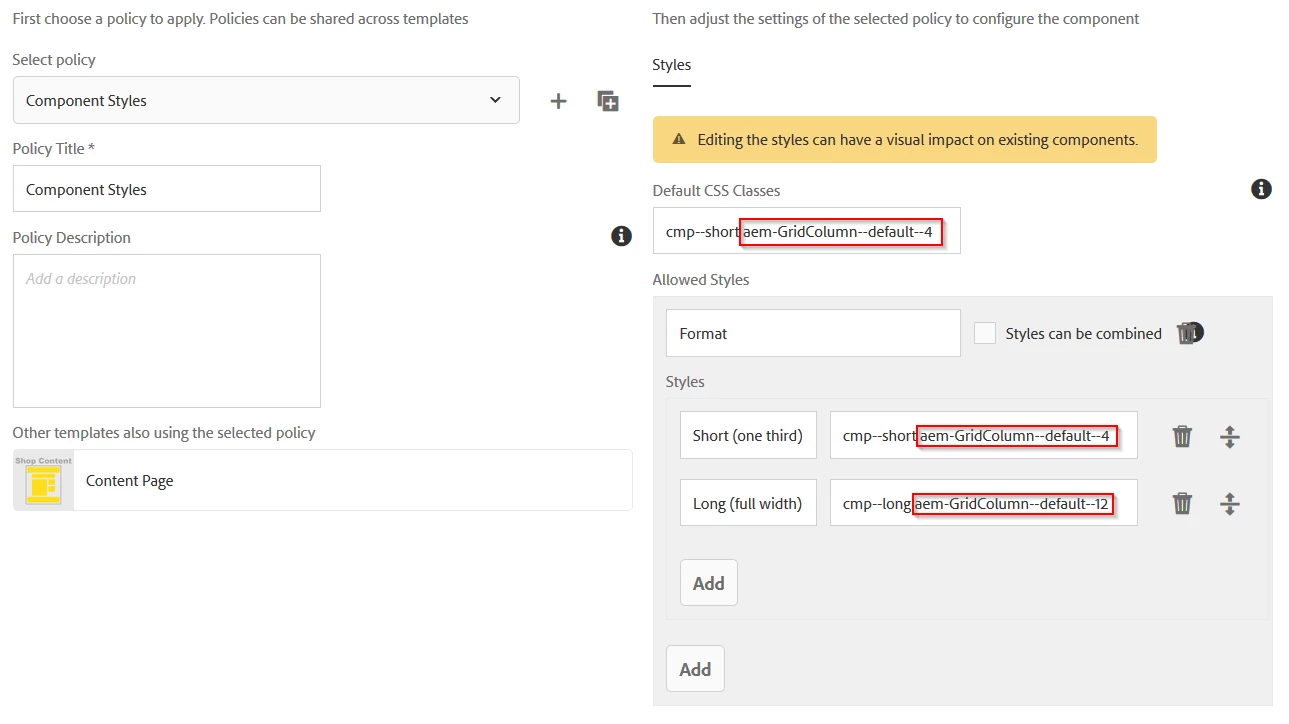
The Short and Long styles have different style definitions (not only for width), but using the GridColumn with size 4 as one of the default classes won't work because AEM is also adding  the aem-GridColumn--default--12 class to the component.

So the question is: is there a way to define a "default" behaviour in a style system of a component to only occupy a third of a layout container when dropped inside?

Thank you very much in advance for the help.

This post is no longer active and is closed to new replies. Need help? Start a new post to ask your question.
Best answer by arunpatidar

Hi,

Wheneve you setup style sytem for any componnets the value is stored in the policy.

e.g. /conf/we-retail/settings/wcm/policies/weretail/components/content/list/we-retail-default/cq:styleGroups

Each item contains three properties cq:styleClasses, cq:styleId and cq:styleLabel

e.g.

/conf/we-retail/settings/wcm/policies/weretail/components/content/list/we-retail-default/cq:styleGroups/item0/cq:styles/item0

When you drop a component and set style for a component in the page, the styleIds saves in the cq:styleIds

e.g.

/content/we-retail/language-masters/en/men/jcr:content/root/responsivegrid/list

Now how to set default style

  1. Go to your component /apps/weretail/components/content/list
  2. add child cq:template node
  3. set cq:styleIds(String[]) property with the default style id (cq:styleId)

2 replies

arunpatidar
Community Advisor
arunpatidarCommunity AdvisorAccepted solution
Community Advisor
May 3, 2019

Hi,

Wheneve you setup style sytem for any componnets the value is stored in the policy.

e.g. /conf/we-retail/settings/wcm/policies/weretail/components/content/list/we-retail-default/cq:styleGroups

Each item contains three properties cq:styleClasses, cq:styleId and cq:styleLabel

e.g.

/conf/we-retail/settings/wcm/policies/weretail/components/content/list/we-retail-default/cq:styleGroups/item0/cq:styles/item0

When you drop a component and set style for a component in the page, the styleIds saves in the cq:styleIds

e.g.

/content/we-retail/language-masters/en/men/jcr:content/root/responsivegrid/list

Now how to set default style

  1. Go to your component /apps/weretail/components/content/list
  2. add child cq:template node
  3. set cq:styleIds(String[]) property with the default style id (cq:styleId)
Arun Patidar
Level 3
May 17, 2022

Hi @arunpatidar 

could you please help me on the below.

have updated the css with the custom code & added same classes at style system for a specific component. But whenever I update the style at the component level, it's returning as below in the json response. Wanted to make it as dynamic like whatever I select as the style, that class name would be set to the the cq:styleIds as below. Kindly help.

current response: cq:styleIds[1652702601682]

expected: cq:styleIds[hero]


Thank you

arunpatidar
Community Advisor
Community Advisor
May 17, 2022

Hi,

The style values stored as id in the /content tree when you apply to the component and policies at /conf stored these values in a node like id and value

you can check examples here https://experienceleaguecommunities.adobe.com/t5/adobe-experience-manager/policies-in-aem6-5/m-p/452076/highlight/true#M33070 

Arun Patidar
visomar
visomarAuthor
May 3, 2019

Thank you very much for your help, Arun. Your guidelines were the key to what I wanted to achieve.

My specific problem is not exactly with a styleId (which also works, I tested it) but with a configuration of the responsiveness of the component.

So, for documenting purposes, the specific steps I followed were these:

  1. Go to your component /apps/weretail/components/content/list
  2. add child cq:template node
  3. inside cq:template node, add another node (nt:unstructured) called cq:responsive
  4. inside cq:responsive node, add another node (nt:unstructured) called default
  5. set offset and width properties with the desired initial configuration (0 and 4 respectively in my case)