Structuring Data in AEM JCR for a Shopping Mall Website | Community
Skip to main content
touseefk2181136
Level 3
May 12, 2024
Solved

Structuring Data in AEM JCR for a Shopping Mall Website

  • May 12, 2024
  • 2 replies
  • 1768 views

I am currently working on a project where I need to create a website using Adobe Experience Manager (AEM). The website is designed to represent multiple malls, with each mall housing numerous stores. Additionally, these stores will be providing various offers.

The client’s requirement is to store all the data related to the malls, stores, and offers in the AEM Java Content Repository (JCR). They have specifically requested not to use SQL, MySQL, or any other external data storage systems.

Given this scenario, I am seeking advice on the best way to structure this data in the JCR. Is it appropriate and efficient to store such hierarchical data in the JCR? If so, could you provide some guidance or best practices on how to achieve this?


Is the following way or organizing this data in JCR is proper way ? 
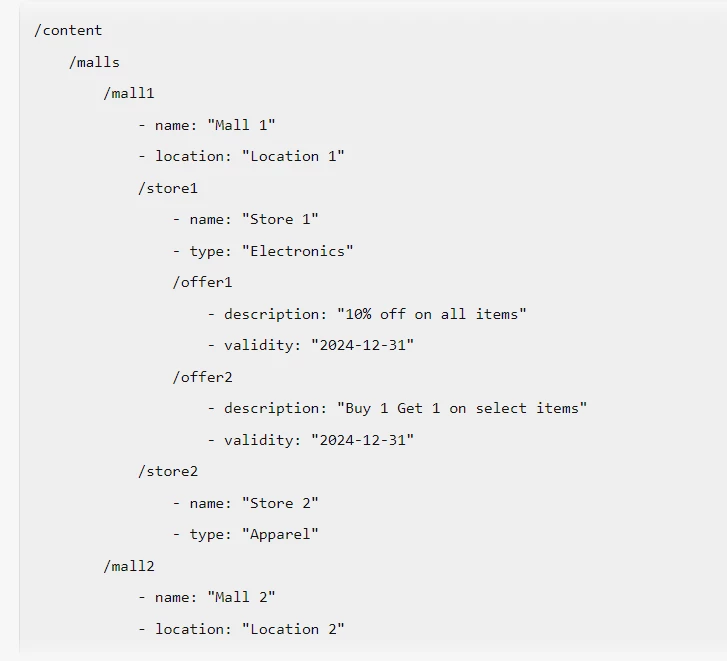


Any insights or suggestions would be greatly appreciated.

 

This post is no longer active and is closed to new replies. Need help? Start a new post to ask your question.
Best answer by Madhur-Madan

Hi @touseefk2181136 ,

JCR is designed to handle hierarchical data, and your structure aligns well with this model.

Here are some best practices you might consider:

  1. Use meaningful node names: Node names should be descriptive and meaningful. In your case, using the mall name, store name, and offer name as node names is a good approach.

  2. Leverage properties: Use properties to store data about nodes. For example, you can store the name, location, and type of a store as properties of the store node.

  3. Avoid deep hierarchies: While JCR can handle deep hierarchies, it’s generally a good practice to avoid overly deep structures as they can impact performance and complicate queries.

  4. Use node types: Node types allow you to define the structure and constraints of a node. You can define a node type for malls, stores, and offers, specifying what child nodes and properties they can have.

  5. Indexing: Make sure to set up proper indexing. This will greatly improve the performance of your queries.

Your structure would look something like this in terms of JCR nodes and properties:


/content /malls /mall1 - jcr:title = "Mall 1" - location = "Location 1" /stores /store1 - jcr:title = "Store 1" - type = "Electronic" /offers /offer1 - jcr:title = "10% off"


In this structure, jcr:title is a commonly used property to store the display name of a node. Each mall, store, and offer is a node with properties. The stores and offers are intermediate nodes to group stores and offers respectively.

Thanks,
Madhur

2 replies

Madhur-Madan
Community Advisor
Madhur-MadanCommunity AdvisorAccepted solution
Community Advisor
May 13, 2024

Hi @touseefk2181136 ,

JCR is designed to handle hierarchical data, and your structure aligns well with this model.

Here are some best practices you might consider:

  1. Use meaningful node names: Node names should be descriptive and meaningful. In your case, using the mall name, store name, and offer name as node names is a good approach.

  2. Leverage properties: Use properties to store data about nodes. For example, you can store the name, location, and type of a store as properties of the store node.

  3. Avoid deep hierarchies: While JCR can handle deep hierarchies, it’s generally a good practice to avoid overly deep structures as they can impact performance and complicate queries.

  4. Use node types: Node types allow you to define the structure and constraints of a node. You can define a node type for malls, stores, and offers, specifying what child nodes and properties they can have.

  5. Indexing: Make sure to set up proper indexing. This will greatly improve the performance of your queries.

Your structure would look something like this in terms of JCR nodes and properties:


/content /malls /mall1 - jcr:title = "Mall 1" - location = "Location 1" /stores /store1 - jcr:title = "Store 1" - type = "Electronic" /offers /offer1 - jcr:title = "10% off"


In this structure, jcr:title is a commonly used property to store the display name of a node. Each mall, store, and offer is a node with properties. The stores and offers are intermediate nodes to group stores and offers respectively.

Thanks,
Madhur

touseefk2181136
Level 3
May 13, 2024

Hi @madhur-madan thanks for you reply. I have few question, can please take a look


  1. Will each hierarchical data will be with their page as show in the following pic ?


  2. Or it can something like as shown in the following pic ?


  3. I have malls, stores and offers data in CSV file. How can I import it in JCR and create corresponding nodes? Do I need to create any utility or I can do it through some groovy script or some other tool ?

    Thank you.
Madhur-Madan
Community Advisor
Community Advisor
May 13, 2024

Hi @touseefk2181136 ,

In the structure I recommended, here’s how cq:Page and nt:unstructured could be used:

cq:Page: This node type is used for the mall1 node. This is because each mall could represent a page in your website.

/content /malls /mall1 (cq:Page) - jcr:title:"Mall 1" sling:resourceType: "myapp/mall" /jcr:content - location: "Location 1"

nt:unstructured: This node type is used for the store1 and offer1 nodes. This is because these nodes do not necessarily represent pages in your website, but rather components or elements within a page.

/content /malls /mall1 (cq:Page) /jcr:content /store1 (nt:unstructured) - name : "Store1" type:"Electronic" /offer1 (nt:unstructured) : "10% off"

This structure allows you to leverage AEM’s page editing features for each mall, while also providing flexibility for the stores and offers. However, this is just one possible way to structure your data, and the actual structure may vary based on your specific requirements.

On the approach part basically all three can be used and it depends on your use case so as which to pick.

  1. Custom Servlet (Utility): This method is powerful and flexible. It allows you to create a user interface for uploading the CSV file, and you can handle errors and edge cases in a user-friendly way. However, it requires more development effort compared to the other methods, as you need to write the servlet, create the user interface, and handle the file upload.

  2. Groovy Scripts: This method is quick and easy, especially if you have the ACS AEM Commons package installed. It allows you to quickly write and execute scripts without needing to compile or deploy code. However, it’s less user-friendly, as you need to manually run the script each time you want to import data. Also, error handling and edge cases might be more difficult to manage.

  3. JCR API: This method is also powerful and flexible, and it doesn’t require any additional packages. However, it requires you to write a standalone Java application, which might be overkill for a simple data import. Also, like the Groovy script method, it’s less user-friendly and requires manual execution.

Thanks,
Madhur

joerghoh
Adobe Employee
Adobe Employee
May 13, 2024

At first sight I would agree to your structure. But there are several unknowns, which can influence this. A few thoughts:


  • ACLs?
  • Content reuse (same offer over stores of multiple brands), you might think about using CF/XFs for it. Also about asset reuse.
  • Do you plan to use the MSM or the language copy feature? 
touseefk2181136
Level 3
May 13, 2024

@joerghoh Thank you. It will be a public website.  Yes we plan to use MSM or language copy feature.

joerghoh
Adobe Employee
Adobe Employee
May 13, 2024

In that case you should think how you want to use the MSM relations, and how the MSM rollouts will be done. Also about local changes, which are overriding MSM inheritance.

(You should also do the math and think about if the MSM is the right tool here. Rollouts can be costly/performance-intense, and if you are just duplicating content without ever overriding it locally you should thinking about replacing duplicated content with a reference.)

Also think about how you want to structure your content processes. You might want to do a paper-and-pencil exercise with your future authoring users to see if that content creation workflow is okay.