


Sonarqube on Docker with AEM plugin | AEM Community Blog Seeding
Sonarqube on Docker with AEM plugin by Vivekanand Mishra
Abstract
1. Install docker

2. Install Sonarqube Image with this command-

docker pull sonarqube

https://hub.docker.com/_/sonarqube

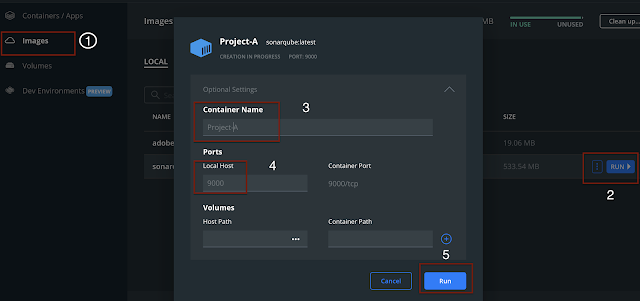
3. Once docker image is ready, Run it with following settings:


Make sure to enter Ports value like: 9000

4. Once server is up and running, Open the Sonar server in your browser

http://localhost:9000

5. Go to administration -> Marketplace and enable AEM Rules
Read Full Blog
Sonarqube on Docker with AEM plugin
Q&A
Please use this thread to ask the related questions.