sling resource resolver clarification | Community
Skip to main content
manikanthar1295
Level 5
August 16, 2019
Solved

sling resource resolver clarification

  • August 16, 2019
  • 5 replies
  • 3996 views

Hi Team,

I have created one component called page component and in that there are 4 html files  and 1 jsp file listed below

page.html

first.html

second.html

third.html

JSP page is

testing.jsp

In content i have created one nt:unstructured file called hello-world like below

Now if i hit URL like

http://localhost:4502/content/hello-world.html --->page.html is loading

if i hit like  http://localhost:4502/content/hello-world.first.html-->first.html page is loading

sling resolver are like

protocol=http

host=localhost

port=4502

content-path=/content/hello-world

selector=first

extension=html

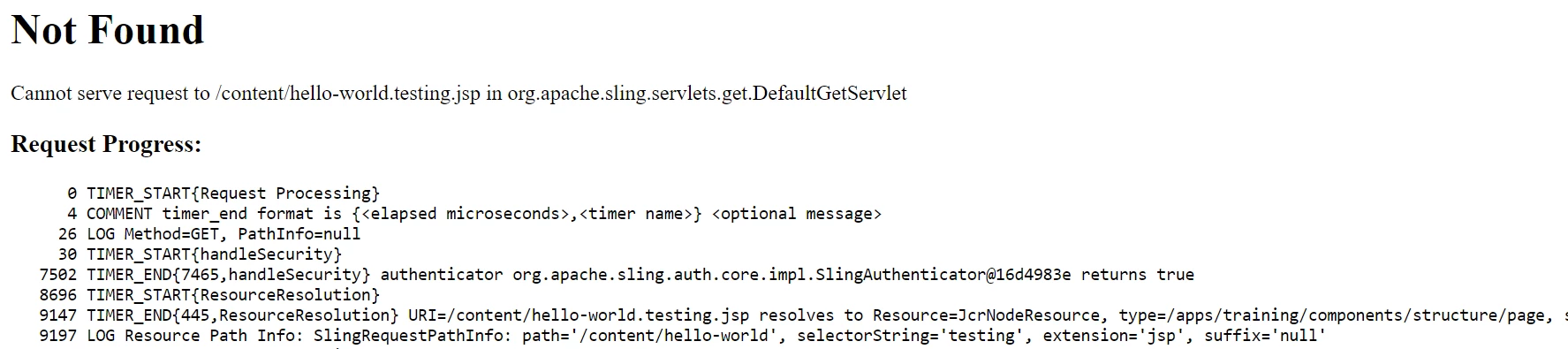
Like that if i hike http://localhost:4502/content/hello-world.testing.jsp​   i am getting like

protocol=http

host=localhost

port=4502

content-path=/content/hello-world

selector=testing

extension=jsp

Sling resolved preference will be given like

1.selector+extension

2.selector

3 extension  etc

Now the Question is  Why url is not resolved for jsp page.

Kindly help for sling resolver for jsp page

Regards

Manikantha R

9844254734

This post is no longer active and is closed to new replies. Need help? Start a new post to ask your question.
Best answer by sdang

Hi Manikantha, If I recall correctly, the default Sling GET Servlet will handle requests with the extension ".html", ".txt", ".json", and ".xml". If you are using a different extension, then another servlet will be needed to handle it or a 404 will be returned. When you request for /content/hello-world.testing.html, the resource resolver will attempt to find if there is a node /content/hello-world. If the node exists, then it will use the appropriate script associated with the node and execute the script. In your request (e.g. /content/hello-world.testing.html), the best match script is the one associated with the selector "testing". Thus, the script "test.jsp" is executed to render the node. Consequently, it is not possible to directly request for the script (e.g. /content/hello-world.testing.jsp).

5 replies

arunpatidar
Community Advisor
Community Advisor
August 16, 2019
Adobe Employee
August 16, 2019

Also this is a very good doc to understand Sling request processing:

The Basics

manikanthar1295
Level 5
August 19, 2019

Hi Arun,

Thanks for your quick response

By  hitting http://localhost:4502/content/hello-world.testing.html

I am  able to open the testing.jsp file.

protocol=http

hostName=localhost

port=4502

content path=hello-world

selector=testing

extension=.html

Now question

1. How it is opening .jsp file if i give the .html as extension.

2.why it is not opening .jsp file as extension

Arun can you   elaborate bit here how it is working.

Regards

Manikantha R

sdangAdobe EmployeeAccepted solution
Adobe Employee
August 19, 2019

Hi Manikantha, If I recall correctly, the default Sling GET Servlet will handle requests with the extension ".html", ".txt", ".json", and ".xml". If you are using a different extension, then another servlet will be needed to handle it or a 404 will be returned. When you request for /content/hello-world.testing.html, the resource resolver will attempt to find if there is a node /content/hello-world. If the node exists, then it will use the appropriate script associated with the node and execute the script. In your request (e.g. /content/hello-world.testing.html), the best match script is the one associated with the selector "testing". Thus, the script "test.jsp" is executed to render the node. Consequently, it is not possible to directly request for the script (e.g. /content/hello-world.testing.jsp).

arunpatidar
Community Advisor
Community Advisor
August 19, 2019

Hi,

The script engines looks for below scripts if you access resource with selector

seletctor.html or

selector.jsp or

selector.esp or

selector.jst

In your case testing.jsp found.

Arun Patidar