Show dropdown content using Sightly | Community
Skip to main content
Level 4
November 23, 2023
Solved

Show dropdown content using Sightly

  • November 23, 2023
  • 1 reply
  • 794 views

I have a dropdown with two values that has show and hide functionality. On selection of option1, certain fields show up. On selection of option 2, another set of fields show up. 

1. How to make sure if one option is selected, another option filled data should be erased?

2. How to handle the sightly to render the filled option content only?
This post is no longer active and is closed to new replies. Need help? Start a new post to ask your question.
Best answer by goyalkritika

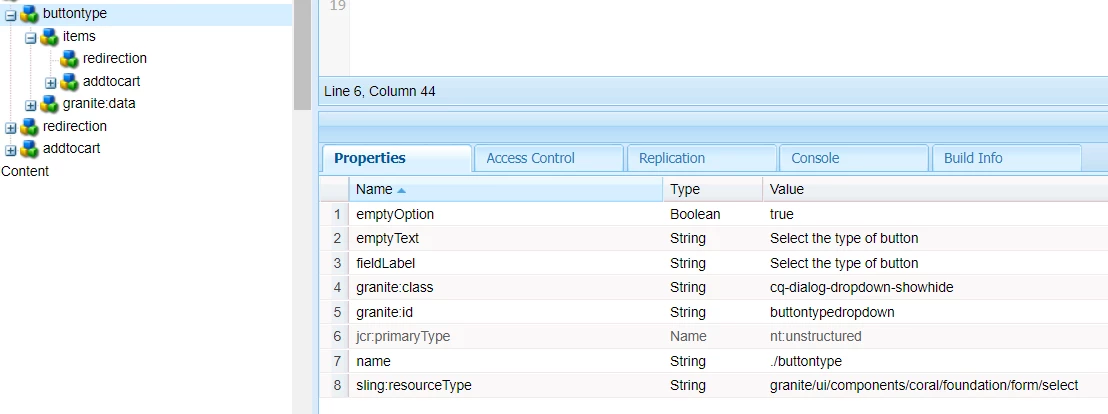
I wrote something similar to achieve this but it did not work. Below is the select dropdown node properties. I added granite:id to it.

And added value property to its child nodes. Below is the js I'm using.


$(document).ready(function() {
    $("#buttontypedropdown").on("change", function() {
$("#renderhtmlforredirection, #renderhtmlforaddtocart").hide();
 
        var selectedOption = $(this).val();
 
        if (selectedOption === "redirection") {
$("#renderhtmlforredirection").show();
            $("#renderhtmlforaddtocart").val('');
        } else if ( selectedOption === "addtocart") {
$("#renderhtmlforaddtocart").show();
            $("#renderhtmlforredirection").val('');
        }
    });
    $("$buttontypedropdown").change();
})

 Where am I going wrong?

1 reply

A_H_M_Imrul
Community Advisor
Community Advisor
November 23, 2023

@goyalkritika 

it has nothing to do with sightly, first achieve it with plain html and JS as follow:

Assuming you have a dropdown (<select>) with two options:


<select id="dropdown"> <option value="option1">Option 1</option> <option value="option2">Option 2</option> </select>


And let's say you have fields related to each option, for example:


<div id="option1Fields"> <!-- Fields related to Option 1 --> <input type="text" id="field1Option1"> <input type="text" id="field2Option1"> <!-- ... other fields --> </div> <div id="option2Fields"> <!-- Fields related to Option 2 --> <input type="text" id="field1Option2"> <input type="text" id="field2Option2"> <!-- ... other fields --> </div>


Here's an example using jQuery to handle the logic:


$(document).ready(function() { $('#dropdown').change(function() { var selectedOption = $(this).val(); // Hide all fields initially $('#option1Fields, #option2Fields').hide(); if (selectedOption === 'option1') { // Show fields for Option 1 and clear Option 2 fields $('#option1Fields').show(); $('#field1Option2, #field2Option2').val(''); // Clear Option 2 fields } else if (selectedOption === 'option2') { // Show fields for Option 2 and clear Option 1 fields $('#option2Fields').show(); $('#field1Option1, #field2Option1').val(''); // Clear Option 1 fields } }); });


Once you achieve it statically, you can write the templating with sightly to populate the dynamic data 

goyalkritikaAuthorAccepted solution
Level 4
November 26, 2023

I wrote something similar to achieve this but it did not work. Below is the select dropdown node properties. I added granite:id to it.

And added value property to its child nodes. Below is the js I'm using.


$(document).ready(function() {
    $("#buttontypedropdown").on("change", function() {
$("#renderhtmlforredirection, #renderhtmlforaddtocart").hide();
 
        var selectedOption = $(this).val();
 
        if (selectedOption === "redirection") {
$("#renderhtmlforredirection").show();
            $("#renderhtmlforaddtocart").val('');
        } else if ( selectedOption === "addtocart") {
$("#renderhtmlforaddtocart").show();
            $("#renderhtmlforredirection").val('');
        }
    });
    $("$buttontypedropdown").change();
})

 Where am I going wrong?