.sftmp file | Community
Skip to main content
vijayk87714775
Level 4
September 17, 2018
Solved

.sftmp file

  • September 17, 2018
  • 3 replies
  • 3246 views

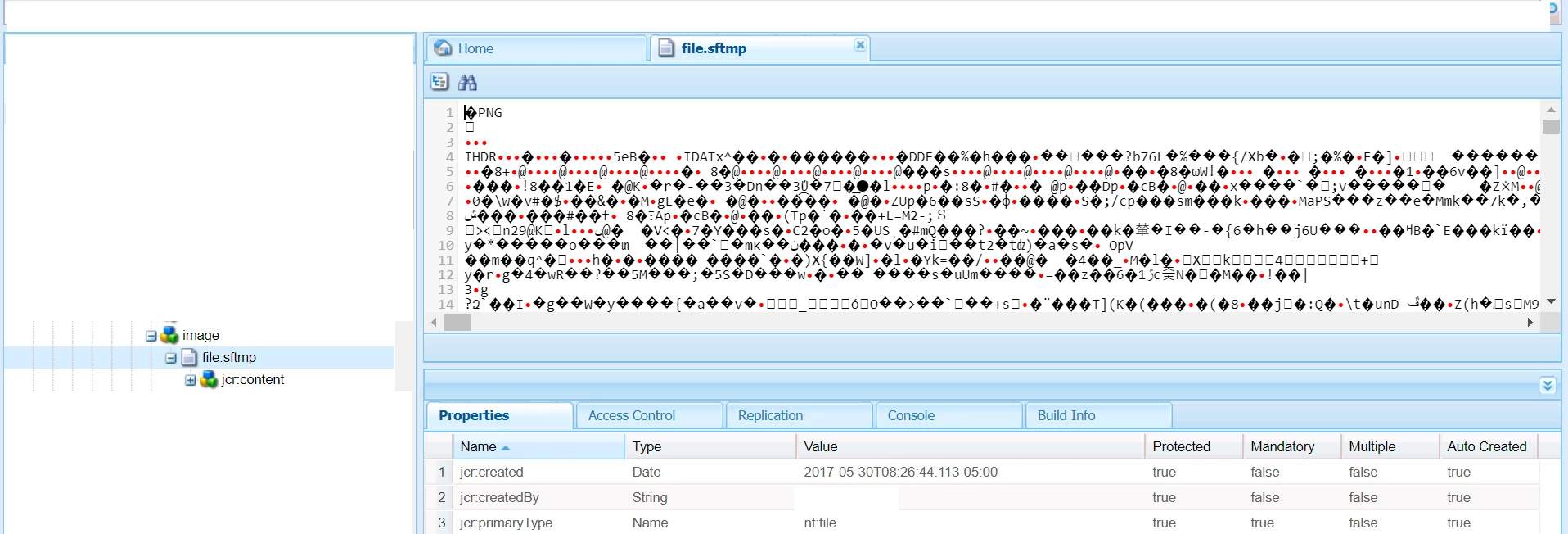
Hi All , In our project under the content there is a node that has file with the extension  .sftmp . Not sure how that node got created . Wanted to know in which scenarios does this node gets created . and If I delete this node will there be any issues ??

Thanks in advance.
This post is no longer active and is closed to new replies. Need help? Start a new post to ask your question.
Best answer by arunpatidar

Hi,

file.sftmp is used to hold tempaory assets data in JCR.

when you use fileupload component and browse/drag-drop an asset in component, asset is uploaded in JCR with name file.sftmp, and as soon as you submit dialog, node name changed to file.

In Summary:

before dialog submit asset node name is file.sftmp

after dialog submit asset node name is file

3 replies

Level 3
September 18, 2018

Please check if you are using a OOTB file upload component in your project.

FileUpload — Granite UI 1.0 documentation

Component Path: /libs/foundation/components/form/upload

sling:resourceType="cq/gui/components/authoring/dialog/fileupload"

Adobe Employee
September 18, 2018

if you try to upload a new thumbnail image on editable template this image gets corrupted and get saved .sftmp file.

The workaround is to remove the file extension .sftmp and image will start loading fine. This was known issue and fixed on AEM 6.4

arunpatidar
Community Advisor
arunpatidarCommunity AdvisorAccepted solution
Community Advisor
September 18, 2018

Hi,

file.sftmp is used to hold tempaory assets data in JCR.

when you use fileupload component and browse/drag-drop an asset in component, asset is uploaded in JCR with name file.sftmp, and as soon as you submit dialog, node name changed to file.

In Summary:

before dialog submit asset node name is file.sftmp

after dialog submit asset node name is file

Arun Patidar