Separate Columns for CQ Tags in Export Metadata Reports | Community
Skip to main content
Level 2
September 13, 2022
New

Separate Columns for CQ Tags in Export Metadata Reports
  • September 13, 2022
  • 6 replies
  • 1681 views

Request for Feature Enhancement (RFE) Summary: Request for a separate column for each CQ tag group (Devices, Keywords, Symptoms, etc) when generating an Export Metadata report.
Use-case: 1. Select multiple assets in AEM Assets UI.
2. From the top menu, click 'Export Metadata'.
3. Enter the export details then click 'Export'.
4. When the report generation is completed, download the report (CSV Download).
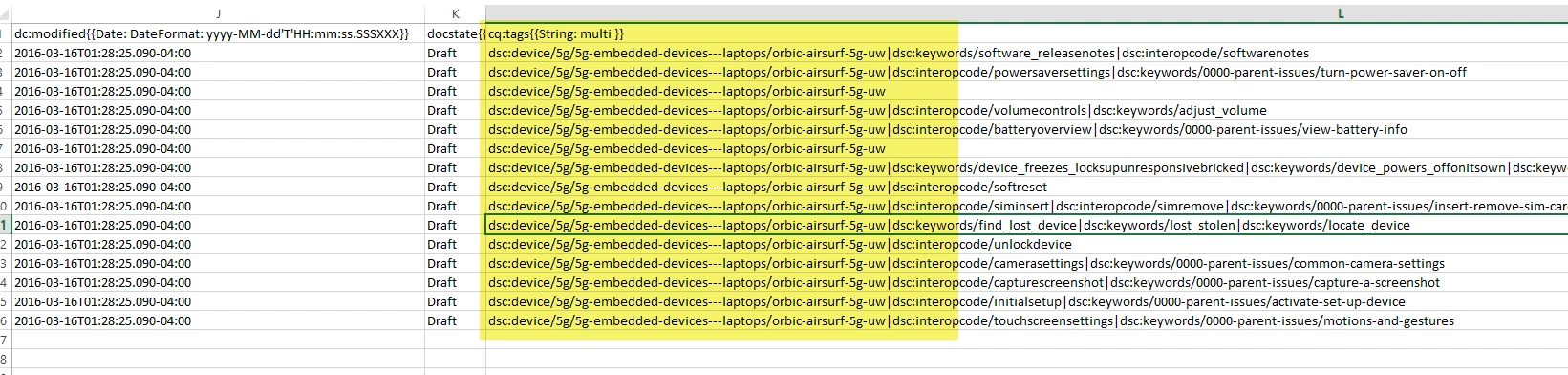
Current/Experienced Behavior: All the cq tags are for an asset are listed in a single column (see attached screenshot).
Improved/Expected Behavior: Each cq tag group (Devices, Keywords, Symptoms, etc) is listed in a separate column.
Environment Details (AEM version/service pack, any other specifics if applicable): AEM 6.5.12 ; AEM Guide 4.1
Customer-name/Organization name: Verizon
Screenshot (if applicable): Uploaded
Code package (if applicable):  

6 replies

Level 2
September 13, 2022

 .

FreedomMarketin
Level 4
September 13, 2022

You can get this by creating separate tag fields.  Instead of relying on cq:tags (which I've always found a weird decision in Adobe's out-of-the-box metadata schema), I think better user interface (and better data structure) is to have separate tag fields.  So you could have 1 for Devices that only exposes the Devices portion of the tags and stores in a Devices-specific metadata field.  Hope this helps.

Level 2
September 14, 2022

Hi,

Thanks for the suggestion. The groups show up in separate columns in Assets UI (Device tags, Interopcode, Symptoms) but are listed as a single cq tag property in crxde.


Please see the attached screenshots.

DivrajSingh
Adobe Employee
Adobe Employee
October 7, 2022

@olugboyega : as suggested by @freedommarketin  if you create separate metadata fields for different types of tags from Metadata schema form editor:


So that the asset metadata will look like:

and in backend, they will be stored as:


Then if you use the Metadata exporter as explained in this post, then you will get result like below:


Does this help?

Level 2
October 10, 2022

Divraj, we'll check this out and let you know how it goes.


Thank you

Level 2
October 10, 2022

Divraj,

Please see my email.